


Aqara Cube T1 Pro Review: Six Faces and a Handful of Gestures in One Zigbee Controller
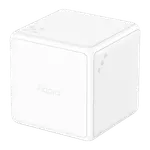
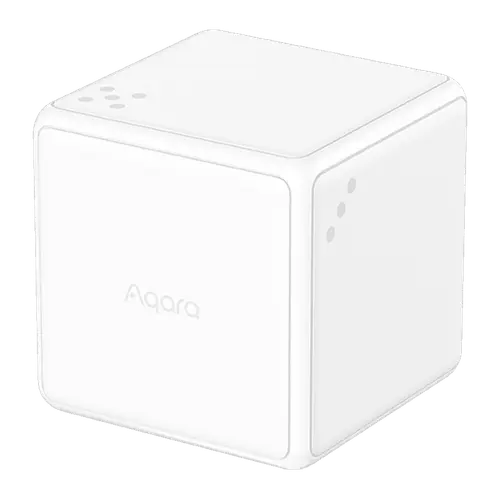
The Aqara Cube T1 Pro is a battery-powered Zigbee controller with no keys: each of its six numbered faces runs a scene, and rotating, shaking or tapping it adds more actions, including dimming compatible lights by turning it. It shines on Home Assistant (Zigbee2MQTT or ZHA) and inside the Aqara app, where every gesture is available, while Apple Home and Alexa only see the six faces. The trade-off is reliability: face changes are sometimes missed or read late, so it suits tinkerers more than anyone who needs a switch that works on the first try.
- Home Assistant tinkerers
- Aqara ecosystem users
- Desk and living room scene control
- Smart home gadget fans
Pros
- Six numbered faces plus rotate, shake, tap, push and flip gestures in one controller
- Rotating it dims compatible Aqara lights or sets a curtain position
- Works with Home Assistant over Zigbee2MQTT and ZHA, and pairs straight to a SmartThings hub
- Apple Home, Alexa, Google Home and Matter through an Aqara hub
- Up to 2 years on a replaceable CR2450 coin cell, with over-the-air updates
- Solid, compact build that looks good on a desk
Cons
- Owners report missed or wrong face detection and occasional lag
- Apple Home and Alexa only use the six faces, not the gestures
- Needs an Aqara Zigbee hub or another Zigbee coordinator, no direct pairing to lights
- Action Mode and Scene Mode cannot run at the same time
- Faces carry only dice dots, so their functions are hard to remember
Who is the Aqara Cube T1 Pro for?
It is for someone who already runs a Zigbee smart home and wants a physical control that does more than a button. Instead of pressing keys, you lay the cube down on one of its six numbered faces to run a scene, then rotate it, shake it, pick it up and hold it, or tap it twice on a table for more actions. Rotating it can dim compatible Aqara lights or move a curtain to a set opening. It needs an Aqara Zigbee 3.0 hub, or another Zigbee coordinator such as Home Assistant with Zigbee2MQTT or ZHA, and a SmartThings hub through SmartThings' own driver. Buyers use it on desks, coffee tables and nightstands to change lighting, start music or open curtains without reaching for a phone.
What buyers love
The most common praise is how many actions fit in one small object. Home Assistant users report that it pairs easily over Zigbee2MQTT or ZHA and that a community blueprint unlocks dozens of combinations, each face paired with its own rotate, shake and tap. Several owners call the gesture recognition precise once it is set up, and many describe the build as solid and well made, with a premium look on a side table. Apple Home users like having six scenes on one device, and the battery is rated for up to 2 years on a single CR2450 coin cell, which one long-time owner backs up with a single battery change in two years of use. And plenty of buyers simply find it fun: guests pick it up and play with it.
What to know before you buy
The ecosystem you use decides how much of it you get. In Apple Home it appears as a switch with six buttons, one per face, and Alexa sees six motion sensors, so rotate, shake and the other gestures only work in the Aqara app or in Home Assistant. Both need an Aqara Zigbee hub, and a few buyers who expected it to pair with an Echo on its own were disappointed. Reliability is the recurring complaint: owners report the cube missing a face change, running the action of the wrong face or responding late, and some found it needs a light shake to wake up after sitting still. The two operating modes (Action Mode and Scene Mode) cannot be used at the same time and switching between them confuses people. The faces only carry dice dots, so remembering what each one does takes labels, and it is not meant for a wall: there is no mount in the box.
Is the Aqara Cube T1 Pro worth it?
For a budget-friendly price it is one of the most flexible controllers you can put on a table, and on Home Assistant or a full Aqara setup it delivers far more actions than a multi-key remote. If you mainly live in Apple Home or Alexa, you get six scenes and little more, and a plain button or a dial is the more dependable choice. Buy it for the fun and the flexibility, not as the one control the whole family relies on.
Frequently asked questions
Does the Aqara Cube T1 Pro need a hub?
Yes. It is a Zigbee device with no Wi-Fi or Bluetooth, so it needs an Aqara Zigbee 3.0 hub for the Aqara app, Apple Home and Alexa. It can also join another Zigbee coordinator, such as Home Assistant with Zigbee2MQTT or ZHA, or a SmartThings hub through SmartThings' own Aqara Cube driver.
Does the Aqara Cube T1 Pro work with Apple Home?
Yes, through an Aqara Zigbee 3.0 hub. In Apple Home it appears as a wireless switch with six buttons, one for each face of the cube, in Scene Mode. Gestures such as rotate and shake are not available there.
Does the Aqara Cube T1 Pro work with Alexa and Google Home?
Yes, both through an Aqara hub. Alexa sees the cube as six motion sensors, one per face, which can start routines. Google Home reaches it over Matter, bridged by a Matter-capable Aqara hub such as the Hub M2.
Does the Aqara Cube T1 Pro work with Home Assistant?
Yes. Zigbee2MQTT supports it as CTP-R01, with both modes, the active face, the rotation angle, battery level and firmware updates, and it also pairs through ZHA. Community blueprints make it easy to assign actions to each face and gesture.
Does the Aqara Cube T1 Pro have any buttons?
No. It is controlled entirely by how it is moved: the face on top, rotating, shaking, picking it up and holding it, tapping it twice, pushing it and flipping it 90 or 180 degrees. The only button is the reset and pairing button under the battery cover.
What battery does the Aqara Cube T1 Pro use?
A replaceable CR2450 coin cell, rated for up to 2 years. The battery cover opens with the ejector tool included in the box.