

GoveeLife Wireless Mini Smart 6 Button Sensor Review: Six Govee Commands in One Pocket Remote
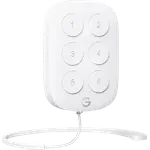
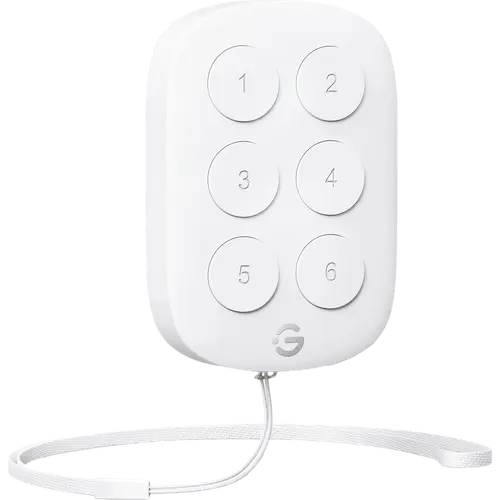
The GoveeLife Wireless Mini Smart 6 Button Sensor puts six one-click commands for Govee lights, plugs and appliances on one small coin-cell remote that can hang from its lanyard, stick to a wall or sit on a nightstand. It talks Bluetooth to the Govee Wi-Fi and Bluetooth devices around it, which act as its gateway, and Home Assistant can read every key through its Govee Bluetooth integration. Each key does one thing per click, there are no double or long presses, and Alexa, Google Home, Apple Home, SmartThings and Matter cannot use it. For a home already full of Govee devices it is an affordable room controller; for any other ecosystem it is the wrong remote.
- Govee smart home owners
- Bedside and sofa control
- Budget buyers
- Home Assistant tinkerers
Pros
- Six keys, each running its own command or scene
- Talks Bluetooth to nearby Govee devices, no dedicated Govee hub
- Works in Home Assistant through the official Govee Bluetooth integration, every key reported
- Indicator light confirms each press
- Low battery notifications in the Govee Home app
- Mounts with adhesive strips or screws, or hangs from its lanyard
- 1 year warranty
Cons
- Single click only: no double press, long press or dimming
- Needs a Govee Wi-Fi and Bluetooth device nearby to work
- No Alexa, Google Home, Apple Home, SmartThings or Matter support
- Battery life quoted at only four months in the product description
- Indoor use only, no IP rating
Who is the GoveeLife Wireless Mini Smart 6 Button Sensor for?
It is made for homes that already run Govee or GoveeLife lights, plugs, fans, heaters and humidifiers. The remote cannot work on its own: it sends each press over Bluetooth to the Govee Wi-Fi and Bluetooth devices nearby, up to 55 m (180 ft) away, which Govee calls a distributed gateway, and the commands are set up in the Govee Home app. With six keys it suits a spot where several devices or scenes are controlled together, such as a bedside table, a sofa or the door of a room.
What the GoveeLife Wireless Mini Smart 6 Button Sensor offers
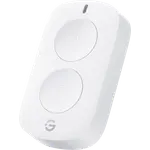
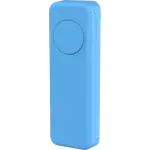
Six physical keys, each one a separate trigger for a command or a scene in the Govee Home app, so one remote replaces six single buttons. It runs on a CR2032 coin cell, the app sends a low battery notification before it runs out, and an indicator light flashes once to confirm that a press was sent. It measures about 2.36 x 1.61 x 0.45 in, comes with a lanyard, and can be fixed to a wall or a flat surface with adhesive strips or screws. Outside the Govee app, Home Assistant's official Govee Bluetooth integration reads each key as its own press event, straight from the remote's Bluetooth broadcasts. Govee covers it with a 1 year warranty.
What to know before you buy
Each key reports a single click only: there is no double press, long press or hold-to-dim, and holding button 1 for 5 seconds only puts the remote into pairing mode. A key can run a command that sets a brightness level, but not raise and lower it. It needs at least one Govee device with both Wi-Fi and Bluetooth in range, and Govee lists a 2.4 GHz Wi-Fi network for those devices as part of the setup. Govee states it cannot connect to Alexa or Google Assistant, and it has no Apple Home, SmartThings or Matter support. It has no IP rating and the manual limits it to indoor use. Battery life is quoted as four months in the product description and up to a year in Govee's FAQ, so expect it to depend on how often the keys are used.
Does the GoveeLife Wireless Mini Smart 6 Button Sensor work with Home Assistant?
Yes. The official Govee Bluetooth integration in Home Assistant supports the H5125 and fires a press event for each of its six keys, so a Home Assistant server with Bluetooth in range can use it as a six-key trigger for any automation, Govee devices or not. That integration's documentation swaps the names of the H5125 and the two-key H5126, but the library behind it defines the H5125 as the six-key model.
Is the GoveeLife Wireless Mini Smart 6 Button Sensor worth it?
For a Govee household that wants a physical control for several devices in one room, yes: six commands on one budget-friendly remote, no wiring, and a choice of lanyard, adhesive or screws. Its limits are just as clear: one press type per key, indoor use only, and nothing outside Govee and Home Assistant. Anyone building around Matter, Zigbee, Alexa or Google Home should pick a scene controller made for that platform instead.
Frequently asked questions
Does the GoveeLife 6 Button Sensor need a hub?
It needs no dedicated Govee hub, but it cannot work alone. Each press goes over Bluetooth to nearby Govee devices that support both Wi-Fi and Bluetooth, which act as a distributed gateway, within about 55 m (180 ft). Govee lists a 2.4 GHz Wi-Fi network for those devices as part of the setup.
Does it work with Alexa or Google Home?
No. Govee states the remote cannot connect to Alexa or Google Assistant, and it has no Apple Home, SmartThings or Matter support either. It controls Govee devices through the Govee Home app, and Home Assistant can read it through its Govee Bluetooth integration.
Can each button do double press or long press?
No. The manual documents a single click as the only trigger for each of the six keys, and holding button 1 for 5 seconds puts the remote into pairing mode. Each key runs one command, so the remote offers six actions in total.
Is the H5125 the 6 button or the 2 button model?
The H5125 is the six-key remote. The two-key GoveeLife button is the H5126, a separate product. Home Assistant's supported devices list swaps the two names, but Govee's own page and manual, and the library the integration uses, define the H5125 with six keys.
What battery does it use and how long does it last?
One CR2032 coin cell, pre-installed in the box. Govee's product description quotes four months of battery life, while its FAQ says up to a year under normal use, and the Govee Home app sends a notification when the battery is low.
How do I mount the GoveeLife 6 Button Sensor?
It can be fixed to a wall or a flat surface with adhesive strips or screws, or hung from its hanging hole with the included lanyard. It is meant for indoor use only.