

Lutron Caseta Pico Remote Review: The Wire-Free Second Switch for Caseta Dimmers
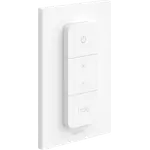
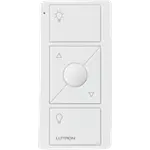
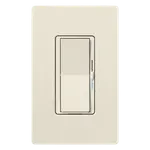
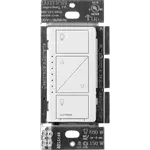
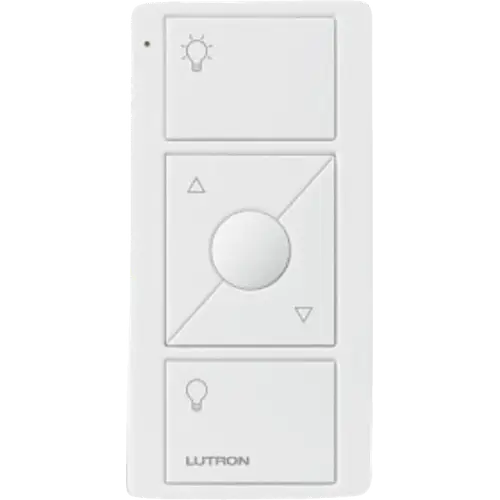
The Lutron Caseta Pico Original Remote for Dimmers is the simplest way to add a second or third control point to a Caseta dimmer without running a wire: it pairs straight to the dimmer in seconds, needs no hub, and turns lights on and off, dims them and recalls a favorite level from anywhere in the room. It is a Caseta accessory rather than a universal smart button, so it controls only Lutron Clear Connect devices, it uses the North American radio band, and it reaches Home Assistant only through the Lutron Smart Hub. For anyone already on Caseta it is an easy, highly rated buy.
- Caseta dimmer owners
- Wire-free 3-way switching
- Bedside control
- Renters
Pros
- Pairs directly to Caseta dimmers and switches with no hub
- On, off, raise, lower and a favorite light level in one remote
- Radio works through walls, no line of sight needed
- CR2032 battery rated for about 10 years
- Small enough to use handheld, on a wall or on a pedestal
- Exposed as button triggers in Home Assistant through the Lutron Smart Hub
Cons
- Only controls Lutron Clear Connect devices
- North American radio band; UK buyers report it does not pair
- Wall bracket and pedestal sold separately
- Not exposed in Apple Home or SmartThings
- No long-press action on Caseta
Who is the Lutron Caseta Pico Remote for?
It is built for homes that already have, or plan to install, Lutron Caseta dimmers. The Pico adds a wireless control point to them: a second switch at the top of the stairs, a bedside remote, a control by the door of a room whose switch sits in the wrong place. Buyers most often describe turning a single dimmer into a 3-way setup without any rewiring, or sticking a Pico to a bed post or a nightstand. It is not a general smart button for other ecosystems: it talks only to Lutron devices over Clear Connect RF.
What buyers love
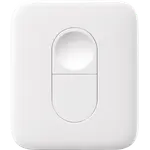
Pairing is the theme that comes up most: holding a button on the dimmer and on the Pico links them in seconds, and adding a replacement Pico later is just as quick. Owners also like that it does not need line of sight, since the radio reaches through walls (Lutron rates 30 feet through walls and 60 feet in the open), and that the keys have a clear, tactile press. The round middle key saves and recalls a favorite light level, and the Raise and Lower keys dim the paired lights, so it does more than an on/off button. One Pico can control up to 10 Caseta dimmers and switches.
What to know before you buy
The Pico runs on Lutron's North American Clear Connect band, around 434 MHz, and buyers in the UK report that it would not pair with their system, so check that your Caseta devices are the North American version. The wall bracket and the tabletop pedestal are not in the box, only the remote itself. Through the Lutron Smart Hub, Home Assistant exposes each key as a press, release and multi-tap trigger, but there is no long-press action on Caseta, and Apple Home and the SmartThings Lutron integration do not show Pico remotes at all. It is rated for indoor use only.
Is the Lutron Caseta Pico Remote worth it?
For a Caseta home, yes. It is an inexpensive way to get a real dimmer control wherever it is needed, without an electrician, without a hub and without worrying about the battery for years, since the CR2032 cell is rated for about 10 years and is replaceable. Its strengths are reliability and simplicity rather than flexibility: if you want a button that triggers scenes across several ecosystems, a Zigbee or Matter button suits that job better.
Frequently asked questions
Does the Lutron Pico remote need the Caseta Smart Hub?
No. The Pico pairs directly to Caseta dimmers and switches over Lutron's Clear Connect RF, with no hub required. The Smart Hub only adds app control and the Home Assistant integration.
How many lights can one Pico remote control?
One Pico can be paired to up to 10 Caseta dimmers and switches, and a single Caseta dimmer accepts up to 10 Pico remotes.
What battery does the Pico remote use and how long does it last?
It uses one CR2032 coin cell, included, which Lutron rates for about 10 years based on around 10 presses a day. The battery can be replaced by sliding it out of the remote.
Does the Pico remote work with Home Assistant?
Yes, through the Lutron Caseta Smart Hub: the core Lutron Caseta integration exposes every Pico button as a device trigger, with press, release and multi-tap actions.
Can I mount the Pico remote on the wall like a light switch?
Yes. It can be stuck to a surface with adhesive, or mounted over a wall box with the Pico wallbox adapter or the wall mounting kit, which is sold separately, so it looks like a regular switch.
Does the Pico remote work outside North America?
This model uses the North American Clear Connect radio band around 434 MHz and is meant for North American Caseta devices; buyers in the UK report it does not pair with their systems.