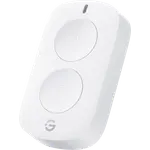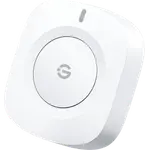


Philips Hue Smart Button v3 Review: A Bigger, Surer Click for Hue Lights
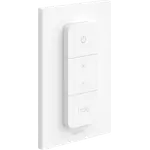
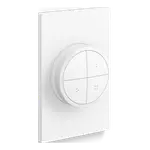
The Philips Hue Smart Button v3 is the simplest way to put a physical control for Hue lights anywhere in the home: one press switches a room or cycles scenes, a long press dims, and it can start or stop Hue automations. This generation is larger and registers every press, but its smooth plastic slides on the flat magnetic mount and there is no wall plate in the box. It needs a Hue Bridge to be customized, and it is premium-priced for a single key.
- Hue Bridge owners
- Bedside and doorway control
- Renters (no wiring)
- Home Assistant and Zigbee users
Pros
- Quick setup in the Hue app
- Every press registers, an improvement over the previous generation
- Scene cycling plus hold-to-dim from one key
- Magnetic: sticks to the mount or any metal surface
- Can start or stop Hue automations
- Works with Home Assistant, including direct Zigbee2MQTT pairing
Cons
- Smooth button slides on its flat magnetic mount
- No wall plate included, only a small adhesive mount
- Larger than the previous Smart Button
- Dimming is a long press, not a twist
- Expensive for a single key
- Customization requires a Hue Bridge
Who is the Philips Hue Smart Button v3 for?
It is built for homes that already run Hue lights on a Hue Bridge and want a switch where there is no wiring for one: by the bed, at the door of a room, on a desk or on the fridge. It is a single key, so it suits one room or one job, such as turning every light in the house off on the way to bed. Without a Bridge it can still be connected to up to 10 Hue lights, but its behaviour cannot be customized, so the Bridge is what makes it worth buying.
What buyers love
Setup is the most praised part: buyers add it in the Hue app in a couple of minutes and say the lights react quickly. Owners upgrading from the earlier Smart Button report that the larger, flat button registers every press, where the old soft-topped one sometimes missed a click. Several use it with Home Assistant or other Zigbee coordinators to start automations or even other devices, and describe the range as solid. The magnetic back that sticks to any metal surface is a favourite detail.
What to know before you buy
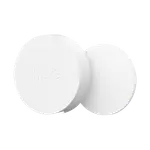
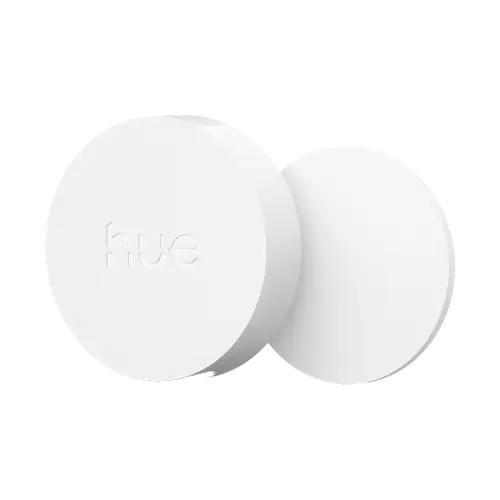
The most repeated complaint is the mount: the button is smooth plastic on a flat magnetic disc with no rim, so it slides when pressed, and this generation dropped the wall plate the older model came with. It is noticeably larger than the previous button. Dimming is a long press, not a twist, which some buyers expected from the photos, and the second disc in the pictures is the mount, not a second button. It runs on one CR2032 coin cell rated for about 2 years, is rated IP20 for indoor use only, and comes in white only. Many buyers also call it expensive for a single key.
Which platforms does it work with?
Through the Hue Bridge it reaches Alexa, where a press can trigger routines, as well as Google Home and Apple Home, and Matter only through the Hue Bridge, which is also how SmartThings gets it. Home Assistant reads its presses through the official Philips Hue integration, and Zigbee2MQTT supports it directly as RDM005. It also receives firmware updates over the air from the Hue app.
Is the Philips Hue Smart Button v3 worth it?
For a Hue home it is the most dependable single button available, and the improved press is a real upgrade over the previous generation. It costs more than generic Zigbee buttons, and the slippery mount is a fair criticism, but the quick setup, the scene cycling and the hold-to-dim make it the easiest way to give family and guests a physical switch.
Frequently asked questions
Does the Philips Hue Smart Button v3 need a Hue Bridge?
Yes, to customize it. Without a Bridge it can be connected to up to 10 Hue lights, but changing what the button does requires a Hue Bridge and the Hue app.
How do you dim lights with the Hue Smart Button?
Press and hold. The lights dim up or down while the button is held; release and hold again to go the other way. It has no twisting dial.
What battery does it use and how long does it last?
One CR2032 coin cell, which Philips Hue rates for at least 2 years, and the battery is included.
Does it work with Alexa, Google Home and Apple Home?
Yes, through the Hue Bridge. Philips Hue lists Alexa, Google Home and Apple Home as compatible, and Matter support also comes from the Hue Bridge.
Does the Hue Smart Button work with Home Assistant?
Yes. The official Philips Hue integration reports its presses through the Bridge, and it can also be paired directly to Zigbee2MQTT, where it is listed as RDM005.
Is a wall plate included?
No. This generation ships with a small adhesive magnetic mount; the button attaches to it, or to any metal surface, by magnet.