

SwitchBot Remote Review: A Two-Key Bluetooth Button Made for the SwitchBot Home
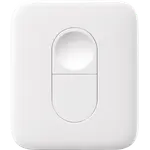
The SwitchBot Remote is a tiny two-key Bluetooth button that pairs straight to SwitchBot devices, so a Lock, a Curtain, a Blind Tilt or a Bot gets a physical control with no hub and no phone. Owners like how fast it is to set up and use it most to open a door, run curtains or press a hard-to-reach switch. The trade-offs are a closed ecosystem (it controls SwitchBot products only), one action per key with no double or long press, and a noticeable delay when a command goes through a hub scene. For anyone already invested in SwitchBot it is an easy, budget-friendly add-on; for anyone else it does very little.
- SwitchBot Lock owners
- SwitchBot Curtain and Blind Tilt users
- Bedside and guest controls
- Hard-to-reach switches
Pros
- Pairs directly with SwitchBot Lock, Curtain, Blind Tilt, Bot and bulbs with no hub
- Quick setup in the SwitchBot app
- Small and easy to place on a desk, nightstand or wall
- Keys can run SwitchBot scenes with a hub
- Bluetooth Low Energy long range
- Over-the-air firmware updates and a low-battery warning in the app
Cons
- Controls SwitchBot products only
- One action per key: no double press, long press or dimming
- Noticeable delay when commands go through a hub scene
- Not compatible with Alexa or Google Assistant
- Some owners report short coin cell life and a weak adhesive pad
Who is the SwitchBot Remote for?
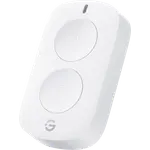
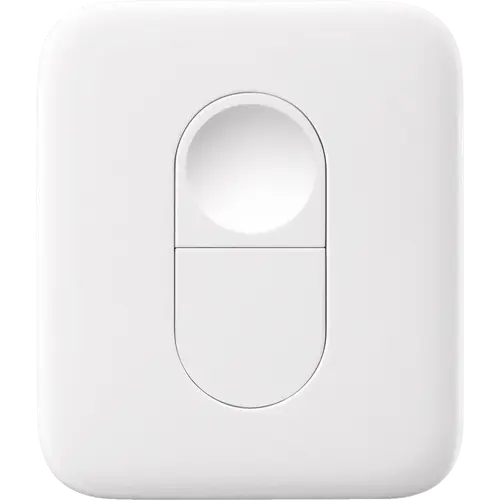
It is an accessory for homes that already run SwitchBot devices. Its two keys, one convex and one concave, pair over Bluetooth Low Energy directly with a SwitchBot Bot, Curtain, Blind Tilt, Color Bulb, Strip Light, Plug Mini or Lock, and keep working with no hub in between. Buyers use it as a door opener mounted away from a smart lock, a bedside button for curtains, a control guests can use without an app, and a remote for a Bot pressing a switch hidden behind a door or inside a wardrobe.
What buyers love
Setup is the most praised part: owners pair it in the SwitchBot app in a couple of minutes, and the app maps each key automatically for a Lock (one key unlocks, the other locks). Many describe it as small, well made and reliable day to day, and Lock owners like being able to remove the lock's own button and open the door from a remote placed well away from it. With a SwitchBot hub, a key can also run a manual scene, which owners use to open or close several curtains at once.
What to know before you buy
It only controls SwitchBot products, a point several disappointed buyers make: it is not a generic smart button for other lights or vacuums, and SwitchBot says it does not work with Alexa or Google Assistant. Each key runs a single action, with no double press, long press or hold-to-dim, so the Remote tops out at two commands. Commands that go through a hub scene can take several seconds, slower than a voice assistant according to some owners, while direct pairing to a nearby device is quick. A few buyers find the CR2450 coin cell drains faster than they expected and the included hook and loop pad does not hold well, and there is no published IP rating, so it is an indoor device.
Does the SwitchBot Remote work with Apple Home or Home Assistant?
Only through a Matter-enabled SwitchBot hub. A Hub 2, Hub 3 or Hub Mini Matter Enabled bridges the Remote to Matter, where it shows up in Apple Home and its keys can trigger Apple Home automations; SmartThings and Home Assistant reach it over the same Matter bridge. Home Assistant's own SwitchBot Bluetooth integration lists the Remote but only reads its battery level, not its key presses.
Is the SwitchBot Remote worth it?
Inside a SwitchBot home, yes: it costs little, needs no wiring, pairs without a hub and turns a lock, curtain or Bot into something anyone can operate with one press. The value drops quickly outside that ecosystem, and buyers who wanted more than two commands or a universal button are the ones left unhappy.
Frequently asked questions
Does the SwitchBot Remote need a hub?
No for direct control: it pairs over Bluetooth straight to SwitchBot devices such as the Bot, Curtain, Blind Tilt, Color Bulb, Strip Light, Plug Mini and Lock. A SwitchBot hub is only needed to run scenes from its keys or to bridge it to Matter.
Can the SwitchBot Remote control non-SwitchBot devices?
No. It only pairs with SwitchBot products. Other brands can only be reached indirectly, by having a key run a SwitchBot scene through a hub.
Does the SwitchBot Remote work with Alexa or Google Home?
No. SwitchBot states the Remote is not compatible with Amazon Alexa or Google Assistant; only the SwitchBot scenes it runs can be voice controlled.
Can I use the SwitchBot Remote with a SwitchBot Lock?
Yes. Pairing it with a Lock assigns one key to unlock and the other to lock, and SwitchBot confirms it can also control a Dual Lock setup.
How many buttons does the SwitchBot Remote have?
Two keys, a convex one and a concave one, each mapped to one action. It does not report double presses or long presses as separate actions.
What battery does the SwitchBot Remote use?
A replaceable CR2450 coin cell, included in the box. The SwitchBot app shows a red battery icon when it needs replacing.