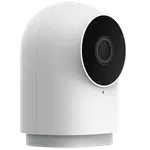




Aqara Camera Hub G350 Review: The First Matter Camera Is Also a Zigbee and Thread Hub
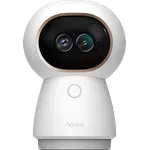
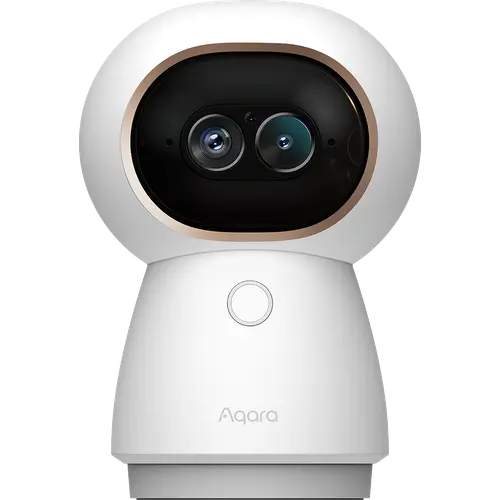
The G350 is the indoor camera to buy when the smart home matters as much as the picture. It is the first Matter-certified camera, so it joins Apple Home, SmartThings, Alexa, Google Home and Home Assistant as a real accessory rather than through a vendor bridge, and the same box runs an Aqara Zigbee network and a Thread border router. The 4K wide lens plus a 2.5K telephoto give it detail no single-sensor rival matches at this size, and the AI runs on the device instead of the cloud. The trade-offs are a rabbit-eared design that not everyone wants in a living room, and pan-tilt controls that owners describe as buggy.
- Aqara households
- Matter and Home Assistant users
- Baby and pet monitoring
- Local recording without a subscription
One camera per entrance you want covered.
Buy on Amazon USACheck pricePros
- Dual-lens design pairs a 4K wide-angle with a 2.5K telephoto and 9x hybrid zoom
- First camera certified for Matter, so it joins Apple Home, SmartThings, Alexa and Google Home natively
- Doubles as an Aqara Zigbee coordinator and a Thread border router
- Local AI for faces, pets, gestures and sound events, processed on the device
- 24/7 recording to a microSD card of up to 512GB, plus RTSP for Home Assistant
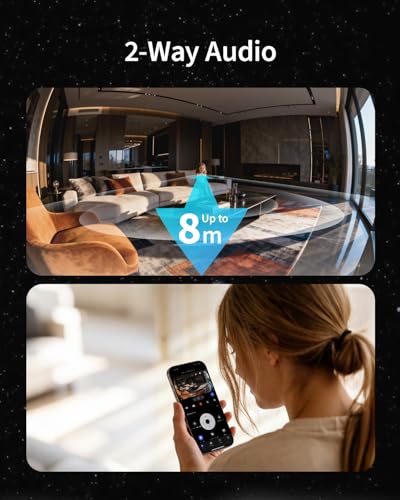
- Built-in 95dB siren and two-way audio
Cons
- Pan-tilt controls are described as buggy and unreliable
- Baby-monitor styling with silicone rabbit ears, and no first-party mount
- Indoor only, with no weather resistance, no Ethernet and no PoE
- microSD card not included, and the full cloud features need a subscription
- Pairing involves several ambiguous QR codes and the app takes time to learn
Who is the Camera Hub G350 for?
This is an indoor camera aimed at people who already run, or are about to run, a platform-agnostic smart home. It is the first camera certified under Matter, which is what lets its live view and two-way audio show up natively across ecosystems instead of being locked to one app, and it doubles as an Aqara Zigbee coordinator and a Thread border router, so it can host up to 80 Aqara sub-devices or split that allowance with Thread accessories. Buyers reach for it most often as a baby monitor or a pet camera, where the pan-tilt tracking and the 9x hybrid zoom earn their place, and several describe it as the first camera that genuinely fits their automation setup after being let down by brands with weak ecosystem support.
What buyers love
The picture is the headline. The wide-angle sensor shoots 4K and is paired with a 2.5K telephoto, and owners consistently call the image sharp and the night view clean, helped by 940nm infrared LEDs that light the room without the visible red glow of cheaper cameras. The second recurring theme is integration: people running Apple Home, SmartThings or Home Assistant report that it slots in without fuss, and Aqara owners value that the camera replaces a separate hub. Setup gets praised as quick, and the app is described as unusually powerful, with local AI that recognises faces, pets, gestures and six distinct sounds without sending anything to the cloud.
What to know before you buy
The most pointed criticism is the pan-tilt software: an owner who installs camera systems professionally found the PTZ behaviour unreliable and buggy, and slow panning can blur recordings while the camera moves. The design divides people, since the body is styled like a baby monitor and ships with silicone rabbit ears, and there is no first-party mount or accessory line, only support for a separately purchased quarter-inch thread. The app's depth cuts both ways and reads as overwhelming at first, and pairing involves several QR codes with little guidance on which one to scan. It is also indoor-only, with no weather rating, no Ethernet and no PoE, so it needs a power outlet nearby, and while it records locally to a microSD card of up to 512GB, the card is not included and the fuller cloud features sit behind a subscription.
Is the Camera Hub G350 worth it?
For an Aqara or Matter household, yes, and the value case is stronger than the sticker suggests once you count the hub it replaces: a Zigbee coordinator and a Thread border router in the same body as the camera. For anyone who just wants a camera pointed at a hallway, the dual-lens hardware and the hub radios are paying for capability that will sit idle, and the playful looks make it a hard sell in a formal room. The pan-tilt complaints are software, which means they can improve, but they are the reason to think twice if tracking is the feature you are buying it for.
Frequently asked questions
Is the Aqara Camera Hub G350 a real Matter camera?
Yes. It is the first camera certified under Matter 1.5, the release that added camera device types, so it can be added to a Matter home as a camera rather than only bridging other accessories. Which features each platform exposes still varies by ecosystem, since platform support for Matter cameras is newer than the certification itself.
Does the G350 work with Apple Home, Alexa, Google Home and SmartThings?
Yes, all four, plus Home Assistant. HomeKit Secure Video is supported, though inside Apple Home the stream is capped at 1080p and needs an iCloud+ plan and an Apple Home hub. Home Assistant gets the video feed over RTSP.
Does it need a subscription?
No, not for the core camera. It records 24/7 to a microSD card of up to 512GB, which is not included, and it can back up to a NAS. Aqara's fuller cloud storage features are the part that requires a subscription.
Can it replace an Aqara hub?
Yes. It works as an Aqara Zigbee coordinator and a Thread border router, connecting up to 80 Aqara Zigbee sub-devices, or 40 Zigbee plus 40 Thread ones, and it bridges them to Matter platforms. Note that it pairs Aqara Zigbee devices only, not third-party Zigbee gear.
What can its AI detect?
Person, pet and face detection, static and dynamic hand gestures, and six sound events including a baby crying, coughing and a dog barking. All of it runs locally on the camera, so no footage is uploaded for the analysis.
Can the G350 be used outdoors?
No. It carries no weather resistance rating and the manual states it is for indoor use only. It also draws power over USB-C with no PoE option, so it needs an outlet within reach.