


Blink Mini Pan-Tilt Review: Full-Room Coverage on a Budget, With Blink's Usual Trade-Offs
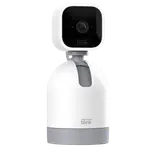
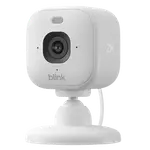
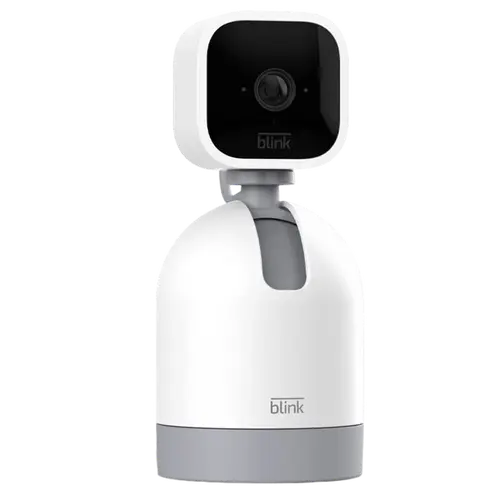
The Blink Mini Pan-Tilt is a small, plug-in indoor camera on a motorized base that pans about 350 degrees and tilts, letting one unit cover a whole room from your phone. Owners love that flexibility, along with the clear HD video (day and night), the easy few-minute setup, the two-way audio for pets and family, and the low price, especially on frequent deals. It fits neatly into the Blink ecosystem and works with Alexa to view the feed on an Echo Show. The trade-offs are Blink's familiar ones: the system can be slow (seconds of lag, occasionally more), you need a subscription or a separate Sync Module to save clips, and the app increasingly paywalls features like clip thumbnails and snapshots even with local storage. Night vision is black-and-white only (no color, no spotlight), a few units arrive faulty, and it is an older model some owners wish were refreshed. For affordable full-room indoor coverage, it remains a strong-value pick.
- Full-room indoor coverage from one camera
- Pet and elderly monitoring
- Blink ecosystem and Alexa households
- Budget buyers who catch a deal
Pros
- Smooth 350-degree pan and tilt covers a whole room from your phone
- Clear HD video day and night; good low-light clarity for the price
- Very affordable, especially on frequent deals
- Easy setup and two-way audio for pets, family or an elderly relative
- Integrates with the Blink ecosystem and Alexa (view on Echo Show)
- Flexible storage via subscription or a local Sync Module
Cons
- The Blink system can be slow, with lag and occasional pan disconnects
- App increasingly paywalls features like clip thumbnails and snapshots
- Night vision is black-and-white only (no color mode or spotlight)
- An older model some owners wish had updated sensors
- A minority of units arrive faulty; short power cords limit placement
- Only works with Alexa and IFTTT
Who is the Mini Pan-Tilt for?
This is a plug-in indoor camera on a motorized pan-and-tilt base, for people who want to watch a whole room from one device. It shoots HD video with a 110-degree lens that pans about 350 degrees and tilts about 135 degrees, has black-and-white night vision, two-way audio and a siren, but no spotlight or color night vision. It connects over 2.4GHz Wi-Fi, and saving clips needs a Blink subscription or a separate Sync Module. It works with Alexa and IFTTT, but not Google Home, HomeKit or SmartThings, and it is wired-only. It best suits budget buyers who want full-room coverage, pet and elderly monitoring, and existing Blink or Alexa households. If you want color night vision, fast real-time response, or subscription-free saved clips with thumbnails, read the caveats first.
What buyers love
The pan-and-tilt is the star. Owners repeatedly praise being able to swipe in the app to rotate and tilt the camera for full-room coverage with no blind spots, replacing the need for multiple cameras, and setting a default home position with one button. The HD video is called clear day and night, with several owners impressed by the low-light and night-vision clarity for the price, and two-way audio is genuinely useful for talking to pets, family or an elderly relative (one owner watched over a recovering dog overnight). Setup is quick and easy, the camera integrates seamlessly with existing Blink devices, a Sync Module and Alexa (viewing the feed on an Echo Show), and motion alerts are reliable without being oversensitive. A small blue light shows when someone is viewing, storage is flexible (subscription or local Sync Module), and above all it is inexpensive, often bought at half price on a deal, making it a favorite for pet watching and peace of mind.
What to know before you buy
A few limits recur. The Blink system can be slow: owners report a couple of seconds of lag between real life and the app (occasionally longer), the pan sometimes loses connection so you close and reopen the camera, and notifications can lag. Saving clips requires a subscription or a Sync Module, and the app has increasingly paywalled features, one UK owner is frustrated that clip thumbnails and snapshots now require a subscription even with local storage, making it tedious to tell what triggered a clip without playing each one. Night vision is black-and-white only, with no color mode or spotlight, and this is an older model that some owners wish had updated sensors and better low-light hardware. A minority of units arrive faulty (TV-style lines on screen, two-way audio that never worked, or motion detection that stops), and some owners hit a remote-access problem where the camera only works on home Wi-Fi until a phone setting is changed. Power cords are short, limiting placement, and it can drop offline in weak Wi-Fi or extreme cold. It only works with Alexa and IFTTT.
Is the Mini Pan-Tilt worth it?
For affordable full-room indoor coverage, the Blink Mini Pan-Tilt is an easy recommendation: the motorized pan and tilt genuinely replaces multiple fixed cameras, the HD picture is clear, setup is simple, and the price is hard to beat on a deal. Just go in knowing the Blink realities. The system runs slower than premium cameras, you will want a subscription or Sync Module to save clips, and Blink increasingly paywalls conveniences like thumbnails. Night vision is black-and-white only, it is an aging model, and the occasional unit is faulty. Buy it if remote full-room control, pet or elderly monitoring and low cost are your priorities and you are in the Blink or Alexa world; if you need color night vision, snappy real-time response, or subscription-free clip browsing, weigh those limits first.
Frequently asked questions
How good is the pan and tilt?
It is the standout feature. You can pan the camera roughly 350 degrees and tilt it from your phone to cover a whole room with no blind spots, replacing the need for several fixed cameras, and set a default home position. On install it runs a wake-up routine that sweeps all angles, so leave clearance around it.
Do I need a subscription?
To save recordings, yes, unless you add a Blink Sync Module for local storage. Note that Blink has increasingly paywalled conveniences, so even with a Sync Module some owners find that clip thumbnails and snapshots now require a subscription, which makes browsing saved clips more tedious.
Does it have color night vision?
No. Night vision is black-and-white infrared only, and there is no built-in spotlight, unlike the newer Blink Mini 2 and Mini 2K+. Owners still find the night-vision picture clear for its price, but if you specifically want color night footage, choose a newer Blink model.
Is the video laggy?
Somewhat. The Blink system is known to be slow, with owners reporting a couple of seconds of delay between real life and the app (occasionally more), and the pan control sometimes drops connection so you reopen the camera. It is fine for checking in, but not instant real-time monitoring.
Can I view it when away from home?
Generally yes, over Wi-Fi and the Blink servers, but a few owners hit an issue where the camera only worked on home Wi-Fi and showed offline once they left, which was fixed by changing a phone setting with Amazon support. If you rely on remote viewing, verify it works away from home during any return window.