Winner
16% OFF
Prime exclusive deal$45.99
$54.99
39% above its lowest price of the last 6 months ($32.99)
Ends in --
 Join Prime to buy it at $45.99
Ends in --
Join Prime to buy it at £35.99

Full Smart Cameras comparison in 2026
Ends in --
Join Prime to buy it at $45.99
Ends in --
Join Prime to buy it at £35.99

We follow prices across the catalog and email you the best deals we find.
No spam. Unsubscribe in one click.
| Feature | Eufy Indoor Cam E220 | TP-Link Tapo C100 | Winner |
|---|---|---|---|
| Price | $45.99 | $17.98 | TP-Link Tapo C100 |
| Warranty | 1 year | 2 years | TP-Link Tapo C100 |
| 2K Video | YES | NO | Eufy Indoor Cam E220 |
| Alerts | Motion, People, Animals, Baby Crying Sound | Motion, People, Baby Crying Sound | Eufy Indoor Cam E220 |
| Rating | 4.4 | 4.4 | Tie |
| Weather Resistance | NO | NO | Tie |
| PoE | NO | NO | Tie |
| Solar Charging | NO | NO | Tie |
| Connectivity | 2.4 GHz WiFi | 2.4 GHz WiFi | Tie |
| Storage | MicroSD Card Slot, Cloud | MicroSD Card Slot, Cloud | Tie |
| 4K Video | NO | NO | Tie |
| HDR | NO | NO | Tie |
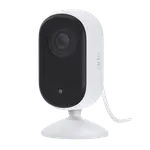
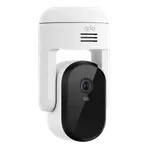
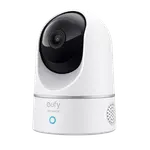
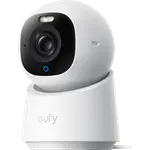
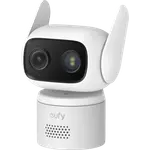
The Eufy Indoor Cam E220 turns 360 degrees and tilts 96 degrees, so one camera can sweep a room by hand or on auto-pan. The TP-Link Tapo C100 is fixed at a 98.8 degree horizontal view, so you have to aim it well once.
The Eufy Indoor Cam E220 records 2K, the TP-Link Tapo C100 tops out at 1080p. The extra detail helps most when you zoom into a recorded clip.
The Eufy Indoor Cam E220 works with Apple HomeKit but not SmartThings. The TP-Link Tapo C100 is the reverse, so your home platform can settle this one on its own.
The Eufy Indoor Cam E220 has internal storage as well as a microSD slot, while the TP-Link Tapo C100 has only the slot, so it records nothing until you add a card. The TP-Link Tapo C100 comes with two years of warranty against one on the Eufy Indoor Cam E220.
Both detect motion, people and a baby crying. Only the Eufy Indoor Cam E220 lists animal detection, which matters for a pet camera.
The Eufy Indoor Cam E220 pans 360 degrees and tilts, while the TP-Link Tapo C100 stares at one fixed angle.
The Eufy Indoor Cam E220 supports Apple HomeKit and the TP-Link Tapo C100 does not.
The TP-Link Tapo C100 supports SmartThings and the Eufy Indoor Cam E220 does not.
The TP-Link Tapo C100 gives a clear 1080p fixed view, a privacy zone and a two-year warranty, without paying for motors you would not use.
The Eufy Indoor Cam E220 detects animals and can follow the room, though owners say its detection is inconsistent.
Owners of both cameras praise the same thing: a picture that looks better than the money suggests, an app that gets them watching in minutes and the option to record to a microSD card without a plan. TP-Link Tapo C100 owners add that it is a camera they bought once and then bought again for other rooms, and power users like the RTSP stream and Home Assistant support, while some were caught out by needing to buy a card before anything records. Eufy Indoor Cam E220 owners single out the pan and tilt that scans a whole room, the HomeKit Secure Video support and years of near-constant use, and they warn that person and pet detection is inconsistent, the app can lag and the card is capped at 128 GB.
Every price change of both, in the same store, so the gap between the two lines is what one costs more than the other.
Loading price history...
The Eufy Indoor Cam E220, thanks to pan and tilt, 2K video, HomeKit support and animal detection. The TP-Link Tapo C100 is the simpler fixed 1080p option with a longer warranty and SmartThings support.
The Eufy Indoor Cam E220 moves: it pans 360 degrees and tilts 96 degrees and records in 2K. The TP-Link Tapo C100 has a fixed lens and records in 1080p.
Only the Eufy Indoor Cam E220. The TP-Link Tapo C100 supports Alexa, Google Home, SmartThings and Home Assistant, but not Apple HomeKit.
Yes, both can record to a microSD card with no monthly plan, and both offer an optional cloud subscription. The TP-Link Tapo C100 has no internal storage, so it needs a card before it records anything.
People who want to see a whole room from one camera, own Apple devices and want 2K video with local recording.
Buyers who want a small, inexpensive fixed camera for one spot, use SmartThings or Home Assistant, or plan to place several cameras around the home.
You are looking at two of them. The full table lines up all Cameras in the catalog with the same specs, so you can filter by what you need and sort by price or rating.

Last price$299.99



Last priceSep 23, 2026$39.99
Last priceOct 3, 2026$99.99


Last priceOct 5, 2026$54.98

Last priceSep 22, 2026$109.99
Last priceOct 6, 2026$49.99
Last price$59.99
Last priceJan 4, 2026$79.00
Last priceOct 6, 2026$56.99
Last price$129.99





Last priceOct 5, 2026$54.98