


Google Nest Cam Floodlight Review: Bright, Smart and Free 3-Hour History, but Install and App Frustrate
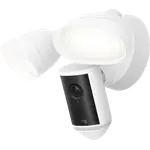
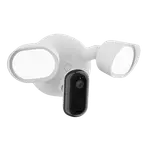
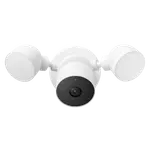
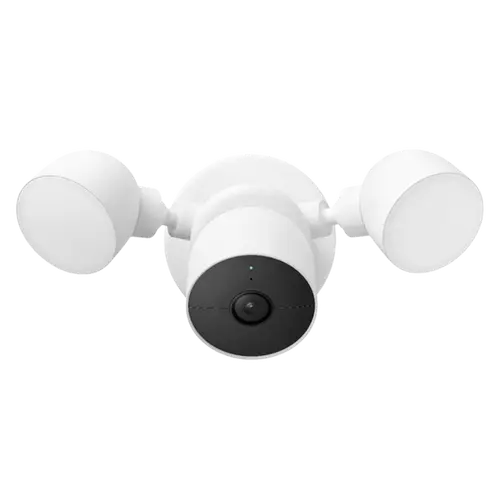
The Google Nest Cam Floodlight is a hardwired floodlight camera that pairs a bright, fully adjustable light with a smart 1080p HDR camera and, unusually, three hours of free event history with no subscription. Owners praise the very bright, dimmable floodlight, the clear HDR video, and the excellent on-device AI that distinguishes people, vehicles and animals, tells you which zone triggered, and starts recording before a subject even enters frame, with fewer false alerts than traditional motion lights. Setup via QR code and the app is quick once wired, the build is solid with a strong magnet, and it has battery backup. The frustrations: physical wiring installation needs some electrical know-how and can be a nightmare, a notable minority hit offline and camera-to-light connection problems, it demands solid internet bandwidth, the mandatory Google Home app is widely seen as a downgrade from the old Nest app, and it is expensive. It works with Google Home, Alexa and Home Assistant, but not HomeKit. For a bright, intelligent Google-ecosystem floodlight camera with free short-term history, it is a strong pick, if the install and app do not put you off.
- Google/Nest ecosystem households
- Bright, customizable outdoor lighting plus camera
- Free short-term event history
- Driveways and dark yards
Pros
- Very bright, fully adjustable floodlight that deters people and wildlife
- Clear 1080p HDR video with vivid color and zoom
- Excellent on-device AI (person, vehicle, animal) with pre-roll recording
- Three hours of event history free, no subscription required
- Quick QR setup, solid build with a strong magnet, and battery backup
- Works with Google Home, Alexa and Home Assistant
Cons
- Wiring install needs electrical know-how and can be difficult
- A minority hit offline or camera-to-light connection problems
- Demands solid internet bandwidth; struggles on slow connections
- Mandatory Google Home app is widely seen as a downgrade from the Nest app
- Expensive; light assembly not user-serviceable; wall switch must stay on
- No local storage; no HomeKit or IFTTT
Who is the Nest Cam Floodlight for?
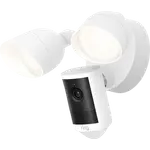
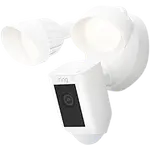
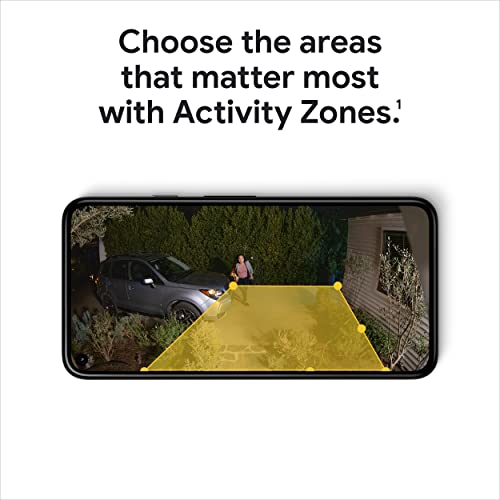
This is a hardwired outdoor floodlight camera for people in the Google/Nest ecosystem who want to both light and record an area. It shoots 1080p HDR with a 130-degree view, color and black-and-white night vision, an adjustable floodlight (1 to 100 percent), two-way audio, a siren and customizable motion zones, and it includes on-device AI that recognizes people, vehicles and animals. It wires into mains power (replacing a wall light), connects over dual-band Wi-Fi, and stores footage in the cloud with three hours of event history free (or a subscription for 30 days); there is no microSD. It works with Google Home, Alexa and Home Assistant, but not HomeKit or IFTTT. It best suits Google/Nest households, anyone wanting a bright light plus smart camera for a driveway or dark yard, and those who value free short-term history. If you want an easy install, a great app, or local storage, read the caveats first.
What buyers love
The light and the smarts stand out. The floodlight is very bright and fully adjustable, with owners running it as low as 20 percent and still lighting a space 15 feet away, and it doubles as a deterrent for people and wildlife or as a plain porch light. Video is clear 1080p HDR with vivid color and usable zoom, and the on-device AI is a highlight: it reliably tells people from vehicles from animals, reports which zone triggered, and, importantly, starts recording before the subject enters the camera's field of view, so you do not miss the approach, with fewer false triggers than passive-IR spotlights. Three hours of event history is free with no subscription, setup is quick via a QR code and step-by-step in-app guidance (often around 20 minutes once wired), and the build is solid and heavy with a strong magnet that shrugs off wind, rain and snow. Being wired means no battery to charge, night recording is in color when the light is on, audio is clear, it unifies with other Nest devices in the Google Home app, and it even has battery backup for power outages.
What to know before you buy
Installation and connectivity are the main pain points. The physical wiring needs some electrical knowledge, and several owners found it a nightmare, made harder if your electrical box is not flush with the wall (some improvised spacers). A notable minority hit offline problems: the camera dropping offline and being hard to reconnect, or the camera failing to communicate with the light and staying offline for weeks even after a replacement, with Wi-Fi and wiring confirmed fine (the 15-second reset button is not documented). It also demands solid internet bandwidth, hogging the connection and responding slowly on slow rural links (one owner could not use it on 12mbps). The mandatory Google Home app is widely seen as a downgrade from the old Nest app, scattering products across screens and making video history harder to reach, and Google removed the ability to view the camera on a TV. It is an expensive floodlight, replacing the light assembly costs half the price of the whole unit (bulbs are not user-replaceable), the wall switch must always stay on, small-pet detection is weak, and Google's habit of discontinuing models frustrates long-time Nest owners. There is no local storage and no HomeKit.
Is the Nest Cam Floodlight worth it?
For a Google/Nest household that wants a bright, customizable floodlight paired with a genuinely smart camera, the Nest Cam Floodlight is one of the best options: excellent on-device AI, clear HDR video, pre-roll recording, a solid build, and three hours of free history without a subscription. The trade-offs are real, though. Budget time and some electrical skill for the install, ensure you have strong Wi-Fi and enough bandwidth, and accept the Google Home app and the premium price. A minority of units hit stubborn offline or camera-to-light issues, so buy from somewhere with an easy return path. Choose it if you are in the Google ecosystem and value bright lighting plus intelligent detection; if you need local storage, HomeKit, a simple install, or a great app, weigh those limits first.
Frequently asked questions
Do I need a subscription?
Not for basic use. It includes three hours of free event history in the cloud with no subscription, which is enough for many owners to review recent events. A Nest Aware subscription extends this to 30 days of history and adds features. There is no local storage or microSD, so longer retention requires the paid plan.
Is it hard to install?
The physical wiring is the tricky part, and it needs some electrical knowledge since it hardwires in place of a wall light. Several owners found it difficult, especially if the electrical box is not flush with the wall. Once wired, app setup via a QR code is quick, often around 20 minutes, and the wall switch must be left on afterward.
How good is the motion detection?
Very good for people, vehicles and animals thanks to on-device AI, and it starts recording before the subject enters frame so you see the approach, with fewer false triggers than passive-IR lights. It also tells you which zone triggered. The main weakness is small pets, which it can miss.
Which app does it use, and does it work with HomeKit?
It uses the Google Home app, which many long-time Nest owners consider a downgrade from the old Nest app for viewing history and managing devices. It works with Google Home, Alexa and Home Assistant, but not Apple HomeKit or IFTTT.
Does it need fast internet?
Yes. It requires solid Wi-Fi and enough bandwidth to work well; on slow connections it can hog the network and be sluggish to load clips, and one owner found it unusable on a 12mbps rural link. Ensure strong Wi-Fi at the mounting location and adequate internet speed before buying.