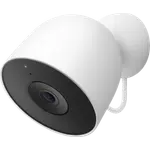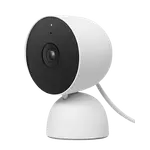


Google Nest Cam (Indoor, Wired) Review: Sharp Video and Free History, but the Google Home App Frustrates
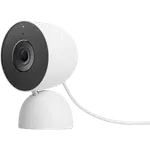
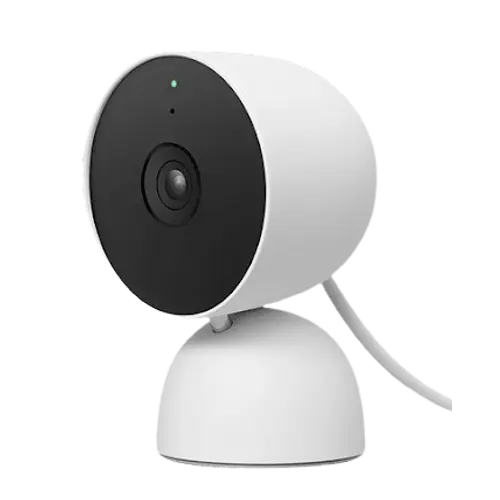
The Google Nest Cam (Indoor, Wired) 2nd gen is a plug-in indoor camera with clear 1080p HDR video, on-device AI, excellent two-way audio and, notably, three hours of event history free with no subscription. Owners love the sharp picture day and night, the instant motion alerts, and how well it works as a pet cam (dogs and cats come running when called through it), plus the reliability of a wired design with no batteries to manage and a camera that stays awake rather than sleeping like a Ring Stick Up. It ties all your Nest devices into one app. The frustrations are software: the mandatory Google Home app is widely seen as a downgrade from the old Nest app, there is no way to view cameras from a desktop browser, the Alexa integration is limited (it will not push person alerts), and a minority hit poor connectivity with frequent 'live video unavailable' and slow-loading clips. It works with Google Home, Alexa and Home Assistant, but not HomeKit. For a reliable, sharp Google-ecosystem indoor camera with free short-term history, it is a strong pick, if the app and lack of desktop viewing do not bother you.
- Google/Nest ecosystem households
- Pet and family monitoring
- Free short-term event history
- Wired, no-battery indoor placement
Pros
- Clear 1080p HDR video with sharp night vision, day and night
- Excellent two-way audio; a standout pet cam that gets pets' attention
- On-device AI person detection with near-instant alerts
- Three hours of event history free, no subscription required
- Wired design (no batteries) that stays awake and responsive
- Unifies with other Nest devices; geofencing; mid-range price
Cons
- Google Home app is widely seen as a downgrade from the old Nest app
- No way to view cameras from a desktop browser; TV casting removed
- Limited Alexa integration (no person-detection alerts)
- A minority hit poor connectivity and slow-loading clips
- Indoor only; storage is essentially cloud, with only a one-hour onboard buffer for Wi-Fi outages
- No HomeKit or IFTTT
Who is the Nest Cam (Indoor, Wired) for?
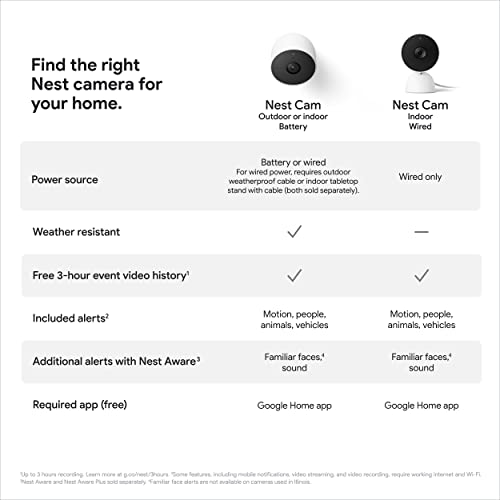
This is a plug-in indoor camera for people in the Google/Nest ecosystem who want a sharp, reliable camera without a subscription for basics. It shoots 1080p HDR with a wide 135-degree view, black-and-white night vision, two-way audio, a siren, customizable motion zones and on-device AI (person detection, with facial recognition on a subscription). It is wired (no battery), connects over dual-band Wi-Fi, and stores footage in the cloud with three hours of event history free, or a Nest Aware subscription for 30 days; there is no microSD slot, and the onboard memory only keeps recording for about an hour if Wi-Fi goes down. It works with Google Home, Alexa and Home Assistant, but not HomeKit or IFTTT, and it is indoor only. It best suits Google/Nest households, pet and family monitoring, and anyone wanting free short-term history and a wired camera that stays awake. If you need desktop viewing, HomeKit, or full Alexa person alerts, read the caveats first.
What buyers love
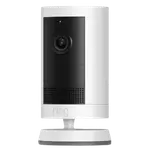
Picture quality, audio and reliability lead the praise. The 1080p HDR video is called clear and sharp day and night, with strong night vision, and on-device AI reliably detects people and can recognize familiar faces with a subscription. Two-way audio is a standout, several owners use it as a pet cam and report their dogs and cats actually come to the camera when called, unlike a laggy video call. Being wired is a real plus: no batteries to charge or swap (a direct upgrade over a Ring Stick Up that lasts about a day and sleeps every 15 minutes), and the camera stays awake and responsive. Setup is quick (around 10 minutes via QR code), motion alerts arrive within seconds, and the wide angle covers a room. Three hours of event history is free with no subscription, the design is clean and compact yet solid (wall-mount or tabletop), and everything unifies with other Nest devices in the Google Home app. Many owners run large, multi-year Nest setups reliably, and it includes geofencing to pause when you are home and record when you leave, all at a mid-range price.
What to know before you buy
The complaints are mostly about software. The mandatory Google Home app is widely regarded as a downgrade from the old Nest app, with clunkier history scrolling and a poorly designed layout, and owners with older Nest cameras dislike juggling two apps. There is no way to view your cameras from a desktop browser (a frequent, strongly felt gripe, since you can only watch from a phone), and Google removed the ability to cast to a TV. The Alexa integration is limited: the skill only alerts on unrecognized motion and will not send person-detection alerts, so it disappoints buyers wanting Echo notifications. A minority hit poor connectivity, one owner saw 'live video unavailable' about 90 percent of the time with black screens and clips taking up to a minute to load, returning all four cameras after long, unhelpful support chats, though many others have flawless performance, especially on strong or mesh Wi-Fi. It is indoor only (some mistakenly expect outdoor use), there is no microSD slot and the onboard memory only covers about an hour of a Wi-Fi outage (storage is essentially cloud), and Google's habit of discontinuing apps and models frustrates long-time Nest owners. There is no HomeKit.
Is the Nest Cam (Indoor, Wired) worth it?
For a Google/Nest household that wants a sharp, dependable indoor camera with excellent two-way audio and three hours of free history, this Nest Cam is an easy recommendation, and it shines as a pet cam and general monitor with no battery hassles. The trade-offs are software-shaped: you must use the Google Home app (a step back from the Nest app), you cannot view from a desktop browser, and Alexa person alerts are not supported. Most owners find it reliable on good Wi-Fi, but a minority hit stubborn connectivity issues, so buy where returns are easy. Choose it if you value the picture, audio, free history and Google integration; if you need desktop viewing, HomeKit, local storage, or full Alexa alerts, weigh those limits, or consider a rival like Wyze, first.
Frequently asked questions
Do I need a subscription?
Not for basics. It includes three hours of event history free in the cloud with no subscription, enough to review recent events. A Nest Aware subscription extends history to 30 days and adds facial recognition. There is no microSD slot, and the onboard memory only covers about an hour of a Wi-Fi outage, so longer retention requires the paid plan.
Can I view it on a computer?
This is a common complaint: there is no way to watch your cameras from a desktop browser, so live viewing and history are handled through the Google Home app on a phone or tablet. Google also removed the ability to cast the feed to a TV, which frustrates owners who want a bigger screen at work or home.
Does it work well with Alexa?
Only partially. The Alexa skill can alert on unrecognized motion, but it will not send person-detection alerts, so if you want Echo notifications specifically when a person is detected, it disappoints. It works fully within the Google ecosystem and also supports Home Assistant, but not HomeKit.
Is it good as a pet camera?
Yes, it is a favorite for that. The two-way audio is clear enough that owners report their dogs and cats come to the camera when called, and it helps with pet separation anxiety or watching an elderly pet. Being wired, there are no batteries to manage, so it can run continuously.
Can I use it outdoors?
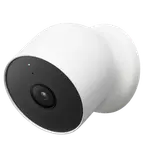
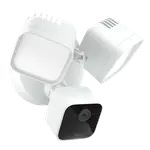
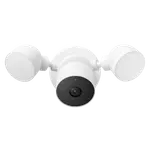
No. This is the indoor wired model and is not weatherproof, some buyers mistakenly expected outdoor use. For outdoor coverage, Google offers separate outdoor and floodlight Nest cameras designed to handle the elements.