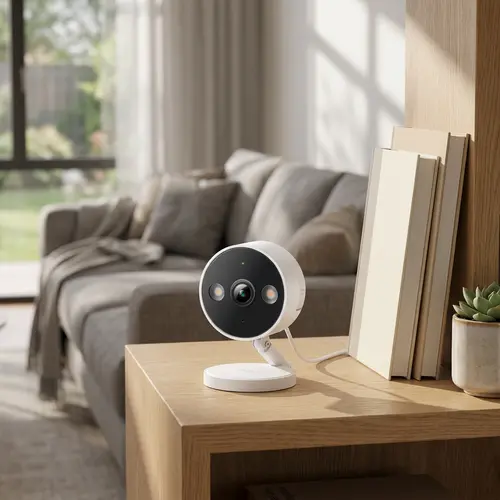



TP-Link Tapo C120 Review: Excellent-Value 2K Camera With No Fees and Great Night Vision
The TP-Link Tapo C120 is a small, inexpensive indoor/outdoor wired camera that punches well above its price, a PCMag Editors' Choice that owners repeatedly rate better than pricier Nest, Ring, Wyze and Foscam cameras they returned. It shoots sharp 2K video with excellent color night vision (its starlight low-light mode looks nearly like daylight), and its biggest draw is subscription-free local storage: pop in a microSD card and it records and loops with no fees. It has rich AI detection (person, pet, vehicle and line-crossing), separate detection zones, a privacy zone, a handy magnetic base, and RTSP/ONVIF support for Blue Iris or iSpy. The catches: continuous recording needs an SD card in each camera (there is no free continuous cloud), the line-crossing detection is very basic and cannot filter out shadows, the microphones are poor, and you cannot download clips remotely without the paid cloud. It works with Alexa, Google Home and Home Assistant, but not HomeKit. For a cheap, subscription-free 2K camera with great night vision, it is one of the best-value picks around.
- Subscription-free budget monitoring
- Excellent color night vision
- Local storage and RTSP/NVR users
- Indoor or covered outdoor coverage
Pros
- Excellent value: sharp 2K that beats pricier Nest, Ring and Wyze for many owners
- Subscription-free local microSD storage with looping recording
- Standout color night vision and starlight low-light mode
- Rich, accurate AI detection (person, pet, vehicle) with per-type zones
- Easy setup, magnetic base, and RTSP/ONVIF for Blue Iris or iSpy
- Tiny indoor/outdoor design with a two-year warranty
Cons
- Continuous recording needs a microSD card in each camera (no free continuous cloud)
- Line-crossing detection is basic and cannot filter shadows or adjust sensitivity
- Poor microphones that pick up wind and miss distant speech
- Night vision does not work through a window (use low-light mode)
- No remote clip download without the paid cloud; 2.4GHz Wi-Fi only
- Less durable feel than premium rivals; no HomeKit
Who is the Tapo C120 for?
This is a compact, low-cost wired camera for indoor or outdoor use, aimed at people who want good 2K coverage with no subscription. It shoots 2K with a 103-degree view, has color and black-and-white night vision, a spotlight, two-way audio, a siren, and customizable motion, person, pet, vehicle and line-crossing detection plus a privacy zone. It connects over 2.4GHz Wi-Fi and records locally to a microSD card with no fee (or optional cloud), and it supports RTSP/ONVIF for NVRs and software like Blue Iris and iSpy. It works with Alexa, Google Home and Home Assistant, but not HomeKit. It best suits budget subscription-free monitoring, owners who value strong night vision, and RTSP/local-storage users. If you need continuous cloud recording without an SD card, reliable line-crossing, or good audio, read the caveats first.
What buyers love
Value and night vision lead the praise. The C120 is cheap yet delivers sharp 2K video that owners say beats older Nest and current Ring, Wyze and Foscam cameras, several returned rivals in its favor. The standout is subscription-free local storage: add a microSD card and it records on a loop with no fees, with a 128 to 256GB card holding weeks of footage. Color night vision is repeatedly called excellent, its starlight low-light mode makes dusk look almost like daylight, and the IR beats similar budget cameras. AI detection is rich and accurate for person, pet and vehicle, with separate zones per type, a privacy zone, and people tagged along the timeline (it even detects through a window, which some cameras cannot). Setup is easy and intuitive even for non-techies, the app is good, the magnetic base makes SD access and cleaning simple, and RTSP/ONVIF support lets it run with Blue Iris or iSpy. It is tiny (smaller than a hockey puck), carries a two-year warranty, and can even keep recording to SD without Wi-Fi after setup.
What to know before you buy
A few limits recur. Continuous recording requires a microSD card in each camera, without one, the Tapo app only streams live and records event segments to the cloud on a subscription, which surprises some buyers (one returned it thinking it needed a card just to view live). The line-crossing detection is very basic: it triggers on anything that crosses the line (people, shadows, cotton, swaying tree branches) with no way to filter by type or adjust sensitivity, unlike the other detection modes, so it produces constant false alerts in a breezy yard. The microphones are poor across the Tapo line, capturing little unless people are right under the camera and turning the slightest breeze into loud wind noise. Night vision does not work through a window (the IR reflects; use low-light mode instead), and you cannot download recorded clips to your phone remotely without the paid cloud, only when on the same Wi-Fi. Other notes: sun reflecting off walls can cause false motion, the hardware feels less durable than premium rivals (though cheap enough to be near-disposable), detection zones only offer four adjustment points, there is no one-tap on/off for all cameras, weak Wi-Fi drops frames, and it is 2.4GHz-only with no HomeKit.
Is the Tapo C120 worth it?
For a cheap, subscription-free 2K camera with genuinely excellent color night vision and rich AI detection, the Tapo C120 is one of the best values available, and owners consistently prefer it to pricier Nest, Ring and Wyze cameras. Just buy it for what it is. Plan on a microSD card for recording (each camera needs its own for continuous capture), avoid relying on the bare-bones line-crossing feature, and do not count on the weak microphone. Note that remote clip downloads need the paid cloud, and it is 2.4GHz-only with no HomeKit. Choose it if low cost, no fees, strong night vision and local storage matter most, especially with RTSP for an NVR; if you need continuous cloud recording without a card, dependable line-crossing, good audio, or HomeKit, weigh those limits first.
Frequently asked questions
Do I need a subscription?
No. Add a microSD card and it records locally on a loop with no fees, which is a main reason owners choose it. An optional cloud plan is available. Note that continuous 24/7 recording requires an SD card in each camera; without one, the app only streams live and records event segments to the cloud on a subscription.
How good is the night vision?
Excellent for the price. The color night vision and starlight low-light mode make dusk and low-light scenes look nearly like daylight, and the IR beats similar budget cameras. The one exception is through glass: night vision reflects off a window, so use the low-light mode rather than IR when pointing through one.
How reliable is the motion and line-crossing detection?
Person, pet and vehicle detection are accurate and have adjustable sensitivity and zones. The line-crossing feature, however, is very basic: it triggers on anything crossing the line, including shadows and swaying branches, with no type filtering or sensitivity control, so it can produce constant false alerts outdoors.
Can I download recordings remotely?
Only with the paid cloud. With local SD storage, you can view recordings remotely but can only download a clip to your phone when connected to the same Wi-Fi network as the camera. If off-site downloads matter to you, you would need the optional Tapo cloud subscription.
Does it work with HomeKit or an NVR?
It does not support HomeKit, but it works with Alexa, Google Home and Home Assistant, and importantly it supports RTSP/ONVIF, so it integrates with NVRs and software like Blue Iris and iSpy for local recording without any subscription.