

TP-Link Tapo C500 Review: Affordable 360-Degree Outdoor Pan/Tilt With No Fees, but a Noisy, Sticky Motor
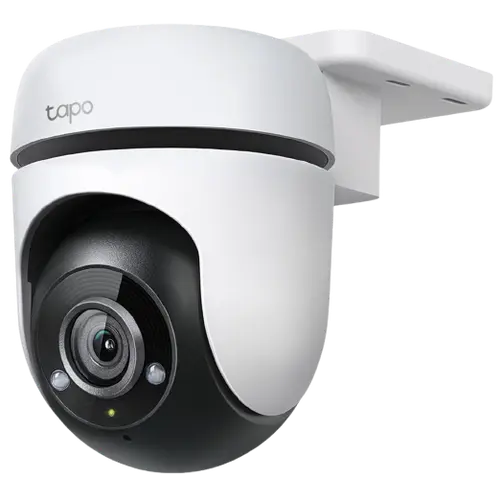
The TP-Link Tapo C500 is an inexpensive wired outdoor camera whose motorized head pans a full 360 degrees and tilts, with motion tracking to follow people, animals and vehicles. Owners love the value, the wide coverage with no blind spots, the clear 1080p picture, the motion-activated light and siren, and above all the subscription-free local storage: add a microSD card and it records, loops and downloads clips with no cloud fee. Many run several around a home and find it reliable through snow and storms. The weaknesses are real, though: the pan/tilt motor is noticeably noisy, and the detection zones do not move with the camera, so once it pans, your carefully drawn zone ends up over a tree and it fixates on blowing leaves while missing the driveway. Some units also get stuck panning and need rebooting a few times a day. It is 2.4GHz Wi-Fi only, with no HomeKit. For cheap 360-degree outdoor coverage with free local storage, it is good value, if you can live with a fixed detection zone and a chatty motor.
- Affordable 360-degree outdoor coverage
- Subscription-free local storage
- Tapo ecosystem owners
- Watching a wide area from one camera
Pros
- Full 360-degree pan and tilt covers a wide area with no blind spots
- Subscription-free local microSD storage (up to 512GB) with easy clip downloads
- Clear 1080p video with decent night vision; motion tracking and patrol mode
- Motion-activated light, siren and two-way audio
- Affordable, with saved viewpoint presets and Alexa/Google integration
- Reliable through weather for many owners; good value in the Tapo ecosystem
Cons
- Pan/tilt motor is noisy, with a loud whine when it moves
- Detection zones do not move with the camera, so panning misaligns them
- Some units get stuck panning and need rebooting a few times a day
- Motion tracking cannot keep up with fast-moving objects like cars
- Occasional disconnects; 2.4GHz Wi-Fi only
- No HomeKit; US plug in some regions
Who is the Tapo C500 for?
This is a low-cost wired outdoor camera on a motorized pan-and-tilt base, for people who want to cover a wide area affordably. It shoots 1080p, pans 360 degrees and tilts, and has color and black-and-white night vision, a motion-activated spotlight, a siren, two-way audio, motion tracking, and AI person and motion detection with zones. It connects over 2.4GHz Wi-Fi and records locally to a microSD card (up to 512GB) with no subscription, or optionally to the cloud. It works with Alexa, Google Home and Home Assistant, but not HomeKit. It best suits affordable wide-area outdoor coverage, subscription-free local storage, and existing Tapo owners. If you rely on precise detection zones or want silent operation, read the caveats first.
What buyers love
Value and coverage lead the praise. The C500 is cheap yet delivers full 360-degree pan and tilt, so one camera can cover a whole area with no blind spots, and owners appreciate the motion tracking that follows people, animals and vehicles, the patrol mode that pans back and forth, and saved viewpoint presets you reach with a single tap. The 1080p picture is clear by day with decent night vision, and the biggest draw is subscription-free local storage: a microSD card (up to 512GB) records on a loop, with clips easy to find by motion over the last 24 hours and downloadable in one click with no extra app. Installation is straightforward, and it adds a motion-activated light (a useful night-time deterrent), a siren, and two-way audio. Many owners run four or five Tapo cameras, pair them with Alexa and Echo Show devices, and report solid reliability through snow and storms over six months or more, with few false detections.
What to know before you buy
Two issues stand out. First, the pan/tilt motor is noisy, some owners describe a loud whine when it moves, and one unit started within 24 hours. Second, and more limiting, the detection zones do not move with the camera: there is only one detection-zone layer, applied identically across all viewpoints, so if you draw a zone over the sidewalk when the camera faces forward and it then pans left, that same zone now sits over a tree, causing it to fixate on blowing leaves while ignoring the driveway. In practice, only the full-area detection zone works reliably, which reintroduces leaf and wind false triggers. Some units also get stuck panning and stop detecting, requiring a reboot two or three times a day (with a 'maximum extent reached' error even when not at the limit), and TP-Link's help even offers a scheduled auto-reboot, implying awareness of the problem. Motion tracking cannot keep up with fast-moving objects like passing cars, it drops connection occasionally (fixed by re-plugging the adapter), it is 2.4GHz Wi-Fi only, ships with a US plug in some regions, and there is no HomeKit.
Is the Tapo C500 worth it?
For cheap 360-degree outdoor coverage with motion tracking and free local storage, the Tapo C500 is good value, and many owners are happy enough to buy several. The key limitations to accept are the noisy motor and, more importantly, that detection zones do not follow the camera as it pans, so if you plan to keep it panning across viewpoints, expect to rely on full-area detection and its leaf false alerts, or keep it in one fixed position where a drawn zone stays accurate. Some units also need regular rebooting. Buy it if you want an affordable, wide-coverage outdoor camera with no fees and can work around the zone limitation; if you need precise per-viewpoint detection, silent operation, higher resolution, or HomeKit, weigh those limits, or consider a fixed Tapo model, first.
Frequently asked questions
Do I need a subscription?
No. Add a microSD card (up to 512GB) and it records locally on a loop with no fee, with clips easy to find by motion and downloadable in one click. An optional cloud plan exists, but most owners rely on the card, which is a key reason they choose it over subscription-based brands.
Do the detection zones work when it pans?
No, and this is the main limitation. There is only one detection-zone layer, applied the same way across all viewpoints, so when the camera pans, a zone you drew over, say, the sidewalk ends up over a tree. In practice only the full-area zone works reliably as it moves, which brings back leaf and wind false alerts.
Is the motor noisy?
Yes. Owners describe a loud whine when the camera pans and tilts, which some find annoying, and one unit developed it within 24 hours. If you plan to have it patrol or track frequently, the noise is worth knowing about, especially near a bedroom window.
Does it get stuck or need rebooting?
Some units do. Owners report the camera getting stuck panning and then failing to detect motion, requiring a reboot two or three times a day, sometimes with a 'maximum extent reached' error even when it is not at the limit. TP-Link offers a scheduled auto-reboot option, which suggests the issue is known.
Does it work with HomeKit?
No. It works with Alexa, Google Home and Home Assistant, but not Apple HomeKit. It connects over 2.4GHz Wi-Fi only, so ensure you have solid 2.4GHz coverage at the mounting location.