

Wyze Bulb Cam Review: A Clever Screw-In Camera-and-Light With Cheap Storage, but No Remote Rotation
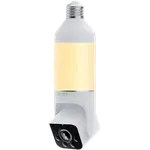
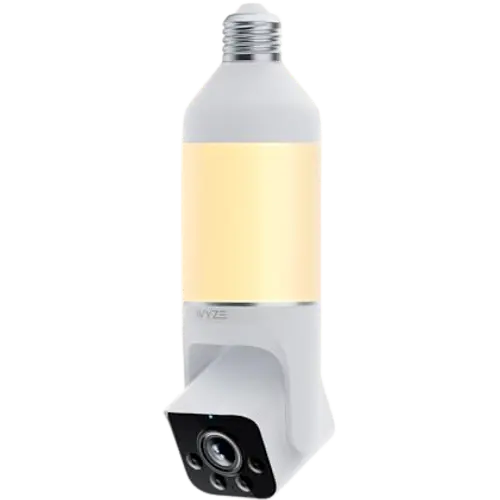
The Wyze Bulb Cam combines a 2K camera with an 800-lumen dimmable LED bulb in a single unit that screws into a standard E26 light socket, so it installs in about five minutes with no wiring or outlet, ideal where you have a light fixture but no power outlet. Owners love the effortless install, the always-on power (no battery to charge as long as the switch stays on), the useful built-in light, the clear daytime 2K picture with a wide 160-degree view, and Wyze's very cheap subscription. The big surprise, and a common complaint, is that it does not rotate remotely: the pan/tilt is manual, so you aim it once physically and it stays there, unlike many other bulb cameras. Color night vision is also weaker than Wyze's older V3, the light does not always obey its schedule, and the subscription tiers are confusing. It works with Alexa, Google Home, Home Assistant and IFTTT, but not HomeKit, and the bulb itself is not a voice-controllable smart bulb. For a cheap, no-wiring camera-plus-light in an existing socket, it is a smart buy, if you do not need remote aiming.
- Light sockets with no nearby outlet
- Cheap camera-plus-light in one
- Wyze ecosystem owners
- Porches, garages and eaves
One camera per entrance you want covered.
Buy on Amazon USACheck pricePros
- Screws into a light socket in about five minutes, no wiring or outlet needed
- Always-on power from the socket, with no battery to charge
- Useful 800-lumen dimmable LED light with scheduling and app control
- Clear daytime 2K video with a wide 160-degree view
- Very cheap subscription and good motion detection with zones
- Two-way audio, siren, and Alexa/Google/Home Assistant/IFTTT support
Cons
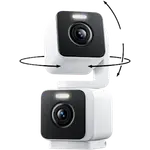
- Pan/tilt is manual only, you cannot rotate it remotely from the app
- Color night vision is washed out and weaker than Wyze's older V3
- Light does not always follow its schedule; occasional live-view flickering
- Confusing multi-tier subscriptions, with pricier hidden levels
- The bulb is not a voice-controllable smart bulb (Wyze app only)
- 2.4GHz Wi-Fi only; no HomeKit or SmartThings
Who is the Wyze Bulb Cam for?
This is a 2K security camera built into a dimmable LED bulb, for people who want a camera and light in one where there is a socket but no outlet. It screws into a standard E26 light socket, shoots 2K HDR with a wide 160-degree view, has color and black-and-white night vision, an 800-lumen dimmable LED, a siren, two-way audio, and motion detection with zones. The pan and tilt are manual (you position it by hand). It draws power from the socket (so it is always on when the switch is on), connects over 2.4GHz Wi-Fi, and records to a microSD card or the cloud with a subscription. It works with Alexa, Google Home, Home Assistant and IFTTT, but not HomeKit or SmartThings. It best suits light fixtures with no nearby outlet, anyone wanting a cheap camera-plus-light, and existing Wyze owners. If you expect remote rotation or strong color night vision, read the caveats first.
What buyers love
Ease of installation is the headline: it screws into an existing light socket like a normal bulb, taking about five minutes with no wiring, no outlet and no cable management, which owners love for porches, garages and eaves where a wired camera would be a hassle. Because it draws power from the socket, it is always on as long as the switch stays on, with no battery to recharge, and Wyze even includes a 'do not turn off' sticker for the switch. The 800-lumen dimmable LED is a genuine plus, doubling as a porch or garage light with adjustable brightness, sunrise-to-sunset scheduling and app on/off control, several owners say they bought it specifically for the light. Daytime 2K video is clear with a wide 160-degree view (better than Wyze's V3 by day), motion detection with zones works well, the speaker and two-way audio are good, and it alerts you if the light is switched off. Wyze's subscription is very cheap (a few dollars a month or around 30 dollars a year with a free trial), it integrates with Alexa, Google and IFTTT, and owners repeatedly call it excellent value at roughly half the cost of rivals.
What to know before you buy
The most common complaint is that it does not rotate remotely: despite the 360-degree pan and 90-degree tilt, aiming is manual, so you set the direction by hand and it stays fixed, you cannot swivel it from the app to check another angle. Many buyers expected auto-rotation like other bulb cameras and were caught out. Color night vision is another letdown: owners find it washed out and dark compared with Wyze's older V3 (one had both installed inches apart), so nighttime color is a weak point even though daytime is excellent. The light does not always obey its schedule for some owners (not turning on or off at the set times), one owner saw the live view flicker until restarting the camera, and the subscription structure is confusing, with several tiers (Cam Plus, Cam Unlimited, Cam Unlimited Pro) that are partly hidden and pricier at the top. Notably, the bulb itself is not a voice-controllable smart bulb, so you cannot control the light through Alexa or Google (only the Wyze app), which some find odd. Audio can lag slightly, and it is 2.4GHz-only with no HomeKit or SmartThings.
Is the Wyze Bulb Cam worth it?
For a cheap, no-wiring way to add both a camera and a light to a spot that has a socket but no outlet, the Wyze Bulb Cam is a clever, high-value buy: five-minute install, always-on power, a useful dimmable light, clear daytime 2K, and one of the cheapest subscriptions around. The key thing to accept is that aiming is manual, this is a fixed-direction camera you position by hand, not a remotely rotating one, so buy it knowing that. Also temper expectations on color night vision, expect some quirks with the light schedule and the confusing subscription tiers, and note the bulb is not voice-controllable. Choose it if you want an easy camera-plus-light in a light fixture and do not need remote rotation; if you want to swivel the view from your phone, strong night color, or HomeKit, look at a pan/tilt or standard outdoor camera instead.
Frequently asked questions
Can I rotate the Bulb Cam from the app?
No, and this is the most common surprise. Despite listing pan and tilt, the aiming is manual: you physically position the camera once and it stays fixed in that direction. You cannot swivel it remotely from the app to peek at another angle, so it behaves like a fixed camera, unlike many rotating bulb cameras.
How does it get power?
It screws into a standard E26 light socket and draws power from there, so it is always on as long as the light switch stays on, with no battery to recharge. Wyze includes a 'do not turn off' sticker for the switch so no one accidentally cuts its power. This makes it ideal where you have a fixture but no outlet.
How good is the night vision?
Daytime 2K is excellent, but color night vision is a weak point: owners find it washed out and dark compared with Wyze's older V3 camera. The built-in 800-lumen light helps illuminate the scene, but if strong nighttime color detail is a priority, this is not its strength.
Do I need a subscription?
You can record locally to a microSD card without one, but cloud recording and smart features use a Wyze subscription, which is cheap (a few dollars a month or around 30 dollars a year, with a free trial). Note the subscription tiers are confusing, with several levels, some partly hidden and more expensive at the top.
Can I control the light with Alexa or Google?
Not the light itself. You control the LED through the Wyze app (brightness, on/off and scheduling), but the bulb is not exposed as a voice-controllable smart bulb, so you cannot switch it via Alexa or Google Home, which some owners find odd. The camera does integrate with Alexa, Google Home, Home Assistant and IFTTT.