

Amazon Echo Show 11 Review: A Bigger, Better-Sounding Kitchen Display With One Nagging Flaw
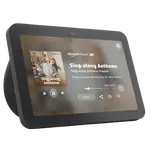
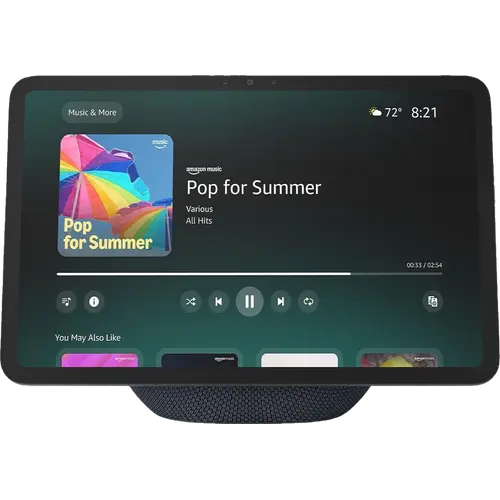
The Echo Show 11 is Amazon's mid-size smart display, an 11-inch Full HD touchscreen built around Alexa+ with a genuinely capable speaker, a 13 MP auto-framing camera and a built-in smart home hub that acts as a Zigbee coordinator, Thread border router and Matter bridge. Owners consistently praise the screen (bright, sharp and readable from across a room), the sound (real bass and enough volume for a medium room, unusual at this size), the far-field microphones that catch a quiet request from the far side of the living room, and a setup so simple it often just inherits your existing Alexa and music accounts. Two caveats matter: a recurring complaint about the touchscreen going unresponsive until the device is rebooted, which recent software updates appear to have improved, and the removal of the opaque sliding camera shutter that earlier Echo Shows had. It is an Alexa-only device with no Google Home, HomeKit or SmartThings support, and it does not wall mount. For an Alexa household that wants one screen for recipes, video calls, photos, family scheduling and smart-home control, it is an easy recommendation, especially on a discount.
- Kitchen and recipe use
- Alexa smart-home households
- Family scheduling and Drop In
- Video calls and photo display
- Elder care and medication reminders
Pros
- Bright, sharp 11-inch Full HD touchscreen that reads well across a room
- Spatial audio with real bass and volume, strong for a display this size
- Far-field microphones catch quiet requests from across the room
- Built-in hub: Zigbee coordinator, Thread border router and Matter bridge
- Wi-Fi 6E on all three bands plus Bluetooth 5.4
- Simple setup that often inherits your existing Alexa and music accounts
- Presence, temperature and ambient light sensing can trigger routines
Cons
- Recurring reports of the touchscreen freezing until rebooted, though updates have helped
- No opaque sliding camera shutter this generation, only the mic and camera off button
- Screen can wake on its own to promote content even with a sleep schedule set
- No wall mounting, and the adjustable stand is a separate purchase
- No Ethernet port, so it relies entirely on Wi-Fi
- Alexa only: no Google Home, Apple HomeKit or SmartThings, and Home Assistant support is partial
- Glass break and smoke or CO alarm sound detection require a subscription
Who is the Echo Show 11 for?
This is the middle child of the Echo Show line, an 11-inch Full HD LCD touchscreen at 1920 x 1200 that sits on a counter or shelf rather than on a wall. It suits an Alexa household that wants a single screen to do several jobs: following recipes hands-free in the kitchen, making video calls through the 13 MP auto-framing camera with 3.3x zoom, running a photo slideshow when idle, holding shared calendars, reminders and lists, and controlling smart-home devices, including pulling up a doorbell or camera feed on demand. It doubles as a hub in its own right, working as a Zigbee coordinator, a Thread border router and a Matter bridge, which means it can host Zigbee and Thread accessories directly instead of needing a separate gateway. Connectivity is current: Wi-Fi 6E across all three bands plus Bluetooth 5.4. Omnisense sensing adds presence detection, an ambient temperature sensor and an ambient light sensor, so routines can fire on someone walking into the room or on the light level changing. Owners also put it to work as a communication hub for busy families and, in more than one case, as a reminder system for an older relative. If you want a wall-mounted panel, or you live in Google Home, HomeKit or SmartThings, this is the wrong device.
What buyers love
The screen and the sound do most of the convincing. Owners upgrading from a 5-inch or 8-inch Echo Show, or from a first-generation model, describe the larger panel as noticeably brighter, sharper and far more relaxing to view, and several specifically value being able to read it from across the room. The audio is the repeated surprise: one owner describes the device as a beefy Amazon speaker with a tablet bolted onto it, and others report clear vocals, real bass and enough volume to fill a medium-sized room, which several rate above standalone Bluetooth speakers they own. Microphone performance draws unusually specific praise, with one owner noting it hears a low-volume request from the other end of the living room better than any Echo speaker they have owned, and responds to commands more reliably. Setup is repeatedly called simple and close to plug-and-play, often picking up an existing music service and Alexa configuration with no work. Beyond media, the use cases owners keep returning to are practical: shared family calendars and announcements that cut down on missed appointments, Drop In between rooms, recipes and weather at a glance, streaming video and YouTube through the browser, a photo display that earns its counter space, and smart-home control that includes viewing a Ring doorbell feed.
What to know before you buy
The most important recurring complaint is the touchscreen. Multiple owners report it becoming unresponsive to touch by the end of the day while still answering voice commands, requiring a reboot from the plug or the Alexa app; one returned the device over it, while another reported that later software updates resolved the freezing and they went back to enjoying it. Treat it as a real risk that appears to be improving rather than a guaranteed fault. The second issue is privacy hardware: this generation drops the opaque sliding camera shutter that earlier Echo Shows carried, leaving the physical microphone and camera enable/disable button plus software controls, which owners who liked flipping a shutter closed in a bedroom find a genuine downgrade. Other friction points: the screen can wake by itself to promote recipes or content even when a sleep schedule is set, Alexa handles one language at a time and defaults to Amazon Music unless you name another service, some owners hit problems grouping it for multi-room music with other Echo devices, and the clock and weather readouts sit small in a corner. One detailed owner also found the speaker a step back from the previous Echo Show 8 at maximum volume, with buzzier highs, and disliked the hardware buttons being moved to the side. Note too that it does not wall mount and there is no Ethernet port, so it depends entirely on Wi-Fi, and the adjustable stand accessory that improves the viewing angle is a separate purchase at around 40 dollars. Sound-based glass break and smoke or CO alarm detection require a subscription.
Is the Echo Show 11 worth it?
For an Alexa household, yes, particularly on a discount, where owners describe it as strong value for what it replaces: a kitchen screen, a decent speaker, a video-calling device, a digital photo frame and a smart-home hub in one unit. The screen size hits a useful middle ground, big enough to read a recipe or watch a show from a few feet away without dominating a room the way the 15-inch and 21-inch models do, and the built-in Zigbee, Thread and Matter hub genuinely removes a box from the setup for anyone starting a smart home. Go in with clear expectations on three things. Alexa+ is good for everyday tasks like timers, weather, music and device control but is not a research assistant, and it can be slow to actuate some devices. The touchscreen freezing reports are real, even if updates appear to be fixing them. And the privacy hardware is a step back from earlier models. If you need wall mounting, Ethernet, a physical camera shutter, or you are invested in Google Home, HomeKit or SmartThings, look elsewhere; otherwise this is the Echo Show most people should buy.
Frequently asked questions
Does the Echo Show 11 have a camera shutter?
Not a sliding opaque one. This generation drops the physical shutter that earlier Echo Shows had and instead gives you a physical button that disables the microphones and camera, plus camera controls on the device and in the Alexa app. Owners who specifically wanted a physical cover over the lens consider this a downgrade and cover it themselves.
Does the Echo Show 11 work as a smart home hub?
Yes, and this is one of its strongest features. It is a Zigbee coordinator, a Thread border router and a Matter bridge, so it can create and manage a Zigbee network, connect Thread accessories to your home network, and expose devices to Matter platforms without a separate gateway. That removes the need for a standalone hub in many setups.
Does it work with Google Home, Apple HomeKit or SmartThings?
No. The Echo Show 11 is an Alexa device and does not support Google Home, Apple HomeKit or Samsung SmartThings. Home Assistant support is partial rather than native, so if your home runs on one of those other platforms this is not the display for you.
Can the Echo Show 11 be wall mounted?
No. Unlike the Echo Show 15 and Echo Show 21, this model is designed to sit on a counter, shelf or nightstand. Amazon sells an adjustable stand accessory separately at around 40 dollars that lets you swivel and tilt it for a better viewing angle, which several owners feel should have been included.
Why do some owners report the touchscreen freezing?
Several owners found the screen stopped responding to touch by the end of the day while still accepting voice commands, and had to reboot by unplugging it or restarting from the Alexa app. It appears to be a software issue, and at least one owner reported that later updates fixed it for them, so check that your device is up to date if you hit it.
Does the Echo Show 11 need a subscription?
Not for the core experience. The display, voice control, video calls, smart home control and hub functions all work without one. A subscription is required for sound-based alerts such as detecting glass breaking or a smoke or CO alarm sounding, and Alexa will prompt for a music subscription if you skip past a certain number of songs.