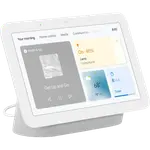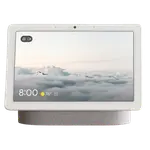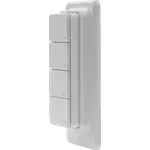


Shelly Wall Display XL Review: A Premium 10.1-Inch Wall Panel Held Back by Its Processor
The Shelly Wall Display XL is a 10.1 inch in-wall control panel that drops into a standard wall box and replaces a switch, with a 5A relay behind it so it can still switch the light it took the place of. Inside the Shelly ecosystem owners describe it as quick, clear and genuinely premium, and the XL format finally makes a whole-home dashboard readable from across the room. The recurring complaint is performance: many owners bought it as a Home Assistant panel and found dashboards slow to load and navigation laggy, with several returning it and saying a cheap Android tablet does that job better for less. Buy it if your home is built on Shelly devices and you want a proper wall control panel; if the plan is a fast Home Assistant dashboard above all, weigh the performance reports first.
- Shelly households
- Whole-home wall control
- Retrofits into a standard wall box
- In-wall appliance switching
Pros
- Large 10.1 inch colour touchscreen at 1280 x 752 with 5-point capacitive touch
- Premium build and finish, readable from across a room
- Quick and coherent when it is driving Shelly devices
- Fits a standard wall box, so it retrofits cleanly into older homes
- Built-in 5A relay keeps switching the circuit it replaced
- Four customizable buttons, with volume and media controls by default
- Wi-Fi 6 on 2.4 and 5 GHz plus Bluetooth 5.4 for speakers
- Renders Home Assistant dashboards, and its own control bar can be hidden
- Proximity sensor wakes the screen and a lux sensor can drive automations
Cons
- Owners repeatedly report slow dashboard loading and laggy navigation, several returning it
- Some units drop off Wi-Fi and freeze until they are restarted
- The native interface is described as unfinished by some owners, with devices vanishing during setup
- The Wi-Fi privacy MAC cannot be disabled, complicating static IPs and MAC-based firewall rules
- No temperature or humidity sensor, unlike the smaller Wall Display
- No Alexa, Google Home, Apple HomeKit or SmartThings support
- No camera and no built-in voice assistant
- Requires a neutral wire and proper electrical installation
- Expensive next to a tablet doing a similar job
Who is the Shelly Wall Display XL for?
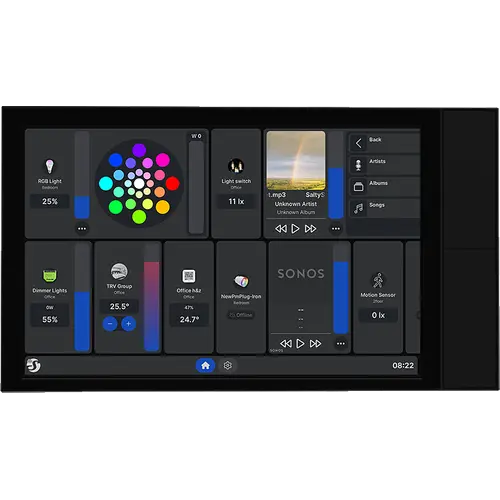
This is the large version of Shelly's in-wall control panel: a 10.1 inch colour touchscreen at 1280 x 752 pixels, with 5-point capacitive touch, that installs in a standard electrical wall box in place of a switch or socket. Behind the glass sits a 5A relay, so the panel keeps switching whatever the old switch controlled, and four customizable hardware buttons run volume and media controls by default and can be reassigned to devices, groups and scenes. It joins the network over Wi-Fi 6 on both 2.4 and 5 GHz and carries Bluetooth 5.4 for speakers, a lux sensor for brightness-driven automations and a proximity sensor that wakes the screen when somebody walks up to it. There is no camera and no built-in voice assistant, and unlike the smaller Wall Display it carries no temperature or humidity sensor, so climate automations read from separate Shelly sensors. It suits a Shelly-based home that wants one wall panel for the whole house, an older property being retrofitted a room at a time, and anyone who wants an in-wall screen that still doubles as a light switch.
What owners like
Build quality is the most consistent praise: owners call it high-quality and good looking, and the XL format is what several of them were waiting for after finding the smaller Wall Display too cramped to drive a whole house. Inside Shelly's own environment it is described as fast, clear and intuitive, showing the state of every device at a glance. The fact that it fits a normal wall box turns out to matter more than the spec sheet suggests: one owner modernising an older house calls it the piece that finally made the installation feel finished, and the integrated relay means the panel replaces a switch instead of sitting beside one. Home Assistant users are represented on the positive side too: the panel renders HA dashboards, its own control bar can be hidden so the screen shows only Home Assistant, and owners running mixed setups like being able to drive non-Shelly gear from the same wall. The two 2 W speakers, the four assignable buttons and the automatic screen wake round out the day-to-day experience.
What to know before you buy
The dominant theme in the reviews is speed. Owners who bought the panel primarily as a Home Assistant dashboard repeatedly report that pages take a long time to load, taps register late and menus hang, and several returned it, with more than one concluding that an Android tablet or an old iPad in kiosk mode does the same job faster for a fraction of the money. Wi-Fi stability comes up next: some units drop off the network while everything else in the same spot stays online, and freeze until they are restarted. A few owners also describe the native Shelly interface as unfinished, one of them going through repeated factory resets while paired devices vanished as new ones were added and the internet radio stopped on its own. There are two networking limits worth knowing if you run a managed LAN: the Wi-Fi privacy MAC cannot be turned off, which makes static IP reservations and MAC-based firewall rules awkward, and with local authentication left disabled the device API can hand out configuration details, including the MQTT password, to anyone on the same network. Practical constraints: a neutral wire is required, the install is real electrical work, and the panel carries only a two-year warranty. On the ecosystem side, this is the narrowest part of the product: Shelly's own documentation lists no Amazon Alexa, Google Smart Home or Samsung SmartThings capabilities for this panel, and there is no Apple HomeKit path either, so control comes from the Shelly Smart Control app and Home Assistant.
Is the Shelly Wall Display XL worth it?
It depends almost entirely on what you plan to put on the screen. As a Shelly control panel it delivers what it promises: a premium, large, wall-flush screen that switches its own circuit, reads clearly from a distance and pulls a Shelly home together in one place, which is why the owners who stayed inside that ecosystem rate it highly. As a general-purpose Home Assistant dashboard it is a harder sell at this price, because the processor is the bottleneck several owners ran into and a much cheaper tablet sidesteps it. There is also an ecosystem cost to weigh, since the panel skips the mainstream voice platforms entirely. If your devices are Shelly, you want a switch replacement rather than a tablet on a stand, and you can live with a spec sheet that leaves out temperature and humidity sensing, it is a genuinely attractive piece of hardware; otherwise the money buys a smoother experience elsewhere.
Frequently asked questions
Does the Shelly Wall Display XL work with Home Assistant?
Yes. Shelly lists Home Assistant integration among the panel's key features, the display is discovered by HA, and the Shelly control bar can be hidden so the screen shows only your Home Assistant dashboard. The caveat owners raise most often is speed: dashboards can take a long time to load and navigation lags, and several owners bought a tablet instead for that reason.
Does it work with Alexa, Google Home, Apple HomeKit or SmartThings?
No. Shelly's own knowledge base lists this panel's Amazon Alexa capabilities, Google Smart Home traits and Samsung SmartThings capabilities as N/A, where its relays and sensors list them as supported, and no Apple Home path is documented for it. Control comes from the Shelly Smart Control app, from Home Assistant, or over MQTT and webhooks.
Does the Wall Display XL measure temperature and humidity?
No. Shelly's spec sheet marks the internal temperature sensor, the ambient temperature sensor and the humidity sensor as absent on this model, which is a difference from the smaller 4 inch Wall Display. What it does carry is a lux sensor, a proximity sensor with a range of about a metre and a four-microphone array, so climate automations have to read from separate Shelly sensors.
What does installing it involve?
It goes into a standard electrical wall box in place of an existing switch or socket, wired to live, neutral, a switch input and the relay output, so a neutral wire has to be present at that point. The relay is rated 5A, which is what lets the panel keep controlling the light or appliance that was on the old switch. This is mains wiring, so treat it as an electrician's job.
Does it have a camera or a built-in voice assistant?
No. There is no camera on the panel and no built-in voice assistant, so it cannot be used for video calls or answer spoken commands on its own. It does have a four-microphone array and two 2 W speakers, which drive audio playback and media control rather than a voice agent.