Sonoff NSPanel Pro Gen2 Review: The Wall Panel That Finally Runs Home Assistant Properly
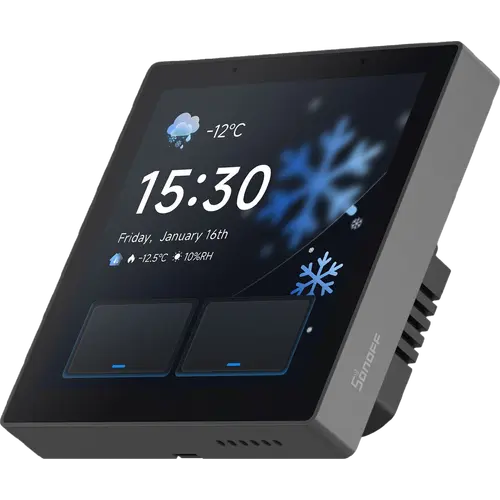
The Sonoff NSPanel Pro Gen2 is a 3.95-inch in-wall control panel that does three jobs at once: it replaces a 2-gang wall switch with two 5A relays, hosts a Zigbee 3.0 network on a Silicon Labs EFR32MG24 coordinator, and bridges those devices into Apple Home, Google Home, Alexa and SmartThings over its built-in Matter bridge. Its real draw is Home Assistant: with 2GB of RAM and 32GB of storage it installs the Home Assistant app from F-Droid with no root and runs as an always-on wall dashboard, and owners upgrading from the first-generation NSPanel Pro describe a clear jump in fluidity. The trade-offs are software rather than hardware: the eWeLink app buries important settings, complex dashboards still load more slowly than on a phone, and installation wants a deep back box. For a Home Assistant or Sonoff household that wants a switch, a Zigbee hub and a wall dashboard in one flush-mounted unit, it earns its premium tier.
- Home Assistant households
- Retrofitting a 2-gang wall switch
- A wall dashboard and Zigbee hub in one
- Existing Sonoff and eWeLink setups
Pros
- Two built-in relays switch a 2-gang circuit directly, no extra modules needed
- Runs the Home Assistant app from F-Droid with no root, as an always-on wall dashboard
- Zigbee 3.0 coordinator adopts existing devices and can replace a separate USB stick
- Matter bridge publishes its devices to Apple Home, Google Home, Alexa and SmartThings
- Clearly faster than the first-generation NSPanel Pro
- Dual-band Wi-Fi, with 5 GHz keeping the connection stable
- Proximity sensor wakes the screen as you approach it
- Solid build that sits cleanly in a standard wall box
Cons
- Home Assistant dashboards still load more slowly than on a phone, and some owners found the interface laggy
- The eWeLink app buries key settings, and some promised modes are hard to find
- Reports of repeated Wi-Fi dropouts, fixed by a firmware update on at least one unit
- Needs a deep back box, and the supplied screws do not fit a UK pattress
- No USB port to power it for configuration before it is wired to mains
- Relays are on/off only, with no dimming, and no internal battery to ride out a power cut
- No temperature or humidity sensor of its own, so the thermostat relies on paired Zigbee sensors
- Premium price, and hard to justify without an existing smart home to control
Who is the NSPanel Pro Gen2 for?
This is an 86-type in-wall panel, so it goes where a light switch already is and runs on the wiring that is already there. Behind the 3.95-inch capacitive touchscreen sit two relays rated 5A per gang and 10A in total, which means it can switch two lighting circuits on its own rather than only commanding other smart devices. It is also a Zigbee 3.0 gateway on a Silicon Labs EFR32MG24 chip, so it hosts sensors, switches and bulbs without a separate hub, and its Matter bridge republishes them to Apple Home, Google Home, Alexa and SmartThings. Underneath it is an Android machine with a quad-core ARM Cortex-A35 processor, 2GB of RAM and 32GB of storage, which is what makes the Home Assistant angle work: the app installs from F-Droid without rooting anything and can be set as the launcher. Dual-band Wi-Fi covers both 2.4 GHz and 5 GHz, and a proximity sensor wakes the display as you walk up to it. What it is not is a media or communications device: there is no camera, no on-device assistant, and no temperature or humidity sensing of its own, so the thermostat screens read from paired Zigbee sensors. It suits people who already run a smart home and want one flush-mounted surface to drive it.
What buyers love
The consolidation is the headline. Owners describe the panel replacing a wall switch, a Zigbee coordinator and an ageing tablet all at once, with several retiring the Zigbee USB stick from their server because the built-in coordinator adopted their existing sensors and lamps without complaint. Home Assistant is the use case people bought it for and the one they rate highest: installing the app from F-Droid is described as easy, it can be set as the default launcher for an always-on dashboard, and the Matter bridge pulls the panel and its Zigbee devices into other ecosystems alongside it. Owners coming from the first-generation NSPanel Pro single out the speed increase as the fix that generation needed most. The two integrated relays get consistent praise for letting a classic light circuit be switched from the panel itself, which is what makes it a genuine switch replacement rather than an accessory. Build quality lands well too: a matte finish, a frame that sits cleanly in a standard box, precise touch response and enough brightness for daytime. The proximity wake is a small thing owners keep mentioning, and one notes that 5 GHz Wi-Fi support keeps the connection noticeably more stable.
What to know before you buy
Performance is the split verdict. Some owners find the interface fluid and apps quick to switch, while others report that Home Assistant Lovelace dashboards load more slowly than on a phone, and a couple returned the panel over lag on even a simple dashboard. It is a real improvement on the previous generation, but it is still a wall panel and not a tablet. The eWeLink app draws the sharpest criticism: the setting that decouples the two relays is buried, at least one owner could not find the roller-shutter mode the app is supposed to offer, and another felt there were too few options overall. Connectivity had a rough launch, with reports of repeated Wi-Fi dropouts, though one owner confirms a firmware update fixed it on their unit. There are practical installation notes worth planning for: it wants a deep flush-mounted box and only squeezes into a round one, the supplied screws do not match a UK pattress, and there is no USB port to power it for configuration before it is wired to mains. The relays are on/off only with no dimming, one owner reported them not yet exposed to Home Assistant, and there is no internal battery, so a power cut takes the panel with it. Finally, the proximity wake occasionally shows a blank screen until tapped, and screen brightness and do-not-disturb cannot be driven from an automation.
Is the NSPanel Pro Gen2 worth it?
It sits at the premium end for a wall panel, and whether that lands depends entirely on how much smart home you already own. Owners with a populated setup describe it as a genuine command centre, while one with only a couple of connected devices found it closer to a gadget, since most of what it can do needs something to talk to. If you run Home Assistant, the value is easy to see: an always-on dashboard, a Zigbee coordinator and a two-gang switch in the footprint of the switch you were replacing, with the Matter bridge keeping Apple Home, Google Home, Alexa and SmartThings in the loop. Go in expecting the software to be the weaker half. The app is clumsy, complex dashboards will not feel phone-fast, and the first-run setup takes patience. If you want a large, fast screen for media and video calls, this is the wrong shape of product; if you want the wiring, the hub and the dashboard collapsed into one plate on the wall, it is the most complete version Sonoff has shipped.
Frequently asked questions
Does the NSPanel Pro Gen2 run Home Assistant?
Yes, and it is the main reason people buy it. The panel runs Android on a quad-core processor with 2GB of RAM and 32GB of storage, and the Home Assistant app installs from the preloaded F-Droid store with no rooting required. Owners set it as the default launcher to get an always-on wall dashboard. Expect complex Lovelace dashboards to load more slowly than they do on a phone, which is the most common complaint, although it is a clear improvement on the first-generation panel.
Can it replace a normal light switch?
Yes. Unlike the first-generation NSPanel Pro, this model has two integrated relays rated 5A per gang and 10A in total for resistive loads, so it directly switches two lighting circuits in place of a 2-gang wall switch. It fits a standard 86-type back box on the existing wiring. The relays are on/off only, so there is no dimming, and installers should plan for a deep back box because the body is 39.5 mm front to back.
Does it work as a Zigbee hub?
Yes. A Silicon Labs EFR32MG24 radio gives it a full Zigbee 3.0 gateway that hosts sensors, switches and lights without any extra hardware, and owners report it taking over devices from an existing setup cleanly. Sonoff also makes the Zigbee mode switchable, so the panel can instead join an existing network as a Zigbee router and extend its range rather than hosting the network itself.
Which smart home platforms does it work with?
The built-in Matter bridge publishes the panel and the Zigbee and Wi-Fi devices behind it to Apple Home, Google Home, Alexa and SmartThings, so the relays and paired accessories can be controlled and voice commanded from any of them. Home Assistant is supported twice over: through that same bridge, and by running the Home Assistant app on the screen itself.
Does it have a built-in voice assistant or a camera?
Neither. The panel has a 1.5W speaker and a dual-array digital microphone, but those handle intercom calls and audible notifications rather than hosting an assistant on the device, and voice control of its relays runs through a separate smart speaker. There is no camera in the bezel either, though the panel can display feeds from Sonoff and RTSP-compatible cameras. The only sensors on board are an ambient light sensor for automatic brightness and a proximity sensor that wakes the screen.