




SwitchBot Smart E-Ink Home Dashboard Review: A Low-Power Weather and Calendar Panel That Needs Polish
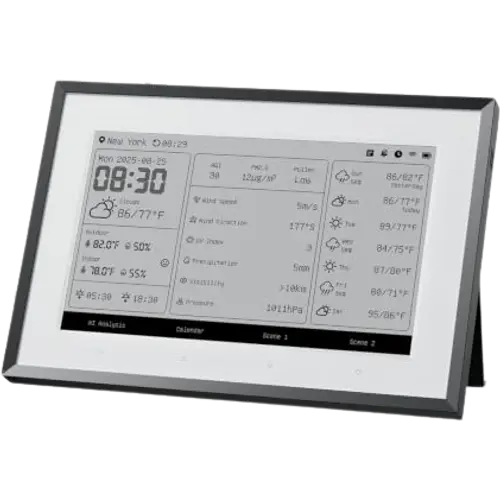
The SwitchBot Smart E-Ink Home Dashboard is a 7.5-inch E-Ink panel that shows weather, indoor and outdoor temperature and humidity, and your calendars at a glance, with the low-power, no-blue-light appeal of e-paper (charge it about once a year). Owners love the restful, always-available display, the easy calendar sync (Google, iCloud, Outlook, Yahoo), the SwitchBot ecosystem integration (showing sensor data and offering two customizable shortcut buttons to control devices, IR appliances or scenes in one tap), and how it acts as a modern family command center without unlocking a phone. But it is an early product with real rough edges that pull its rating down: the screen is very dim without external light and glossy enough to reflect glare, response is slow with the whole display flashing on updates, setup is confusing (even switching Celsius to Fahrenheit is obtuse), the main screen only shows internet weather (external sensors are relegated to a secondary screen), calendars refresh only once a day, and early firmware was flaky. It needs a SwitchBot Hub for full functionality, and Alexa only sees its temperature. For a low-power, at-a-glance weather and calendar display in the SwitchBot ecosystem, it is promising, but not yet polished.
- Low-power at-a-glance weather and calendar
- SwitchBot ecosystem owners
- Bedside or desk displays with no blue light
- Family calendar command center
Pros
- Very low power E-Ink: charge about once a year, no blue light
- Easy calendar sync (Google, iCloud, Outlook, Yahoo) at a glance
- SwitchBot integration: shows sensor data and two shortcut buttons for one-tap control
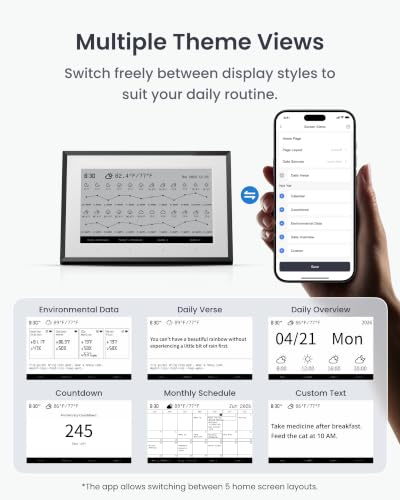
- Up to four customizable views, alarms, and a tap-to-light front light
- Discreet, elegant design; wall or desk mounting
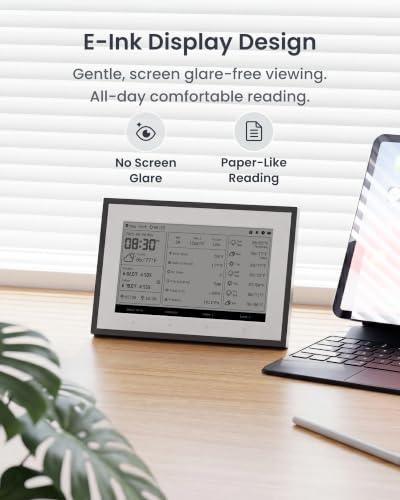
- Restful, paper-like reading that avoids a bright tablet screen
Cons
- Very dim without external light; front light only stays on a few seconds
- Glossy screen reflects glare, hard to read even with the backlight
- Slow E-Ink response with a full-screen flash on updates
- Confusing setup (even Celsius-to-Fahrenheit is obtuse)
- Main screen shows only internet weather; external sensors on a secondary screen
- Calendars refresh once a day; early firmware flaky; needs a SwitchBot Hub for full features
Who is the E-Ink Home Dashboard for?
This is a 7.5-inch E-Ink (electronic paper) home dashboard that shows weather, indoor and outdoor temperature and humidity, and synced calendars. It has built-in temperature and humidity sensors, a front light for low-light reading, up to four customizable screen views, alarms and alerts, and two shortcut buttons to trigger SwitchBot devices, IR appliances or scenes. It connects over 2.4GHz Wi-Fi and Bluetooth, mounts on a wall or a desk stand, and works within the SwitchBot ecosystem (a SwitchBot Hub is needed for full integration, and via the hub it ties into Google Home, Alexa, HomeKit and SmartThings). It has no touchscreen, no color, no voice assistant and no camera. It best suits people wanting a low-power, always-on weather and calendar display with no blue light, SwitchBot owners, and a bedside or desk information panel. If you need a bright, responsive, or reflection-free screen, or accurate local sensor data on the main view, read the caveats first.
What buyers love
The E-Ink appeal is the draw: it sips power (owners charge it roughly once a year), emits no blue light so it is easy on the eyes at night, and reads like paper. When lit well it is crisp and packs in a lot, weather, indoor and outdoor temperature and humidity, and calendars, and owners love checking it multiple times a day without unlocking a phone. Calendar integration is a highlight, syncing Google, iCloud, Outlook and Yahoo easily to show one to three days of schedule (a genuine family command-center feel). Within the SwitchBot ecosystem it does more: it can display data from SwitchBot sensors, and its two customizable shortcut buttons control SwitchBot devices, IR appliances or scenes in one tap (for example opening blinds) with no voice or phone needed, while its internal sensor can trigger SwitchBot automations. Owners appreciate the up-to-four customizable views (weather, calendar, countdown, environmental data, schedules, custom), alarms and do-not-disturb, the tap-to-light front light for night reading, the wall or desk mounting, and the discreet, elegant look. Several find it reads well from many angles with no glare and call it a well-thought-out, low-key smart-home dashboard.
What to know before you buy
This is an early product with rough edges that explain the mixed rating. The screen is very dim without external light, hard to read unless you are close or use the front light, and the front light only stays on for a few seconds (owners want it to last longer). The glossy panel also reflects glare, which some find hard to read even with the backlight on. As E-Ink, it is slow to respond, with the whole display flashing on updates and interactions largely done through the app rather than the device. Setup is confusing and inconsistent: buttons are unlabeled, the app and device can fall out of sync, and even switching Celsius to Fahrenheit is obtuse (you change it in your app user profile and then hold an undocumented button on the device). Screen customization is limited, and importantly the main screen only shows internet weather, external SwitchBot sensors are relegated to a secondary screen, which disappointed buyers who wanted accurate local readings up front. Calendars refresh only once a day unless you force an update, early firmware was flaky (update to 2.0 or higher first, which can take several tries), and at least one unit stopped connecting after a few minutes. It needs a SwitchBot Hub for full functionality, and Alexa only sees its temperature (not usable in weather routines), though Google Home exposes temperature and humidity for automations.
Is the E-Ink Home Dashboard worth it?
As a low-power, always-on weather and calendar display that spares you a bright tablet screen and blue light, the SwitchBot E-Ink Home Dashboard is a promising, genuinely useful idea, and SwitchBot owners get the bonus of shortcut buttons and sensor integration. But it is not yet polished: the dim, glossy screen is hard to read without good light, response is slow, setup is fiddly, the main view shows only internet weather rather than your local sensors, and the software is still catching up (update the firmware first). SwitchBot is known for improving via updates, so it may get better. Buy it if you want a low-power, eye-friendly at-a-glance dashboard and calendar and are in the SwitchBot ecosystem, and can tolerate the current quirks; if you need a bright, responsive, reflection-free display or accurate local sensor data front and center today, wait for it to mature or choose a different panel.
Frequently asked questions
How long does the battery last?
A long time, thanks to E-Ink. Owners report charging it roughly once a year, since e-paper only draws power when the display changes. That makes it well suited to a bedside table, desk, RV or office where you do not want to recharge or plug in constantly.
Is the screen easy to read?
It depends on lighting. In good ambient light it is crisp and clear, but it is very dim without external light and can be hard to read unless you are close or use the front light, which only stays on for a few seconds. The glossy surface also reflects glare, which some find bothersome even with the backlight on.
Can it show my local sensor data instead of internet weather?
Only partly, and this disappoints some buyers. The main screen shows internet-based outdoor weather, which can be inaccurate, and connected SwitchBot external sensors can only be displayed on a secondary screen, not the primary view. If you bought it mainly for accurate local readings up front, that is a limitation.
Which calendars and platforms does it support?
It syncs Google, iCloud, Outlook and Yahoo calendars (shown under a schedule view), though they refresh only once a day unless you force an update. For smart-home use it needs a SwitchBot Hub; via the hub it works with Google Home, Alexa, HomeKit and SmartThings, but Alexa only sees its temperature, while Google Home exposes temperature and humidity for automations.
Is the software polished?
Not yet. Owners describe confusing, inconsistent setup, unlabeled buttons, app-and-device sync issues, and limited screen customization, and early firmware was flaky (update to version 2.0 or higher first, which can take a few attempts). SwitchBot typically improves its products through updates, so expect it to get better over time.