



Aqara Smart Lock U100 Review: A Feature-Packed Apple Home Key Deadbolt That Needs a Hub to Shine
The Aqara Smart Lock U100 is a genuinely feature-packed deadbolt, and owners, especially iPhone users, love how many ways it lets them in: a fast, accurate fingerprint reader, Apple Home Key via iPhone or Apple Watch, NFC cards, a keypad passcode, a physical key, and Bluetooth. It works with Apple HomeKit and Home Assistant natively and is often the most affordable lock that combines Home Key with fingerprint and physical keys. The fingerprint sensor draws consistent praise for being roughly one-second fast and reliable, and installation on an existing deadbolt is mostly straightforward. The catches are worth understanding: without an Aqara hub the lock only works over Bluetooth (with a short connection delay), so remote access, logs, and Alexa/Google/Matter/IFTTT all require buying a hub, and Apple Home Key only works on one phone unless you also have an Apple home hub to share your Home. Build quality is the biggest concern, a minority of buyers report defective units, random beeping, locking loops, or early low-battery warnings, and customer support gets mixed reviews. When you get a good unit and pair it with a hub, owners are very happy; just budget for the hub and know it is best suited to Apple households.
- iPhone and Apple Watch households
- Apple HomeKit and Home Assistant users
- Keyless entry with many unlock options
- Replacing an existing deadbolt
Pros
- Many unlock options: fingerprint, Apple Home Key, NFC, keypad, Bluetooth and physical key
- Fast, accurate fingerprint reader
- Native Apple HomeKit and Home Assistant support
- Mostly straightforward install on an existing deadbolt
- Temporary and per-person passcodes for guests
- Strong value for a Home Key lock, with a physical-key backup
Cons
- Needs an Aqara hub for remote access, logs, and Alexa/Google/Matter/IFTTT
- Apple Home Key works on only one phone without an Apple home hub
- Build quality is hit or miss; some defective units and mixed support
- Bluetooth-only connection (with delay) if you don't add a hub
- Tiny, fiddly rear battery-cover screws and limited color options
Who is the Aqara U100 for?
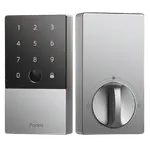
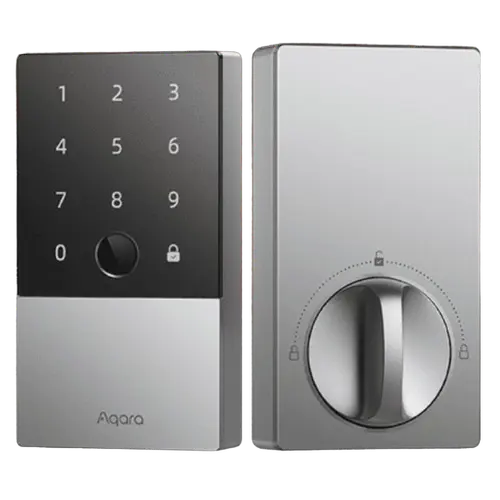
This is a keyless smart deadbolt aimed at people who want lots of unlock options and native Apple HomeKit support. It offers a fingerprint reader, Apple Home Key (tap your iPhone or Apple Watch), NFC cards, a keypad passcode, Bluetooth, and a physical key backup, and it works with Apple HomeKit and Home Assistant. It runs on 4 AA batteries (rated around 8 months, with a USB port for emergency power) and is IP65 weatherproof. It best suits iPhone and Apple Watch households, HomeKit and Home Assistant users, anyone who wants multiple ways to get in, and those replacing an existing deadbolt. If you use Android and want Google or Alexa control, or you want remote access, be aware you will need an Aqara hub.
What buyers love
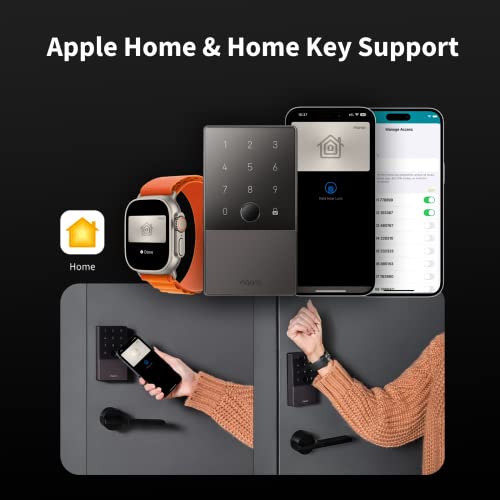
The standout is the sheer number of ways to unlock, which owners call very convenient for mixed households: fingerprint, a 6-digit passcode, NFC cards, a physical key, Apple Home Key, and Bluetooth. The fingerprint reader gets the most praise, described as fast (about a second) and accurate, with one owner rating it 99 out of 100 against an Ultraloq. Apple integration is a major draw: HomeKit setup via the QR code is quick, and tapping an iPhone or Apple Watch to unlock (Home Key and NFC) is a favorite feature, especially handy when your hands are full. It also works with Home Assistant natively, which several buyers specifically chose it for. Installation on an existing deadbolt is mostly straightforward, and the Aqara app is easy to follow. Owners value the temporary and per-person passcodes for guests, cleaners, or elderly family, the physical-key backup if the battery dies, and the ability to auto-lock at night via automation. Many also see it as strong value, often the cheapest Home Key lock with this feature set, and several liked it enough to buy a second or third unit.
What to know before you buy
The main thing to understand is that you will likely want an Aqara hub. Without one, the lock only connects over Bluetooth (with a few seconds of delay), so remote access, activity logs, and Alexa, Google, Matter and IFTTT support all require adding a hub, and the cheaper hubs need a 2.4GHz Wi-Fi network. Apple Home Key also works on only one phone unless you have an Apple home hub (Apple TV or HomePod) to share your Home to another device, a limitation owners feel Aqara does not advertise clearly. The other concern is build quality, which appears hit or miss: while many units work flawlessly, a minority report defects such as an endless locking loop, random beeping, a glitching keypad, defective striker screws, or a low-battery alert after only a few weeks, and some found customer support unhelpful. Smaller notes: the rear battery-cover screws are tiny and fiddly, initial setup can be time-consuming, the color options can be hard to match to existing hardware, and battery life runs in the several-month range. Buying from a reputable seller and testing thoroughly on arrival is wise.
Is the Aqara U100 worth it?
For an iPhone or Apple Watch household, the Aqara Smart Lock U100 is a compelling, well-priced deadbolt: a fast and accurate fingerprint reader, Apple Home Key, NFC, a keypad and a physical key, plus native HomeKit and Home Assistant support and handy guest passcodes. The trade-offs are real, you will probably want an Aqara hub for remote access and full smart-home control, Apple Home Key on multiple phones needs an Apple home hub, and build quality is somewhat hit or miss with variable support. If you are an Apple user willing to add a hub, most owners are very happy and buy more than one; if you are on Android, want out-of-the-box remote control without a hub, or need guaranteed rock-solid reliability, weigh a Wi-Fi lock or a pricier alternative first.
Frequently asked questions
Do I need an Aqara hub?
For basic use, no, the lock connects over Bluetooth and even pairs with Apple Home so an Apple Watch can unlock it. But without an Aqara hub you have no remote access and no activity logs, and Alexa, Google, Matter and IFTTT only arrive once the hub is added; Bluetooth also has a short connection delay. Most owners end up adding a hub, and the cheaper models need 2.4GHz Wi-Fi.
How well does Apple Home Key work?
Very well on a single phone, tapping an iPhone or Apple Watch unlocks quickly, and HomeKit setup via the QR code is fast. The catch is that Home Key only works on one device unless you also have an Apple home hub (Apple TV or HomePod) to share your Apple Home to another person's phone, which owners note is not clearly advertised.
Is the fingerprint reader reliable?
Yes, it is one of the most praised features. Owners describe it as fast (around a second) and accurate, working reliably with dry fingers, with one rating it 99 out of 100 versus an Ultraloq. A few owners see occasional misreads, and enrolling your print at a realistic angle with the door closed helps accuracy.
How is the build quality and reliability?
It is hit or miss. Many units work flawlessly for a year or more, but a minority of owners report defects such as an endless locking loop, random beeping, a glitching keypad, or an early low-battery alert, and some found support unhelpful. Test the lock thoroughly on arrival and buy from a seller with an easy return or replacement policy.
What powers it and is there a backup?
It runs on 4 AA batteries, rated around 8 months, with plenty of low-battery warning, and it has a physical key as a backup if the batteries die. There is also a USB port for emergency power. Some owners use lithium AAs hoping for longer life between changes.