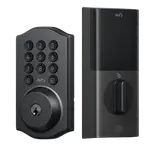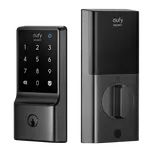




eufy Smart Lock C30 Review: A Simple, Reliable Keypad Deadbolt With Built-in Wi-Fi (Mind the Battery)
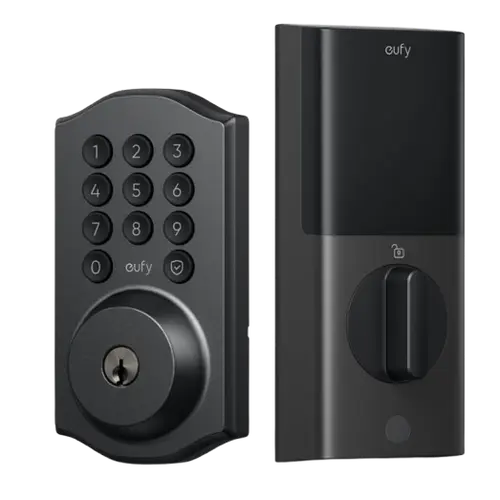
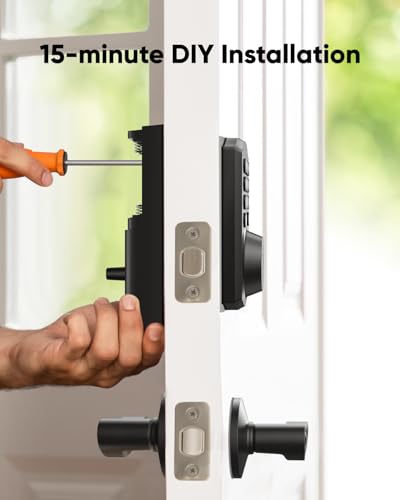
The eufy Smart Lock C30 is the simple, keypad-only deadbolt in eufy's lineup: no fingerprint, but built-in Wi-Fi (no bridge needed), remote lock/unlock, per-user codes and scheduled auto-lock, at a budget-friendly price. Owners love the everyday convenience, entering with a code instead of keys, unlocking remotely from the car for groceries or letting in a house sitter from another city, and having the door lock itself on a schedule so it's never left open (one popular review credits it with ending arguments over a forgotten front door). Installation is easy (about 30 minutes with a screwdriver, occasionally chiseling the jamb for the sturdier bolt), the app is well built and stays reliably connected for most, it integrates with Alexa and Google, and it looks sleek with a responsive backlit keypad and an anti-peep scramble-code feature. The clear downside is battery life: it uses 4 AA cells and many owners replace them every couple of months, even with lithium, and the app doesn't show an exact battery percentage (only a low warning), so it's less ideal for a rarely-visited property unless you carry the physical key. A minority also hit reliability issues around six months (going offline, keypad not accepting the PIN). For a dependable, affordable keypad deadbolt on Alexa or Google, it's a strong value, just keep an eye on the batteries.
- Budget keypad keyless entry
- Homes without a smart-home hub
- Scheduled nightly auto-lock
- Alexa or Google Home users
Pros
- Convenient keypad entry with no-bridge built-in Wi-Fi
- Remote lock/unlock and status from anywhere
- Excellent scheduled and automatic locking
- Per-user codes, access logs, and an anti-peep scramble code
- Easy install, sleek look, and reliable Wi-Fi for most
- Physical-key backup with clear low-battery warnings, at a budget price
Cons
- Short AA battery life; frequent replacements even with lithium
- App shows only a low-battery warning, not an exact percentage
- No fingerprint reader (keypad only)
- Each lock's key can't easily be rekeyed to match your others
- A minority report offline/keypad issues after ~6 months; no HomeKit/Matter
Who is the eufy C30 for?
This is the entry-level, keypad-only eufy deadbolt (no fingerprint). It unlocks via a keypad passcode, the app remotely, and a physical key, with built-in Wi-Fi that needs no bridge, auto-lock and scheduling, per-user codes and an anti-peep code option. It works with Alexa and Google Home and runs on 4 AA batteries. It best suits budget-minded buyers who want keypad keyless entry, homes without a smart-home hub, households that want scheduled nightly locking, and Alexa or Google users. It has no fingerprint reader, no Apple HomeKit or Matter, and no camera, so if you want biometrics or Apple/Matter support, or long unattended battery life, read the caveats first.
What buyers love
The core appeal is simple convenience with real smart features. Keypad entry means no fumbling for keys, and built-in Wi-Fi (no bridge) lets owners lock and unlock remotely, from the car when arriving with groceries, in the rain, or from another city to let in a house sitter or service provider, and check the door's status from anywhere. Scheduled and automatic locking is a favorite: set it to lock during the hours you're asleep or away and never worry about a forgotten door (one owner humorously credits it with solving marital friction over an unlocked front door). Per-user codes with access logs and notifications let you see who came and went, up to 8-digit codes are supported, and an anti-peep scramble feature lets you pad your code with random digits. Installation is easy (around 30 minutes with a screwdriver, sometimes chiseling the jamb for the sturdy bolt), the app is well built and stays reliably connected for most owners, and it integrates smoothly with Alexa and Google. Owners praise the sleek, modern look, the responsive backlit keypad, the physical-key backup, and clear low-battery warnings (a confirmation beep plus a red lock button), all at a competitive, budget-friendly price, several bought multiple units.
What to know before you buy
The most common complaint by far is battery life. The C30 uses 4 AA batteries, and many owners find themselves replacing them every couple of months, sometimes twice in four months, even with lithium cells. The lock gives good low-battery warning, but the app doesn't display an exact battery percentage (owners repeatedly wish it did), so it's harder to plan ahead, this makes it less ideal for a vacation or second property where dead batteries could lock you out unless you carry the physical key. Being keypad-only, there's no fingerprint reader (step up to a C33/C34/E-series eufy for that). Each lock ships with its own unique key that can't easily be rekeyed to match your other doors, which is inconvenient and potentially costly if you buy several. A minority of owners also report reliability problems after about six months, the lock going offline (making remote control unusable) or the keypad not accepting the PIN. Finally, there's no printed manual (you scan a QR code), and no HomeKit, Matter, NFC or camera.
Is the eufy C30 worth it?
For an affordable, dependable keypad deadbolt with genuinely useful smart features, the eufy Smart Lock C30 is a strong value: easy install, no-bridge Wi-Fi, reliable remote control and status, excellent scheduled auto-lock, per-user codes with an anti-peep option, and solid Alexa/Google integration, plus a physical-key backup. The main trade-off is battery life, expect to change the 4 AA cells every few months and note the app won't show an exact percentage, so carry a key for rarely-used doors. There's no fingerprint, HomeKit, Matter or camera, and a minority hit reliability issues around six months. Buy it if you want simple, affordable keypad entry with remote control on Alexa or Google; if you want fingerprint, Apple/Matter support, or long unattended battery life, step up to another eufy model or a rechargeable-battery lock.
Frequently asked questions
Does it need a bridge or hub for remote control?
No. The C30 has Wi-Fi built into the lock, so you get remote lock/unlock, status checks and code management with no separate bridge or hub. It also integrates with Alexa and Google Home. It does not support Apple HomeKit or Matter.
Does it have a fingerprint reader?
No. The C30 is the keypad-only model, so you unlock with a passcode, the app, or a physical key. If you want fingerprint entry, step up to a eufy model like the C33, C34 or the E-series, which add a fingerprint reader.
How is the battery life?
This is the main weakness. It uses 4 AA batteries, and many owners replace them every couple of months, even with lithium cells. It gives good low-battery warning (a beep and a red lock button), but the app doesn't show an exact percentage, so keep spares handy, and carry a physical key for a rarely-used or vacation property.
Is the auto-lock and scheduling good?
Yes, it's a highlight. You can schedule the door to lock automatically during set hours (for example overnight or when you're away), plus standard auto-lock, so you never worry about a forgotten door. You also get per-user codes, access logs and unlock notifications.
Can I rekey it to match my other doors?
Not easily. Each C30 comes with its own unique physical key that can't readily be rekeyed to match your existing house keys, so if you buy several you may need to carry multiple keys or pay a locksmith. The physical key serves mainly as a backup to the keypad and app.