

Eufy Smart Lock C32 Review: An Affordable Fingerprint Lever Lock for Interior Doors
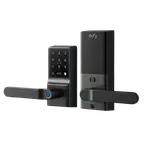
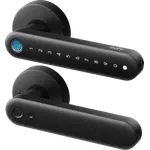
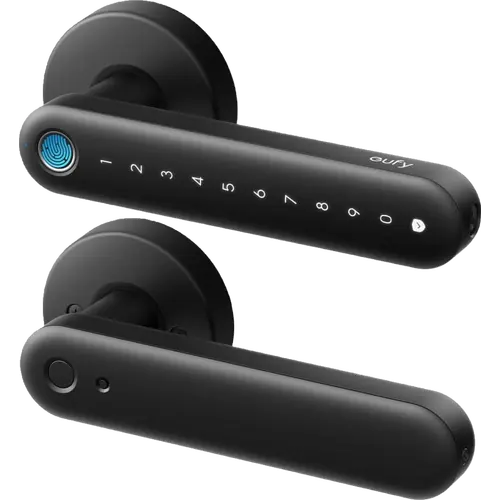
The Eufy Smart Lock C32 is a budget fingerprint lever lock made for interior doors. It replaces a standard interior handle with one that unlocks by fingerprint in about 0.3 seconds, by keypad passcode, through the eufy app over built-in 2.4 GHz Wi-Fi, or with a physical key, and it stores up to 50 fingerprints and 100 passcodes. Alexa and Google Home control work without a bridge or subscription, but there is no Apple Home, Matter or SmartThings support, no camera, and eufy does not recommend it for front doors or weather exposure.
- Interior doors (offices, bedrooms, storerooms)
- Fingerprint keyless entry
- Alexa or Google Home households
- No-subscription seekers
Pros
- Fast fingerprint unlock (about 0.3 seconds) built into the lever
- Keypad, eufy app and physical key as additional ways in
- Built-in 2.4 GHz Wi-Fi with remote lock/unlock and no bridge or subscription
- Works with Alexa and Google Home, and with Home Assistant through the eufy Security integration
- Stores up to 50 fingerprints and 100 passcodes
- Solid, heavy build with an oversized, easy-to-grip lever
- IP53 rated and easy to install, about 15 minutes with a screwdriver
Cons
- Indoor use only; eufy does not recommend it for front doors or rain exposure
- No Apple Home, Matter or SmartThings support
- Four AA batteries last about five months, shorter than eufy's eight-AA models
- Auto-lock is a count-down timer with no door-position sensor
- No camera, face recognition or Apple Home Key
- A few buyers report fingerprint or app connection problems
Who is the Eufy Smart Lock C32 for?
The C32 is the indoor member of eufy's lever-style smart lock line: a handle that replaces a standard interior-door handle and adds keyless entry. It suits a study, home office, bedroom, storeroom, garage or basement door, and it is the model to choose when you want the comfort of a lever with fingerprint and keypad entry rather than a deadbolt. It runs on four AA batteries and joins your 2.4 GHz Wi-Fi directly, so the eufy app can lock, unlock, check status and issue codes remotely without a separate bridge. If you need to secure a front door, look at eufy's deadbolt and video locks instead.
What buyers love
Installation is the most repeated praise: buyers describe swapping the old handle in about 15 minutes with a screwdriver and pairing over Wi-Fi without trouble. The fingerprint reader is the feature they highlight most, fast enough to unlock as the hand naturally grips the lever, and the keypad passcode and eufy app add more ways in. Buyers also like that the app and Wi-Fi stay reliable, that remote access works for letting people in, and that the lock feels heavy and well built for the money. Integration with Alexa, Google Home and the wider eufy ecosystem comes up as an advantage for households already using eufy devices.
What to know before you buy
Two things decide whether the C32 fits. First, it is an interior lock: eufy positions it for indoor doors and says it is not recommended for front doors or for doors exposed to rain, so it is not a replacement for a weather-rated exterior deadbolt. Second, its ecosystem support is narrow: it works with Alexa and Google Home and through the community eufy Security integration in Home Assistant, but there is no Apple Home, Matter or SmartThings support, and no camera, face recognition or Apple Home Key. Power comes from four AA batteries rated for about five months, which is shorter than eufy's eight-AA deadbolts, though a USB-C port accepts a power bank for emergency access. Auto-lock is a count-down timer rather than a door-position sensor, so it can lock while the door is ajar. A small number of buyers report the fingerprint reader failing after a few weeks, and the app connection can occasionally take a moment to respond.
Is the Eufy Smart Lock C32 worth it?
For an interior door that needs keyless entry, the C32 is a sensible value: fingerprint and keypad in one oversized lever, built-in Wi-Fi with remote control and no subscription, Alexa and Google Home voice control, a physical key fallback and a solid, heavy build. What it gives up is ecosystem breadth (no Apple Home, Matter or SmartThings), camera and video features, and the longer battery life of eufy's eight-AA deadbolts, and it is explicitly not meant for front doors. If you are fitting an office, bedroom or storeroom door and you use Alexa, Google Home or the eufy app, it is an easy recommendation; if you need a Matter or Apple Home lock or an outdoor deadbolt, choose a different eufy model.
Frequently asked questions
Is the Eufy Smart Lock C32 for interior doors only?
Yes. eufy positions the C32 for interior doors such as offices, bedrooms, storerooms and garage entries and says it is not recommended for front doors or for doors exposed to rain. For a front door you want one of eufy's weather-rated deadbolt or video locks.
Does the Eufy Smart Lock C32 work with Alexa, Google Home, Apple HomeKit or Matter?
It works with Amazon Alexa and Google Home for voice control and with Home Assistant through the community eufy Security integration. eufy states the C32 is not compatible with Apple HomeKit, Matter or IFTTT.
Does the Eufy Smart Lock C32 need a hub or a subscription?
No. It has built-in 2.4 GHz Wi-Fi, so the eufy app controls it remotely and manages codes without a separate bridge or hub, and the core lock features need no subscription.
How is the Eufy Smart Lock C32 powered, and what happens if the batteries die?
It runs on four AA batteries rated for about five months. If they run flat, a USB-C port accepts a power bank so you can unlock with fingerprint or PIN, and a physical key is included as backup. The USB-C port is for emergency power only and does not charge the batteries.
How many fingerprints and passcodes can it store?
Up to 50 fingerprints and 100 passcodes, and you can add and remove them from the eufy app.