

eufy Smart Lock C33 Review: A Sturdy Fingerprint Lever Lock With Great Scheduling and Rock-Solid Wi-Fi
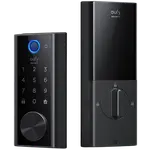
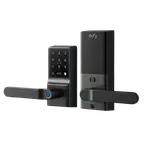
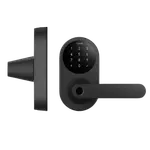
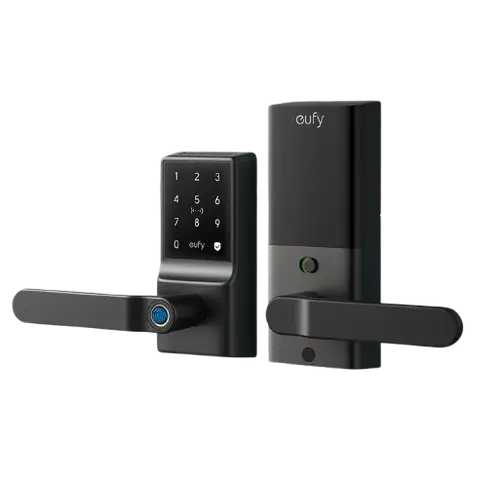
The eufy Smart Lock C33 stands out in eufy's lineup by being a lever/handle lock with a fingerprint door knob rather than a deadbolt, which owners specifically choose for the comfort of a lever when their hands are full, and it works great on doors without a deadbolt or on bedrooms. It feels solid and well built, installs in around 15 minutes, and pairs a fast, mostly reliable fingerprint reader with a keypad, app control and a physical key. The feature owners rave about most is scheduling: leave the door unlocked by day and have it lock itself every night automatically, ending the wondering about whether you locked up. Built-in Wi-Fi gives dependable remote status and control, per-user codes and temporary guest codes are handy, and durability is excellent (one lock survived seven months of direct desert sun and rain). The main gripes are minor: it uses 8 AA batteries and the included cells are weak, so owners recommend swapping in lithium or rechargeable AAs from the start, the fingerprint reader occasionally needs a second try (adding multiple fingers helps), and a few had an install issue where the internal cable wasn't fully seated, causing the bolt not to retract until pushed in firmly. It has no HomeKit, Matter, NFC or camera. For a dependable fingerprint lever lock with excellent scheduling, it is easy to recommend.
- Doors that need a lever instead of a deadbolt
- Scheduled nightly auto-lock
- Fingerprint keyless entry
- Alexa or Google Home users
Pros
- Lever/handle design (not a deadbolt), great for full hands and no-deadbolt doors
- Fast fingerprint reader with multiple fingers per user
- Excellent scheduled and automatic locking for peace of mind
- Built-in Wi-Fi with rock-solid remote access and status
- Solid, premium build with proven weather durability (IP53)
- Easy ~15-minute install and good value
Cons
- Uses 8 AA batteries; included cells are weak (swap in lithium)
- Fingerprint may need multiple enrolled fingers to read reliably
- Install requires firmly seating the internal cable or the bolt won't retract
- No Apple HomeKit, Matter, NFC or camera
- Loud default beep (can be disabled)
Who is the eufy C33 for?
This is a keyless lever/handle lock with a fingerprint door knob, distinct from eufy's deadbolt models, aimed at people who want a lever rather than a knob and keyless entry. It unlocks via fingerprint, a keypad passcode, the app remotely, and a physical key, with built-in Wi-Fi, scheduled and automatic locking, and IP53 weatherproofing. It works with Alexa and Google Home, and runs on 8 AA batteries (rated around 8 months). It best suits doors that need a lever (including doors without a deadbolt, and bedrooms), households that want scheduled nightly locking, fingerprint keyless entry, and Alexa or Google users. It has no Apple HomeKit, Matter, NFC or camera, so if you need those, look elsewhere in eufy's range.
What buyers love
The lever/handle design is a deliberate draw: owners who did not want a deadbolt appreciate the comfortable lever (easier with groceries or full hands) and find the deadlatch beefier than the original hardware it replaces, making it ideal for doors without a deadbolt or for bedrooms. The fingerprint reader is fast and accurate most of the time, and you can enroll multiple fingers per user. The standout feature is scheduling: owners set the door to unlock during the day and lock itself every night, which they describe as genuine peace of mind, no more wondering if someone forgot to lock up. There are multiple ways in (fingerprint, keypad, app, physical key), with per-person and temporary guest codes and unlock notifications, and installation is easy (about 15 minutes with the help of the install video, and you can swap the deadbolt/latch positions for clearance). Build quality is a recurring highlight, solid, heavy, premium-feeling real security hardware with a smooth lever, and Wi-Fi is rock solid with reliable remote access. Durability is excellent too, with one fully exposed unit surviving seven months of desert sun and rain, and several owners liked it enough to buy a second.
What to know before you buy
Battery is the most common complaint: it takes 8 AA cells, and owners find the included batteries weak, especially in cold climates, so many recommend installing Energizer Ultimate Lithium or rechargeable lithium AAs from the start (noting lithium cells hold charge well but then die suddenly, so watch the app's low-battery warning). The fingerprint reader, while good, occasionally fails to read one finger reliably, the fix is to enroll multiple fingers per user and mind your finger angle. The app can take a second to connect at times, and there is a fairly loud default beep that you can disable. The most important install note: a few owners found that fingerprint or app unlocking reported the door as unlocked but the bolt did not retract (openable only with the physical key), which turned out to be the internal cable not fully seated in its adapter, pushing it in firmly (the connector is very tight) fixed it completely, so take care with that step during installation. Finally, it has no Apple HomeKit, Matter, NFC or built-in camera, and no separate battery backup beyond the physical key.
Is the eufy C33 worth it?
For a dependable, well-built fingerprint lever lock, the eufy Smart Lock C33 is easy to recommend: a comfortable lever design (great for doors without a deadbolt), a fast fingerprint reader, excellent scheduled and automatic locking, rock-solid Wi-Fi with remote access, and proven weather durability, all at a fair price. The trade-offs are minor: it uses 8 AA batteries (swap in lithium for best life), the fingerprint reader may need multiple enrolled fingers, and installation requires firmly seating the internal cable or the bolt won't retract. It has no HomeKit, Matter or camera. Buy it if you want a lever-style keyless lock with strong scheduling and reliable Wi-Fi on the Alexa or Google side; if you need a deadbolt, HomeKit/Matter, or a built-in camera, choose a different eufy model.
Frequently asked questions
Is this a deadbolt or a lever lock?
It is a lever/handle lock with a fingerprint door knob, not a deadbolt. Owners specifically choose it for the comfortable lever (easier with full hands) and use it on doors without a deadbolt or on bedrooms. It has a sturdy deadlatch, and you can reposition the deadbolt and latch for clearance during installation.
How does the scheduling and auto-lock work?
This is the most praised feature. You can schedule the door to stay unlocked during the day and lock itself automatically every night, so you never wonder if you locked up. It also supports standard auto-lock, and you get unlock notifications and can check the lock's status remotely from the app.
What about battery life?
It uses 8 AA batteries, rated around 8 months, but owners find the included cells weak, especially in cold weather. The common recommendation is to install Energizer Ultimate Lithium or rechargeable lithium AAs from the start. Note lithium cells hold charge a long time then drop off quickly, so heed the app's low-battery warning.
My fingerprint or app says unlocked but the door won't open, what's wrong?
This is a known install issue: the internal cable wasn't fully seated in its adapter, so the motor reports unlocked but the bolt doesn't retract (openable only with the physical key). The fix is to reopen the unit and push the internal cable firmly into the very tight connector until it clicks in completely, which resolves it.
Does it work with Alexa, Google or Apple HomeKit?
It works with Alexa and Google Home for remote control and status, with rock-solid Wi-Fi. It does not support Apple HomeKit or Matter, and there is no NFC or built-in camera. Entry is via fingerprint, keypad code, app, or physical key.