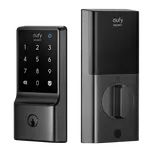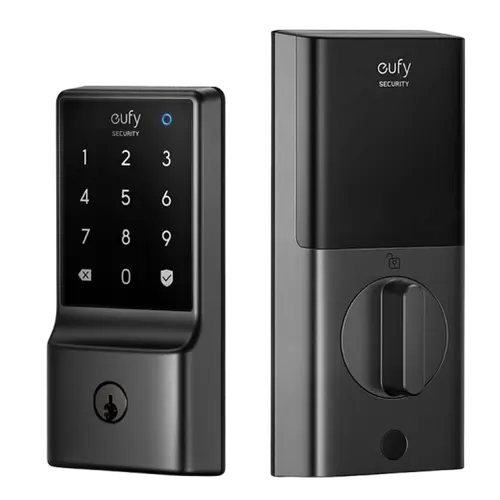


Eufy Smart Lock C34 Review: An Easy Deadbolt Swap with Built-in WiFi
The Eufy Smart Lock C34 is aimed at homeowners who want to swap out an aging mechanical deadbolt (Kwikset, Schlage) for something that unlocks by app, passcode or Alexa/Google/Apple voice command without adding a separate hub. Installation and setup are consistently described as fast and mechanical, the touchscreen keypad is responsive, and Matter support means it plays well across ecosystems. The trade-off is a battery system some owners find inconsistent about warning before it dies; an open-source setup reaches the lock over Matter rather than a native eufy integration. For a straightforward, budget-friendly connected deadbolt, it's a solid pick.
- Homeowners replacing an aging mechanical deadbolt
- Alexa, Google Home or Apple HomeKit households
- Renters and buyers who want a no-subscription lock
- Anyone who wants built-in WiFi without a separate hub
Pros
- Fast, mechanical-feel installation swapping an existing deadbolt
- Quiet, smooth motor for locking and unlocking
- Built-in WiFi, no separate hub or bridge needed
- Works with Alexa, Google Home, Apple HomeKit and Matter
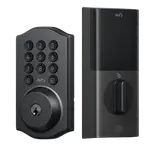
- Touchscreen passcode keypad for keyless entry
- No subscription required
Cons
- No backup battery port if the 8 AA batteries die
- Some owners report unreliable low-battery warnings
- No native Home Assistant integration, Matter only
- Auto-lock doesn't check whether the door is fully closed
- Weatherproofing seal can be tricky to seat during install
Who is the Eufy Smart Lock C34 for?
The C34 is built for anyone replacing a standard deadbolt with a connected one, without wiring in a separate bridge or hub, since it uses built-in WiFi to talk to the Eufy app directly. Owners frequently mention moving off older mechanical or first-generation smart locks (Kwikset Kevo, Schlage, Kwikset Halo) that ate batteries or rarely worked, and finding the C34's physical install (swapping the deadbolt tailpiece) and app pairing quick, often described as a five-to-fifteen minute job. With Matter, Alexa, Google Home and Apple HomeKit support, it suits mixed-ecosystem households as much as single-platform ones.
What buyers love
The most consistent praise is how easy the lock is to physically install and pair, even for people with no smart-lock experience. Several reviewers highlight a quiet, smooth motor for locking and unlocking (a step up from noisier mechanical deadbolts that used to wake people up), plus reliable auto-lock after the door closes. The touchscreen passcode keypad works well for keyless entry, and integration with Alexa, Google Home and Apple Home via Matter is repeatedly called out as working smoothly for voice control. Buyers also like that there is no subscription required to use the core lock/unlock features.
What to know before you buy
The C34 runs on 8 AA batteries with no backup battery port on the lock itself, and a handful of owners report the low-battery alert not firing reliably before the batteries actually die, a real caveat worth planning around with a calendar reminder rather than relying solely on the app warning. There is no native Home Assistant integration either, so an open-source hub pairs the lock over Matter instead. The auto-lock after the door closes doesn't verify the door is fully shut before engaging, so it can lock against a partially closed door. A couple of owners also mention the weatherproofing seal around the lock body can be fiddly to seat correctly during install.
Is the Eufy Smart Lock C34 worth it?
For a budget-friendly deadbolt replacement with built-in WiFi, an 18-month warranty and broad ecosystem support (Alexa, Google Home, Apple HomeKit, Matter), the C34 delivers on the basics that matter most: a fast install and a lock that reliably locks and unlocks on command. Buyers coming from failure-prone mechanical or older smart locks tend to be the happiest, while anyone who wants a backup battery, Home Assistant support, or best-in-class battery monitoring should weigh those gaps first.
Frequently asked questions
Does the Eufy Smart Lock C34 need a separate hub or bridge?
No. It has built-in 2.4 GHz WiFi, so it connects directly to your home network and the Eufy app without any extra bridge hardware.
Does it work with Alexa, Google Home and Apple HomeKit?
Yes, the C34 supports Alexa, Google Home and Apple HomeKit, plus Matter for broader cross-platform compatibility.
Does the Eufy Smart Lock C34 have a fingerprint reader?
No, this model does not include fingerprint unlock. Entry methods are the mobile app, the touchscreen passcode keypad, and a physical key backup.
What happens if the batteries run out?
The lock takes 8 AA batteries and does not have a backup battery input, so batteries need to be replaced proactively; some owners note the low-battery alert isn't always reliable, so checking battery level periodically in the app is worth doing.
Will the door automatically lock itself?
Yes, it supports auto-lock after the door has been closed for a set period, though it does not use geolocation-based auto-lock when you leave home.
Is a subscription required to use the Eufy Smart Lock C34?
No, core lock and unlock functionality, including one-time and periodic passcodes, works without any subscription.