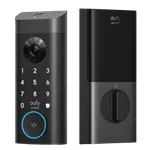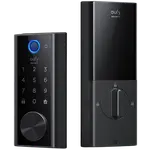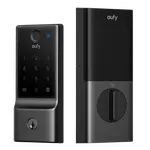


eufy Smart Lock E31 Review: A Matter and Apple Home Fingerprint Deadbolt With a Rechargeable Battery (and Battery Caveats)
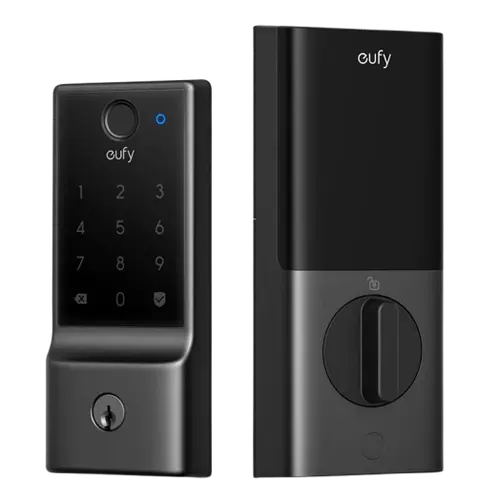
The eufy Smart Lock E31 is the rechargeable-battery version of eufy's Matter-ready fingerprint deadbolt (the near-identical E30 uses replaceable AA batteries). Owners love how quickly it installs, often 5 to 15 minutes swapping an old deadbolt, and how fast and accurate the fingerprint reader and keypad are. Its big advantage over most eufy locks is broad smart-home support: built-in Wi-Fi plus Matter, Apple Home, Alexa and Google, so you can control it by voice, check status and view an access history. The headline feature is the 10000mAh rechargeable battery pack with USB emergency power, which many welcome as an end to constantly tossing AA batteries, and it often holds charge very well (one owner lost just 1% in two weeks). But battery is also its biggest risk: a subset of owners report the pack lasting only a week and a half to a month with light use and, worse, no low-battery warning before it dies, an issue discussed on forums and possibly firmware-related, and customer support drew sharp criticism from those affected. Other caveats are shared with the line: no open-door sensor, a motor that's a bit loud for some, a non-rekeyable keyway, and hub requirements for full Apple Home or Google/Thread control. For a Matter and Apple Home fingerprint deadbolt you'd rather recharge than refill with AAs, it's appealing, but weigh the battery reports.
- Matter and Apple Home households
- Fingerprint keyless entry
- Those who prefer a rechargeable battery over AAs
- Alexa or Google Home users
Pros
- Broad smart-home support: Matter, Apple Home, Alexa and Google
- Fast, accurate fingerprint reader and responsive keypad
- Very easy 5 to 15 minute install on an existing deadbolt
- Rechargeable 10000mAh battery with USB emergency power (no AA waste)
- Built-in Wi-Fi with remote control and access history
- Solid, non-bulky build with a physical-key backup
Cons
- Some owners report short battery life and no low-battery warning
- Customer support criticized by affected owners
- No open-door sensor, so it can lock while the door is open
- Keyway can't be rekeyed; full Apple Home/Google needs a hub or Thread router
- Not supported by Home Assistant
Who is the eufy E31 for?
This is a keyless fingerprint deadbolt with built-in Wi-Fi and unusually broad smart-home support, Matter, Apple Home, Alexa and Google, distinguishing it from most eufy locks. It unlocks via fingerprint, a keypad passcode, the app remotely, and a physical key, with auto-lock and an access history. It runs on a built-in 10000mAh rechargeable battery pack with USB emergency power, which is the key difference from the otherwise-similar E30 (which uses 8 replaceable AA batteries). It best suits Matter and Apple Home households, fingerprint keyless-entry fans, people who prefer recharging over swapping AAs, and Alexa or Google users. Given some reported battery issues, buy from a seller with easy returns, and if you'd rather use standard AAs, consider the E30 instead.
What buyers love
Installation is a recurring highlight: owners swap it onto an old deadbolt in 5 to 15 minutes, often calling it mechanical plug-and-play, and app setup and fingerprint enrollment are quick. The fingerprint reader is fast and accurate (several say faster than unlocking a phone), and the touch keypad is responsive. The standout versus other eufy locks is smart-home breadth: built-in Wi-Fi plus Matter, Apple Home, Alexa and Google, so owners use Siri or Alexa to lock, unlock and check status, and value the access history, this is a favorite among Apple Home users who wanted reliable Siri control. The rechargeable 10000mAh battery is a big draw for many, ending the cycle of tossing AA batteries (a relief for those replacing Kwikset Kevo or Halo locks that ate cells every few weeks), it ships pre-charged, has a USB emergency port, and for some holds charge excellently (one owner lost only 1% over two weeks). Build quality feels solid and not bulky, the motor is quiet for many (a welcome change from a noisy Schlage), auto-lock adds peace of mind, it pairs with eufy doorbells, and a physical key provides backup, all at a competitive price.
What to know before you buy
The biggest risk is the battery. While many owners get great life, a notable subset report the rechargeable pack lasting only about a week and a half to a month even with light use, and, more seriously, giving no low-battery warning before it dies, which risks a lockout (an issue owners found discussed on forums and suspect is firmware-related). Affected owners also describe frustrating, seemingly automated customer support that offered to sell another battery rather than resolve the fault. Because of this, keep a physical key accessible and monitor charge closely. Other caveats are shared across the line: the lock has no open-door sensor, so it can try to auto-lock even when the door is open, the motor is a bit loud and less smooth for some (though quiet for others), and the keyway can't be rekeyed to match your other doors. For full smart-home control, Apple Home and Siri work reliably only if you have an Apple home hub (like a HomePod) once your phone screen is off, and Google Home via Thread needs a Thread border router. It also isn't supported by Home Assistant, and there's no brushed-nickel finish.
Is the eufy E31 worth it?
For a good-looking fingerprint deadbolt with broad smart-home support and no AA batteries to buy, the eufy Smart Lock E31 is appealing: easy to install, a fast fingerprint reader and keypad, built-in Wi-Fi, Matter/Apple Home/Alexa/Google compatibility, a physical-key backup, and a rechargeable 10000mAh pack with USB emergency power, at a competitive price. The catch is battery reliability: while many owners are delighted, a meaningful subset report short life and no low-battery warning, with unhelpful support, so this is the thing to weigh. If you want the rechargeable-battery convenience and buy where returns are easy, it can be excellent; if you'd rather avoid the battery-firmware risk, the AA-powered E30 covers the same features, and if you need an open-door sensor or Home Assistant, look elsewhere.
Frequently asked questions
What's the difference between the E31 and E30?
They are near-identical fingerprint deadbolts; the difference is the battery. The E31 uses a built-in 10000mAh rechargeable pack with USB emergency power, while the E30 uses 8 replaceable AA batteries. Choose the E31 to avoid buying AAs, or the E30 if you'd rather swap standard cells, especially given some E31 battery-life reports.
Are there battery problems I should know about?
For many owners the rechargeable battery holds charge very well, but a notable subset report it lasting only about a week and a half to a month with light use and, critically, giving no low-battery warning before dying, which can cause a lockout (owners suspect a firmware issue). Keep a physical key handy, monitor the charge, and buy where returns are easy.
Does it work with Apple Home, Matter, Alexa and Google?
Yes, this is its standout feature. It has built-in Wi-Fi and supports Matter, Apple Home, Alexa and Google for voice and app control plus status and history. Reliable Apple Home/Siri control when your phone is asleep needs an Apple home hub (like a HomePod), and Google Home via Thread needs a Thread border router. It is not supported by Home Assistant.
Will it auto-lock even if my door is open?
Potentially, yes. Like the rest of this line, the E31 has no open-door sensor, so it can't tell whether the door is closed and may auto-lock regardless. Keep that in mind when using auto-lock with the door propped open.
How is the fingerprint reader and installation?
Both are strong. The fingerprint reader is fast and accurate (some say quicker than unlocking a phone), and the keypad is responsive. Installation is easy, owners typically swap it onto an existing deadbolt in 5 to 15 minutes, and app setup and fingerprint enrollment are straightforward. The battery ships pre-charged.