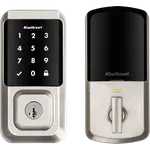


Kwikset Halo Touchscreen Review: The Wi-Fi Deadbolt You Can Re-Key Yourself
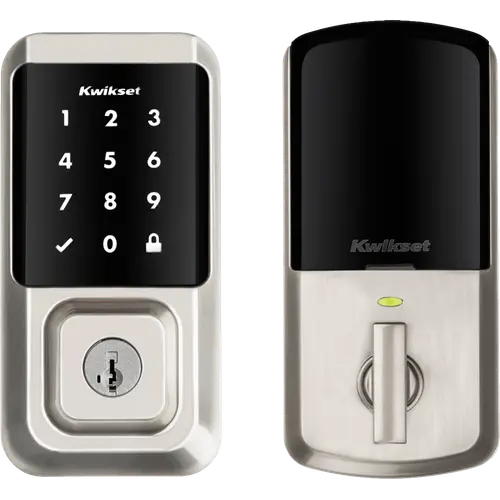
The Kwikset Halo Touchscreen is a keyless-entry deadbolt with Wi-Fi built into the lock, so the Kwikset app can lock, unlock and hand out codes from anywhere with no hub, no bridge and no subscription. It is certified to BHMA Grade AAA, the highest residential grade for security, durability and finish, stores up to 250 access codes behind a SecureScreen touchscreen, and keeps a real Kwikset keyway that owners can re-key to their existing house key in under a minute, which is the reason they name most often for buying it. The recurring frustration is the first ten minutes: the lock joins 2.4 GHz networks only, and owners running mesh systems with band steering describe hours of factory resets before it finally connects. Get it onto a clean 2.4 GHz network and it is a solid, well-built deadbolt at a sensible price.
- Households that want no hub
- DIY installers
- Alexa and Google Home homes
- Anyone who re-keys their own locks
- Families sharing access codes
Pros
- Wi-Fi built into the lock, with no hub, bridge or subscription
- Up to 250 access codes, with one-time, date-range and weekday schedules
- SecureScreen asks for two random digits so fingerprints do not reveal the code
- SmartKey keyway re-keys to your existing key in about a minute
- BHMA Grade AAA, the highest residential certification
- Works with Alexa, Google Home, SmartThings and Home Assistant
- Auto-Lock with an adjustable delay, plus geofencing that unlocks as you arrive
- Code alarm after three consecutive wrong codes, and app alerts for tampering
- Fits a standard deadbolt cutout and installs with a screwdriver
Cons
- 2.4 GHz Wi-Fi only, and band steering on mesh routers breaks the pairing
- Owners report a weak radio and long, repeated setup attempts
- No Apple Home and no Apple home key, which the Halo Select Plus added later
- No Matter support on this model
- Battery drain is the most common owner complaint
- No backup power terminal, the physical key is the only fallback when the batteries die
- No door position sensor, the app reports the bolt and not the door
- The Kwikset app is published in a limited list of countries
- One year of electronics warranty
Who is the Kwikset Halo Touchscreen for?
Anyone replacing a standard deadbolt who wants remote control without adding a bridge. Wi-Fi lives in the lock itself, so the Kwikset app reaches it from anywhere with an internet connection: lock, unlock, check status, read the full event history and manage up to 250 access codes. Those codes can be permanent, limited to a date range, limited to certain weekdays and times, or good for a single use within 24 hours, which covers the family, the cleaner and the contractor without handing anyone a key. Auto-Lock relocks the bolt after a delay you choose, geofencing unlocks it as you walk up, and a one-touch button on the keypad locks it on the way out. It runs on four AA batteries and installs on doors from 1-3/8 to 2 inches thick with an adjustable backset.
What buyers love
Installation is the most common piece of praise: owners with no lock experience describe swapping an existing deadbolt in well under an hour with nothing but a Phillips screwdriver, guided by instructions and an interactive in-app walkthrough they repeatedly call clear. The second is SmartKey. Several owners say it is the specific reason they keep buying Kwikset, because the cylinder re-keys to the key they already carry in about a minute and no locksmith is involved. Beyond that they praise the build, calling it solid and well designed, the responsiveness of the touchscreen, and an app they find intuitive. Voice control lands well too, with owners setting the lock up in both Alexa and Google Home and then locking, unlocking and checking status by voice. The sentiment that comes up again and again is plain peace of mind: no more lost keys, no more family waiting on the porch, and the ability to open the door remotely while walking up with an armful of groceries.
What to know before you buy
The setup is where this lock loses people. It joins 2.4 GHz networks with WPA2 only, and owners running mesh access points report that band steering hides the network from the lock entirely: the fixes they describe are disabling steering or standing up a dedicated 2.4 GHz SSID, and more than one went through repeated factory resets and a couple of hours before it connected. Several also report a weak radio, showing one bar where a phone shows full signal. Battery life is the other consistent theme and opinion splits: Kwikset quotes about six months from four AA alkalines, some owners land near that or better, and others describe the cells draining fast enough to be a running cost, with door misalignment the usual culprit. There is also a cluster of reports of a unit failing to re-pair after a battery change. Availability matters too, since the Kwikset app is only published in the Americas and a short list of other countries, and owners elsewhere have been left with a lock they could not set up. Finally, this is the plain Halo: there is no Apple Home, no Apple home key and no Matter, all of which arrived later on the Halo Select and Halo Select Plus, and there is no door position sensor, so the app reports the bolt rather than whether the door is standing open.
Is the Kwikset Halo Touchscreen worth it?
For a hub-free Wi-Fi deadbolt with a proper mechanical lock underneath, yes. You get the highest BHMA residential rating, a code system that scales to a household or a rental, SecureScreen so fingerprints on the glass do not give the code away, a code alarm after three wrong attempts, and a keyway you can re-key yourself, all at a price that undercuts most of its keypad rivals. What you trade away is the modern smart-home layer: Apple Home and Matter are not part of this model, and the Wi-Fi radio is the weakest thing about it. If your router is straightforward and Alexa, Google Home, SmartThings or Home Assistant is where you live, this is a lot of lock for the money. If you want Apple home keys or a Matter fabric, the Halo Select family is the model to look at instead.
Frequently asked questions
Does the Kwikset Halo Touchscreen need a hub or a bridge?
No. Wi-Fi is built into the lock, so it joins your home network directly and the Kwikset app controls it from anywhere with an internet connection. No hub, panel or subscription is involved.
Which smart home platforms does it work with?
Alexa and Google Home are set up by linking your Kwikset account, with no hub required. SmartThings adds it under Partner devices in the SmartThings app, and Home Assistant reaches it through the community Kwikset Smart Locks integration installed via HACS. Apple Home is not on the list for this model.
Why will the lock not connect to my Wi-Fi?
It only joins 2.4 GHz networks secured with WPA2. On a mesh or dual-band router that steers clients between bands, the lock often cannot see the network at all, so disable band steering or create a dedicated 2.4 GHz network for it. Keeping the phone on the same network during setup helps too.
How long do the batteries last?
Kwikset quotes roughly six months from a fresh set of four AA alkaline batteries, depending on use. Owner experience varies widely, and the usual cause of fast drain is a misaligned bolt and strike, which forces the motor to work harder on every cycle. Rechargeable and lithium-ion cells are not recommended.
Can I keep using my existing house key?
Yes. The cylinder uses Kwikset SmartKey, so you can re-key it to a key you already carry in about a minute with the included tool, without calling a locksmith. Two keys come in the box.
Can I give a guest a temporary code?
Yes. The lock holds up to 250 access codes and the app can limit each one to a single use within 24 hours, to a date range, or to specific weekdays and times on a recurring schedule. Codes can be added, edited and deleted remotely.