
Still comparing? Get what's new by email
New releases and the smart home news worth knowing, in your inbox.
No spam. Unsubscribe in one click.
| Feature | Nuki Smart Lock Ultra | SwitchBot Lock | Winner |
|---|---|---|---|
| Rating | 4.5 | 3.4 | Nuki Smart Lock Ultra |
| Warranty | 2 years | 1 year | Nuki Smart Lock Ultra |
| Connectivity | 2.4 GHz WiFi, Bluetooth, Thread Protocol | Bluetooth | Nuki Smart Lock Ultra |
| Lock/Unlock System | Remote, Bluetooth, Passcode, Fingerprint, Physical Key | Remote, Bluetooth, Passcode, Fingerprint, Face Recognition, NFC Tag, Physical Key | SwitchBot Lock |
| One-Time Password | Keypad required | NO | Nuki Smart Lock Ultra |
| Periodic Password | Keypad required | NO | Nuki Smart Lock Ultra |
| Weather Resistance | NO | NO | Tie |
| Battery Life | 6 months | 6 months | Tie |
| Integrations | Google Home, Alexa, Apple HomeKit, Samsung SmartThings, Home Assistant, Matter | Google Home, Alexa, Apple HomeKit, Samsung SmartThings, Home Assistant, Matter | Tie |
| Anti-peep Password | NO | NO | Tie |
| Emergency Fingerprint | NO | NO | Tie |
| Doorbell | NO | NO | Tie |
What the differences mean
Remote access and smart home
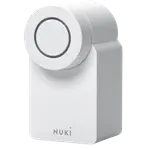
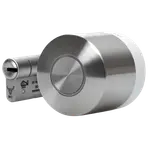
The Nuki Smart Lock Ultra has 2.4 GHz Wi-Fi built in and supports Matter, with a Thread border router in the mix, so Google Home, Alexa, Apple Home and SmartThings connect straight to it. The SwitchBot Lock is Bluetooth only, so every one of those platforms needs a SwitchBot Hub, and Matter needs the Hub 2.
Power
The Nuki Smart Lock Ultra has a built-in rechargeable battery, while the SwitchBot Lock takes 2x CR123A cells. Both are listed at about 6 months, but neither has a backup battery, and SwitchBot owners report the cells draining faster than that.
Size
The Nuki Smart Lock Ultra is a compact 57 x 58 mm unit on the inside, while the SwitchBot Lock measures 111.6 x 56 x 73.2 mm. The weight is the same, but the SwitchBot is the bulkier thing on the door.
Ways to unlock
Both use a keypad accessory for codes and fingerprints. The SwitchBot Lock also lists NFC tag unlock and a Vision Keypad for face recognition, while the Nuki Smart Lock Ultra has neither. The Nuki is the one with one-time and periodic passcodes listed, which the SwitchBot is not.
Warranty
The Nuki Smart Lock Ultra carries 2 years against 1 year for the SwitchBot Lock, which matters for a motorised device that moves a bolt many times a day.
Which one to buy if
- you want remote control and voice assistants without buying a hub
The Nuki Smart Lock Ultra has Wi-Fi built in, while the SwitchBot Lock needs a SwitchBot Hub for everything beyond Bluetooth.
- your home runs on Apple Home
The Nuki Smart Lock Ultra supports Matter directly, and owners describe adding it to Apple Home by scanning a QR code.
- you rent and have an unusual or surface-mounted cylinder
SwitchBot Lock owners report fitting it to a wide range of cylinders with the included adapters, while the Nuki is a retrofit for European-style cylinders.
- you already use SwitchBot hubs, curtains or sensors
The SwitchBot Lock joins the same app and hub, and adds NFC tags and a face-recognition keypad option.
- you want a guest code that expires on its own
The Nuki Smart Lock Ultra lists one-time and periodic passcodes with its keypad, and the SwitchBot Lock does not.
- + Rating: 4.5
- + Warranty: 2 years
- + Connectivity: 2.4 GHz WiFi, Bluetooth, Thread Protocol
- - Lock/Unlock System: Remote, Bluetooth, Passcode, Fingerprint, Physical Key vs Remote, Bluetooth, Passcode, Fingerprint, Face Recognition, NFC Tag, Physical Key
- + Lock/Unlock System: Remote, Bluetooth, Passcode, Fingerprint, Face Recognition, NFC Tag, Physical Key
- - Rating: 3.4 vs 4.5
- - Warranty: 1 year vs 2 years
What owners say
Owners of both locks agree that installation is quick, a guided app walks you through it, and keeping the existing cylinder and key is a big part of the appeal. From there the stories split. Nuki Smart Lock Ultra owners, many of them coming from earlier Nuki models, describe a faster, more compact and more premium lock, praise its Apple Home setup by QR code and its support, and mostly complain about the cost, a slightly fiddly cylinder length setting and the fact that keypad, fingerprint and NFC are separate accessories. SwitchBot Lock owners single out how many cylinders it adapts to and how easy temporary guest codes are with the keypad. Their complaints are about the motor failing to retract stiff latches, jamming in the cold, fast battery drain with a late warning and recalibration after every battery change.
Frequently Asked Questions
Which is better overall: Nuki Smart Lock Ultra or SwitchBot Lock?
The Nuki Smart Lock Ultra. It has built-in Wi-Fi, Matter over Thread, a rechargeable battery, a two-year warranty and one-time and periodic codes with its keypad. The SwitchBot Lock wins on unlock methods such as NFC and face recognition, and on how many cylinders it fits.
What is the biggest difference between the Nuki Smart Lock Ultra and the SwitchBot Lock?
Connectivity. The Nuki Smart Lock Ultra connects to Wi-Fi by itself and speaks Matter, while the SwitchBot Lock is Bluetooth only and needs a SwitchBot Hub for remote control and for Alexa, Google Home, Apple Home and SmartThings.
Do the Nuki Smart Lock Ultra and the SwitchBot Lock work with Home Assistant?
Yes, both list Home Assistant support. The difference is the other platforms: the Nuki Smart Lock Ultra reaches them directly, and the SwitchBot Lock does so through a SwitchBot Hub.
Does the Nuki Smart Lock Ultra or the SwitchBot Lock have a keypad or fingerprint reader built in?
Neither. Both need a separate keypad for codes and fingerprints. The SwitchBot Lock can also use a Vision Keypad for face recognition and supports NFC tags, which the Nuki Smart Lock Ultra does not.
Who should buy the Nuki Smart Lock Ultra?
Buyers who want a premium, fast retrofit lock with Wi-Fi and Matter built in, Apple Home users, and anyone who prefers a rechargeable battery to swapping cells.
Who should buy the SwitchBot Lock?
Renters and owners with an awkward cylinder, people already using SwitchBot hubs or Home Assistant, and buyers who like NFC tags or a face-recognition keypad, as long as their door latch is not too stiff for its motor.
Our store on AmazonShop our ideas on AmazonLists of the smart home setups we would put together ourselves, ready to add to your Amazon cart.Shop on AmazonCompare all 54 Door Locks side by side
You are looking at two of them. The full table lines up all Door Locks in the catalog with the same specs, so you can filter by what you need and sort by price or rating.
- 54 Door Locks
- 55 specs compared
- 51 filters