27% OFF
$79.97
$109.99

Full Smart Door Locks comparison in 2026
New releases and the smart home news worth knowing, in your inbox.
No spam. Unsubscribe in one click.
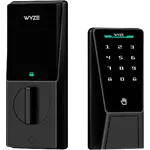
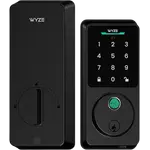
| Feature | Philips Wi-Fi Smart Deadbolt DDL242X | Wyze Auto-Lock Bolt v2 | Winner |
|---|---|---|---|
| Price | $79.97 | $79.00 | Wyze Auto-Lock Bolt v2 |
| Rating | 4.3 | 4.5 | Wyze Auto-Lock Bolt v2 |
| Weather Resistance | YES | IP53 | Tie |
| Connectivity | 2.4 GHz WiFi, Bluetooth | 2.4 GHz WiFi | Tie |
| Integrations | Google Home, Alexa | Alexa | Tie |
| Lock/Unlock System | Remote, Bluetooth, Passcode, Fingerprint, Physical Key | Remote, Passcode, Fingerprint, Physical Key | Tie |
| Anti-peep Password | YES | YES | Tie |
| Emergency Fingerprint | NO | NO | Tie |
| Doorbell | NO | NO | Tie |
The Wyze Auto-Lock Bolt v2 wins, but only on price and owner feedback. The Philips Wi-Fi Smart Deadbolt DDL242X matches it on entry methods and adds a 2-year warranty and more code options.
Very. Both are Wi-Fi deadbolts powered by 8 AA batteries with a fingerprint reader, a keypad with anti-peep codes, a physical key, auto-lock after the door closes and Alexa support.
The Philips Wi-Fi Smart Deadbolt DDL242X supports one-time and periodic passcodes and an Away mode. The Wyze Auto-Lock Bolt v2 has no Away mode, and its one-time and periodic codes are not documented.
The Wyze Auto-Lock Bolt v2 has a USB-C emergency port for temporary power, and both locks can still be opened with a physical key.
Buy the Wyze Auto-Lock Bolt v2 if you want the most affordable way to get fingerprint and keypad entry on a standard deadbolt, with a USB-C emergency port.
Buy the Philips Wi-Fi Smart Deadbolt DDL242X if you want a 2-year warranty, scheduled guest codes, Away mode and Google Home support.
 Our store on AmazonShop our ideas on AmazonLists of the smart home setups we would put together ourselves, ready to add to your Amazon cart.Shop on Amazon
You are looking at two of them. The full table lines up all Door Locks in the catalog with the same specs, so you can filter by what you need and sort by price or rating.