


SwitchBot Lock Review: A Versatile, Renter-Friendly Retrofit Lock Held Back by a Modest Motor and Battery
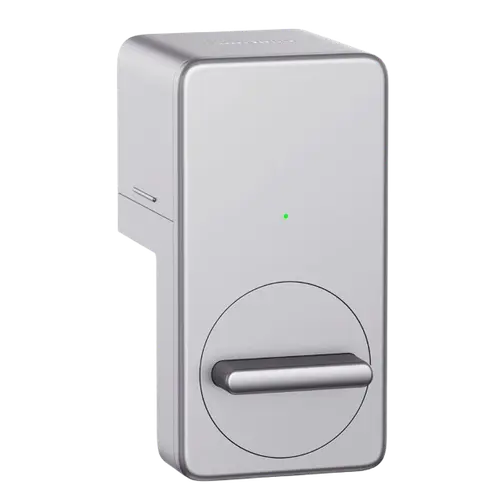
The SwitchBot Lock is an affordable retrofit smart lock that mounts over your existing deadbolt (no replacement, keep your key), and its biggest strength is versatility, owners fit it to a wide range of cylinders, including European security locks and surface-mounted setups it is not even advertised for, thanks to the many included adapters. Installation is quick (around 15 to 30 minutes) and the app is intuitive: devices pair on the first try, and with the optional Keypad you unlock via fingerprint, code, phone, NFC tag or the remote, with easy temporary guest codes. Add a SwitchBot Hub for remote control, status and alerts, or a Hub 2 for Matter and HomeKit, and Home Assistant is supported directly. The weaknesses are consistent, though: the motor is only modestly powerful, so on doors with a stiff latch, tight weather seals, an exterior knob or a multi-point lock it can fail to retract the latch (owners often nudge the door to relieve tension), and it can jam in cold weather. The 2x CR123A batteries drain surprisingly fast for some, with a late low-battery warning and no backup, and the lock needs recalibrating after each battery change. It is also a bit bulky-looking and slightly slow. For a renter-friendly, adaptable lock on an easy door, it is good value, just check that your door is light-actioning first.
- Renters and non-replaceable locks
- Adapting to unusual cylinders
- Keeping your existing key
- SwitchBot ecosystem or Home Assistant users
Pros
- Fits an unusually wide range of cylinders, including surface-mounted and security locks
- Renter-friendly: keeps your existing deadbolt and key
- Quick install with an intuitive app and easy pairing
- Many unlock options with the Keypad, plus easy temporary guest codes
- Remote control and Matter/HomeKit via a hub; Home Assistant supported
Cons
- Modest motor can struggle to retract stiff latches or on knob-only/multi-point doors
- Can jam in cold weather
- CR123A batteries drain fast for some, with a late warning and no backup
- Needs recalibration after each battery change
- Bulky look and slightly slow; keypad/fingerprint are separate accessories
Who is the SwitchBot Lock for?
This is a retrofit smart lock that mounts over the inside of your existing deadbolt, so your exterior hardware and key are unchanged, aimed at renters and anyone who cannot replace their lock. It runs over Bluetooth, with remote control and integrations (Alexa, Google Home, HomeKit, SmartThings, IFTTT, and Matter via Hub 2) requiring a SwitchBot Hub, while Home Assistant works directly. Passcode and fingerprint come from a separate SwitchBot Keypad, and NFC, Apple Home Key and physical-key entry are supported. It runs on 2 CR123A batteries (rated around 6 months) with no backup battery, and offers auto-lock and geolocation. It best suits renters and non-replaceable locks, unusual cylinders, keeping your existing key, and SwitchBot or Home Assistant users. If your door has a stiff latch, an exterior knob, a multi-point lock, or you want a strong motor and long battery life, read the caveats first.
What buyers love
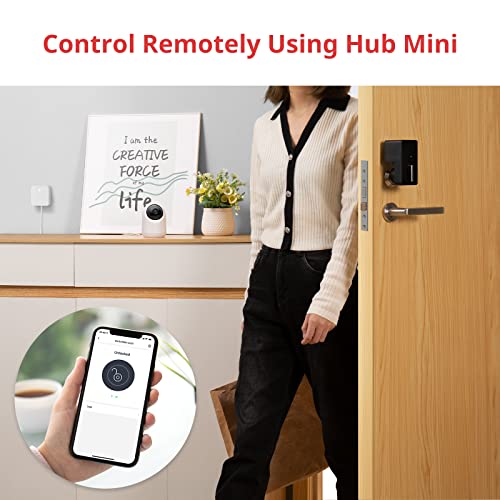
Versatility is the standout: owners fit the SwitchBot Lock to a wide variety of cylinders, including European security locks (Mottura and similar) and surface-mounted (applique) setups it is not marketed for, helped by the generous set of included adapters and adhesives. Installation is quick, commonly 15 to 30 minutes, and the app is a highlight, intuitive, with all components (lock, hub, keypad) pairing on the first attempt and guided calibration. With the optional Keypad there are many ways in, fingerprint, code, smartphone, NFC tag, Alexa and the remote, and owners love creating temporary codes or fingerprints for guests, which is ideal for vacations or pet sitters. A SwitchBot Hub Mini adds remote lock/unlock, push notifications showing who opened the door and how, and remote confirmation that the door is properly closed, while a Hub 2 enables Matter and HomeKit, and Home Assistant is supported directly. Owners also value the configurable time-based auto-lock (which solves the latch not re-latching on its own), the strong value versus a Nuki or Yale, and reliable long-term operation, with several reporting it still works well a year later.
What to know before you buy
The most common complaint is motor strength. The lock is designed mainly to slide a deadbolt open and closed, and on doors where you must retract a spring latch, especially with tight weather seals, a stiff cylinder, an exterior knob (no handle), or a European multi-point lock, the motor can struggle or fail to pull the latch back, so owners often nudge the door toward the frame to relieve tension, and some returned it as incompatible. It can also jam in cold weather (one owner saw it fail at around 4°C). Battery life is another issue: the 2x CR123A cells drain fast for some owners (a few weeks in bad cases), the low-battery warning can arrive too late (under 10%, when it may no longer open), and there is no backup battery, plus the lock needs recalibrating after each battery change. Setup instructions do not clearly explain the calibration tricks needed to retract a latch, so expect some fiddling. Other notes: it is fairly bulky and unattractive compared with a Nuki, slightly slow to open, the included 3M adhesive can peel in cold or humid spots (super glue helps), giving guests access requires them to use the app, and one owner found support unresponsive. It will not work on locks requiring you to lift the handle before locking.
Is the SwitchBot Lock worth it?
For a renter-friendly, highly adaptable retrofit lock on an easy-actioning door, the SwitchBot Lock is good value: it fits an unusually wide range of cylinders, keeps your existing key, installs quickly, has an excellent app and Keypad, and offers broad integrations through a hub plus direct Home Assistant support. The trade-offs are a modest motor that can struggle on stiff or knob-only doors and jam in the cold, CR123A batteries that drain fast with a late warning and no backup, recalibration after each swap, and a bulky look. Buy it if your door has a light, easy latch and you want an affordable, versatile smart lock, ideally testing that your door opens smoothly first. If your door is stiff, has an exterior knob, or uses a multi-point lock, consider the more powerful SwitchBot Lock Pro or a full-replacement lock instead.
Frequently asked questions
Will it fit my door and lock?
Often yes, and adaptability is its strength, owners have fitted it to many cylinders, including European security locks and surface-mounted setups, using the included adapters. The key requirement is a light, smooth latch: on doors with stiff cylinders, tight seals, an exterior knob, or multi-point locks, the motor may struggle, so test that your door opens easily first.
Do I need a hub, and does it work without internet?
The lock runs over Bluetooth and works nearby without internet. But remote lock/unlock and integrations (Alexa, Google Home, HomeKit, and Matter via Hub 2) require a SwitchBot Hub, which owners call essential for remote use. Home Assistant is supported directly.
How long do the batteries last?
It uses 2 CR123A batteries rated around 6 months, but real-world life varies and some owners see only a few weeks. The low-battery warning can arrive late (under 10%, when it may no longer open), there is no backup battery, and you must recalibrate the lock after each battery change, so keep spare cells on hand.
Does it include a keypad or fingerprint reader?
No. Passcode and fingerprint entry require the separate SwitchBot Keypad, which owners praise as reliable and easy to set up, and it supports temporary codes and prints for guests. The lock itself also works with NFC tags, Apple Home Key, your physical key, the app and the remote.
How does it compare to the SwitchBot Lock Pro?
This is the original, more affordable model. Its main limitations, a modest motor and short CR123A battery life, are exactly what the newer Lock Pro improves, with a stronger motor and 4 AA batteries plus a rechargeable Power Pack. If your door is stiff or heavy, the Pro is the safer choice.