


SwitchBot Lock Vision Review: 3D Face Unlock on a Deadbolt That Needs No Hub
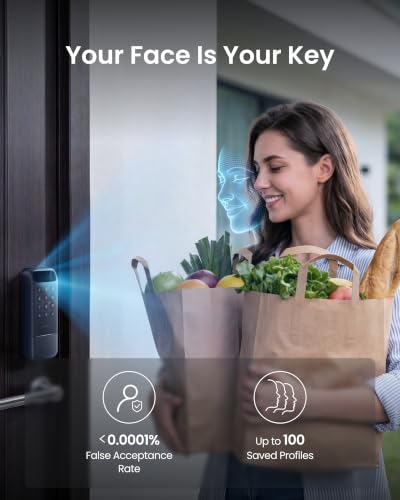
The Lock Vision is the entry point to SwitchBot's face-recognition deadbolts, and it keeps the part that matters: the same 3D structured-light scanner as the Pro, projecting over 20,000 infrared dots, storing up to 100 faces and reading them in complete darkness. It retrofits an existing deadbolt and joins a smart home over CSA-certified Matter on its own 2.4GHz Wi-Fi, so Apple Home, Alexa, Google Home, SmartThings and Home Assistant all reach it without a bridge. Power is a 10,000mAh pack rated for twelve months, backed by a CR123A cell good for 500 emergency unlocks and a USB-C port that takes any power bank. What it gives up against the Pro is the rest of the biometrics: there is no fingerprint reader and no palm vein sensor, so face, keypad, NFC card, app, geofence and physical key are the six ways in. Pick it when hands-free entry is the goal and a keypad is an acceptable second option.
- Hands-free entry when your hands are full
- Retrofitting an existing deadbolt
- Matter and Home Assistant setups
- Households sharing timed or one-time access
Pros
- 3D structured-light face recognition with over 20,000 infrared dots, up to 100 stored faces, and it reads in complete darkness
- CSA-certified Matter over built-in Wi-Fi reaches Apple Home, Alexa, Google Home, SmartThings and Home Assistant with no bridge
- 10,000mAh rechargeable pack rated for twelve months, with a CR123A backup good for 500 emergency unlocks
- A USB-C port on the exterior escutcheon takes any power bank if both batteries run flat
- Six to twelve digit passcodes, with up to 90 permanent codes plus one-time, time-limited and anti-peep entry
- Up to 100 NFC cards, alongside app control, geofence unlock and a physical key
- Magnetic door sensor drives auto-lock once the door closes and reports a door left ajar
- Geofence auto-lock secures the door when you leave, with timers from 30 seconds to 30 minutes
- Alerts for every lock and unlock, tampering, low battery and repeated failed attempts
- IP65 rated and retrofits an existing deadbolt with a screwdriver, with no subscription to pay
Cons
- No fingerprint reader; the semiconductor sensor is exclusive to the Lock Vision Pro
- No palm vein recognition either, so the keypad is the main fallback when a face is not read
- 2.4GHz Wi-Fi only, with no 5GHz band
- No Zigbee, Z-Wave or Thread radio, so everything routes over Wi-Fi and Matter
- Apple's Home Key tap-to-unlock is not supported
- No camera or doorbell in the lock, so it cannot show you who is at the door
- Sold in a single finish
Who is the SwitchBot Lock Vision for?
This is a retrofit deadbolt, so it suits anyone who wants to keep the existing hardware and the existing keys rather than rebore the door. The exterior escutcheon measures 6.42 by 2.76 by 1.10 inches and the interior 7.09 by 3.03 by 1.26 inches, in zinc alloy and PC+ABS, with an IP65 rating that lets it face the weather on a front door. The defining capability is walk-up entry: the 3D scanner reads a face as you approach, which is the difference between fumbling for keys with an armful of shopping and simply arriving. Around that sit five more ways in, so a household with a cleaner, a dog walker and visiting family can each get their own method rather than sharing one code.
What the SwitchBot Lock Vision offers
Face recognition here is structured light rather than a flat camera match: over 20,000 infrared dots build a depth map, up to 100 faces can be enrolled, and because the projector supplies its own infrared light it works in total darkness. The keypad takes six to twelve digit codes with up to 90 permanent entries and 10 emergency ones, plus one-time codes for a delivery, time-limited codes for a weekend guest, and anti-peep entry that lets you pad the real code with random digits. Up to 100 NFC cards cover anyone who would rather tap than type. Connectivity is built in: 2.4GHz Wi-Fi and Bluetooth on board, CSA-certified Matter over that Wi-Fi, and therefore Apple Home with Siri voice unlock, Alexa, Google Home, SmartThings and Home Assistant with no bridge to buy and no subscription to pay. Automation leans on a magnetic door sensor, which drives auto-lock once the door actually closes with timers from 30 seconds to 30 minutes, reports a door left ajar, and pairs with geofencing that unlocks on arrival and locks up when you leave. The lock pushes an alert for every lock and unlock, for tampering, for low battery and for repeated failed attempts, and keeps its access log on the device for up to six months.
What to know before you buy
The gap between this and the Lock Vision Pro is biometric, not structural: the semiconductor fingerprint reader and the contactless palm vein sensor are both exclusive to the Pro, so if a face scan fails here the fallback is the keypad, a card, the app or the physical key rather than a second biometric. Wi-Fi is 2.4GHz only, which is normal for a battery lock but does mean a router running a merged band can make pairing awkward. There is no Zigbee, Z-Wave or Thread radio, so everything routes over Wi-Fi and Matter. Apple's Home Key tap-to-unlock is not supported, so an iPhone or Apple Watch held to the escutcheon will not open the door, and voice or app control is the Apple path instead. There is no camera and no doorbell in the lock itself, so nothing here shows you who is standing outside; SwitchBot sells a video doorbell separately for that. It ships in a single finish, and the warranty runs a year.
Is the SwitchBot Lock Vision worth it?
The case for it is straightforward: it is the cheaper half of the Lock Vision pair and the expensive component, the structured-light face scanner, is the one that carried over intact. Everything else that makes the Pro appealing is here too, including the 10,000mAh battery, the CR123A and USB-C fallbacks, IP65, the door sensor, the alert set and hub-free Matter. What you are declining is redundancy in biometrics. That is a fair trade for a household happy to type a code on the rare occasion a face is not read, and a poor one for anyone who specifically wants a fingerprint reader on the door, where the Pro is the honest recommendation. As a first Matter lock that needs no bridge and no monthly plan, it is one of the better-equipped retrofit deadbolts available.
Frequently asked questions
Does the SwitchBot Lock Vision have a fingerprint reader?
No. The fingerprint sensor and the palm vein reader are both exclusive to the Lock Vision Pro. The Lock Vision unlocks by 3D face recognition, keypad passcode, NFC card, the app, geofencing or the physical key.
Does the SwitchBot Lock Vision need a hub?
No. It has 2.4GHz Wi-Fi and Bluetooth built in and carries CSA-certified Matter over that Wi-Fi, so it connects straight to your network and to a Matter home without a SwitchBot hub or any other bridge.
Does it work with Apple Home, Alexa, Google Home, SmartThings and Home Assistant?
Yes, all five, and Matter is what gets it there. Apple Home also supports Siri voice unlock, and Home Assistant can additionally use the official SwitchBot integration.
Does the SwitchBot Lock Vision require a subscription?
No. Every feature works without a paid plan. The access log is stored on the lock itself for up to six months, and face data is encrypted and kept locally on the device rather than in a cloud.
How long does the battery last, and what happens if it dies?
The 10,000mAh rechargeable pack is rated for twelve months at around ten unlocks a day. If it runs out, a built-in CR123A cell provides up to 500 emergency unlocks with a five-year standby, and if that is flat too, a USB-C port on the exterior escutcheon lets any power bank open the door.
Will it fit my existing door?
It replaces a standard deadbolt with a screwdriver, no drilling. SwitchBot specifies a cross bore of 1.50 or 2.13 inches, a door thickness of 1.38 to 2.17 inches and a backset of 2.36 or 2.76 inches, so measure those three before ordering.