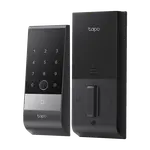


TP-Link Tapo DL130 Review: A Palm Vein Deadbolt with a Dual-Battery Design
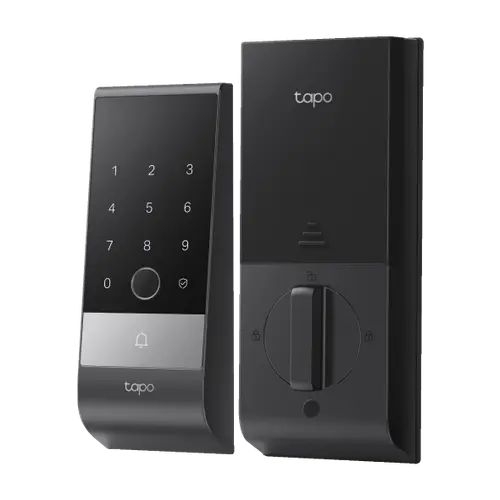
The Tapo DL130 is a Wi-Fi and Bluetooth deadbolt that unlocks by palm vein, fingerprint, keypad code, the Tapo app or a physical key. Owners praise how easy it is to install, the fast fingerprint reader, the long-lasting rechargeable battery and the way it works with other Tapo devices. The weak spots are reports of the auto-lock stopping and a palm reader that some households find inconsistent, plus no Apple Home or Matter support. It is a strong pick for Alexa, Google Home or SmartThings homes, and a poor fit for Apple Home homes.
- Hands-free entry seekers
- Tapo camera and doorbell owners
- Alexa and Google Home homes
- Easy DIY installs
Pros
- Quick, simple installation that owners often call easy
- Palm vein, fingerprint, keypad code, app and key entry
- Fingerprint reader described as fast and accurate
- Removable 7800 mAh battery plus a built-in backup keeps the lock working while charging
- Auto-lock once the bundled door sensor confirms the door is closed
- Works with other Tapo devices, Alexa, Google Home and SmartThings
- Built-in doorbell button on the keypad
- Two year warranty
Cons
- Auto-lock stopped working for some owners
- Palm reader needs several tries or rejects people for some households
- No Apple Home, Apple Home Key or Matter
- No camera, NFC or face recognition
- Door sensor placement matters for auto-lock
- Interior assembly is not weatherproofed
Who is the Tapo DL130 for?
It suits households that want several ways in without carrying a phone: palm vein, up to 100 fingerprints, up to 200 access codes on a backlit keypad, the app and two backup keys. Owners who replaced an older keypad or biometric lock describe it as a clear upgrade in speed and battery life, and those who already run Tapo cameras and doorbells like that the lock sits in the same app and can be unlocked from the doorbell screen. It also suits homes that use Alexa, Google Home or SmartThings for voice control.
What do owners like about it?
Installation is the most repeated compliment, with many calling it quick and simple and the app setup just as easy. Several owners say the palm reader works well and is quick, and the fingerprint reader is mentioned as accurate and fast. The dual-battery design gets praise because the built-in 500 mAh backup keeps the lock running while the removable 7800 mAh pack charges, and owners describe the battery life as great. Others note quiet operation, a sleek look, stable Wi-Fi and Bluetooth connectivity, random-digit anti-peep keypad entry and the option to schedule Wi-Fi off periods to save battery.
What are the common complaints?
The most serious one is auto-lock. The lock bolts itself only after the bundled door sensor confirms the door is closed, so owners stress placing the sensor carefully with the supplied placement tool. A few owners report the feature stopping after days or weeks, with the door left unlocked, and toggling the setting did not fix it for them. The palm reader divides opinion: some find it flawless, while others say it needs several tries or rejects some people often enough that they use the fingerprint reader or code instead. A small number had pairing or stability problems, and some wanted a camera, an unlock-on-approach feature or Apple Home support, none of which it has. A few found the alignment and the inside end-cap screws fiddly.
Does it work with smart home platforms?
It works with Amazon Alexa, Google Home and Samsung SmartThings, and it connects over 2.4 GHz and 5 GHz Wi-Fi and Bluetooth 5.0 with no Zigbee, Z-Wave or Thread radio. Apple HomeKit, Apple Home Key and Matter are not supported, and NFC and face recognition are not offered. The exterior assembly is rated IP65, but the interior assembly is not weatherproofed, so install it on a sheltered door.
Is the Tapo DL130 worth it?
For most buyers the easy install, the quick fingerprint unlock, the battery design and the deep Tapo integration make it a good value among biometric smart locks. The deciding question is auto-lock: if you depend on the door locking itself every time, test it in the first weeks, because the reports of it failing are the main reason some owners rate the lock low. The palm reader is a convenience, and it is sensible to enroll fingerprints and a code as well.
Frequently asked questions
How can you unlock the Tapo DL130?
With your palm vein, a fingerprint (up to 100), a keypad code (up to 200), the Tapo app, voice control through Alexa or Google Home, or one of the two backup keys.
Does the Tapo DL130 work with Apple HomeKit or Matter?
No. It works with Amazon Alexa, Google Home and Samsung SmartThings. Apple HomeKit, Apple Home Key and Matter are not supported.
How long does the Tapo DL130 battery last?
The rechargeable 7800 mAh pack is rated for about a year. A built-in 500 mAh backup keeps the lock running while the main pack is removed to charge, and owners describe the battery life as great.
How does the Tapo DL130 auto-lock work?
It uses the bundled door sensor and locks once the door is confirmed closed. Placing the sensor correctly matters, and a few owners report the auto-lock stopping working, so check it after setup.
Is the Tapo DL130 weatherproof?
The exterior assembly is rated IP65. The interior assembly is not weatherproofed, so it is best on a sheltered door.
Does the Tapo DL130 have a camera?
No. It has a doorbell ring button on the keypad but no camera, although owners with Tapo doorbells can unlock from the doorbell's screen in the app.