



Wyze Lever Lock Review: Fingerprint Entry Built Into the Door Handle
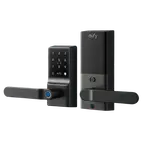
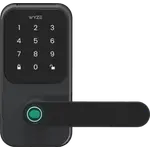
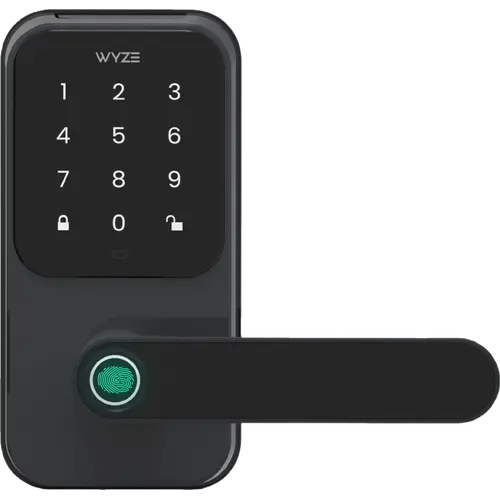
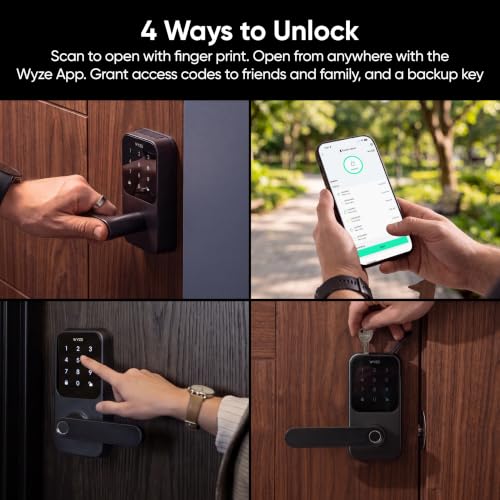
The Wyze Lever Lock puts the fingerprint reader in the handle itself, so a normal grip opens the door, and it pairs that with a keypad, app control over built-in Wi-Fi and two physical keys. It is aimed at the everyday side or back door rather than the main deadbolt, and it needs no hub or subscription. The trade-offs are a short list of supported ecosystems, a single black finish and a cloud-dependent app for anything beyond fingerprints.
- Fingerprint-first households
- No-hub setups
- Alexa and Google Home users
- Doors that already have a lever handle
Pros
- Fingerprint reader built into the handle, with up to 50 stored prints
- Backlit keypad with up to 50 codes, one-time codes and anti-peep entry
- Built-in 2.4 GHz Wi-Fi 6, so no hub or subscription is needed
- Auto-lock when the door shuts, after a delay or at a scheduled time
- Up to 12 months on eight AA batteries, plus a USB-C emergency power port
- Two physical keys as a backup
- IP54 weather resistance and Bluetooth 5.3
Cons
- No Apple HomeKit, SmartThings or Matter support
- Home Assistant support is not documented
- Sold in black only
- No camera, video or motion detection
- Geolocation-based unlocking is not documented
- Local control is not documented, so routines depend on the Wyze app and cloud
Who is the Wyze Lever Lock for?
This is a lock for the door you use all day, the side entrance, the back door or the garage door, where reaching for a key or a phone is the slow part. Because the fingerprint reader sits on the handle, opening the door is a single motion: grab and turn. The built-in Wi-Fi means there is no bridge to buy and no monthly plan, and the eight AA batteries are included, so the whole setup stays simple. It suits a household that wants fingerprint and code entry without turning the door into a project.
What stands out on paper
The headline feature is the fingerprint sensor in the handle, which stores up to 50 prints and unlocks as you grip it. A backlit keypad covers the no-phone cases: it holds up to 50 codes, supports one-time and scheduled codes, and accepts extra digits before or after the real code so a bystander cannot read it from the pattern. Auto-lock can trigger when the door shuts, after a delay, or at a set time each night. Around that sit Wi-Fi 6 on 2.4 GHz, Bluetooth 5.3, up to 12 months of battery life from eight AA cells, a USB-C emergency power port for dead batteries, IP54 weather resistance and two physical keys as the oldest fallback there is.
What to know before you buy
The ecosystem list is short. Alexa and Google Home are supported, with a spoken PIN required for voice unlocking, but there is no Apple HomeKit, SmartThings or Matter here, and Home Assistant support is not documented. Remote control, notifications and code management run through the Wyze app over Wi-Fi, and local control is not documented, so routines lean on the cloud. The lock comes in black only, it has no camera, video or motion detection, and geolocation-based unlocking is not documented. The battery figure is also a best case at a moderate number of daily unlocks.
Is the Wyze Lever Lock worth it?
As a budget lever lock, it covers the practical basics well: fast fingerprint entry, a real keypad, auto-lock, app control and a long AA battery rating, with no hub and no subscription to factor into the cost of ownership. The compromise is breadth rather than the core experience, since Apple Home, SmartThings and Matter are absent and there is only one finish. For a side or back door in an Alexa or Google Home household, that is a sensible trade. For a house built around Apple Home or Matter, it is the wrong fit.
Frequently asked questions
Does the Wyze Lever Lock need a hub or a subscription?
No. Wi-Fi 6 is built into the lock, and the Wyze app controls it directly, so there is no hub to buy and no subscription required for the lock itself.
Which smart home platforms does the Wyze Lever Lock work with?
It works with Alexa and Google Home, and voice unlocking requires a spoken PIN. Apple HomeKit, SmartThings and Matter are not supported, and Home Assistant support is not documented.
How is the Wyze Lever Lock powered?
It runs on eight AA batteries, which are included, with up to 12 months of battery life at a moderate number of daily unlocks. A USB-C port provides emergency power if the batteries run flat.
How many fingerprints and passcodes can it store?
Up to 50 fingerprints and up to 50 passcodes. Codes can be permanent, scheduled or one-time, and anti-peep entry lets you add extra digits around the real code.
Can the Wyze Lever Lock lock itself automatically?
Yes. Auto-lock can be set to trigger when the door shuts, after a delay, or at the same time every night, all managed in the Wyze app.
Does the Wyze Lever Lock work with Home Assistant?
Home Assistant support is not documented for this lock. Control and notifications run through the Wyze app and the supported Alexa and Google Home integrations.