


Yale Assure Lock 2 Touch Review: Fingerprint Entry Without a Hub, at a Battery Cost
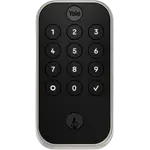
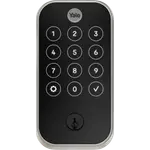
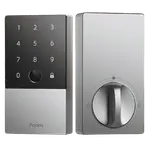
The Yale Assure Lock 2 Touch is a keyed fingerprint deadbolt with Wi-Fi built in, so it locks, unlocks and reports from anywhere without a separate bridge. Owners who like it praise a quick do-it-yourself install and how convenient the fingerprint reader is for a busy front door, plus temporary codes for guests and contractors. The recurring complaint is battery life: several owners replaced the four AA cells within weeks, and a few reported the lock going unresponsive. It suits Alexa, Google Home and Apple Home households that value fingerprint entry, as long as they can live with frequent battery changes.
- Busy family front doors
- Alexa, Google Home and Apple Home users
- Hosts sharing temporary access
- DIY deadbolt replacements
Pros
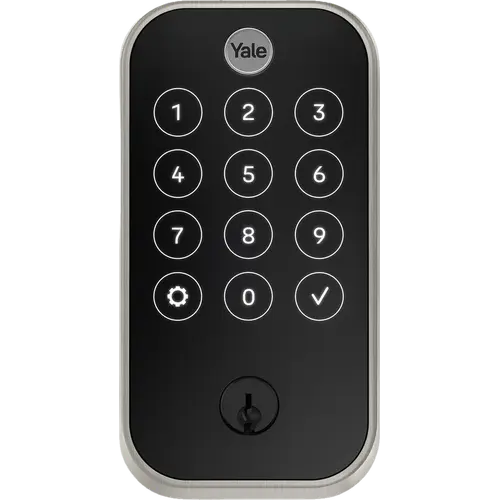
- Fingerprint reader, backlit keypad, app and voice entry in one lock
- Wi-Fi built in, no bridge needed for remote access
- Owners describe a quick DIY install into existing deadbolt holes
- Auto-Lock with DoorSense and Auto-Unlock by phone location
- Temporary access to share with guests and contractors
- Works with Alexa, Google Home and Apple HomeKit
Cons
- Several owners replace the AA batteries every few weeks
- Some units become unresponsive and need the app to wake them
- No backup battery, Matter, SmartThings or Apple Home Key
- 2.4 GHz Wi-Fi only
- App not available in every country
Who is the Yale Assure Lock 2 Touch for?
It is made for households replacing a standard deadbolt who want every way in at once: a fingerprint, a backlit keypad with a code per person, the app, a voice assistant and, on the keyed model, two backup keys. Owners with kids, frequent visitors or contractors coming and going say it is where the lock earns its keep, because nobody needs a key and access can be shared from the app. Wi-Fi is built in, so remote control and notifications work without a bridge, and it works with Amazon Alexa, Google Home and Apple HomeKit.
What buyers love
Installation is the most consistent praise: owners who fitted it themselves describe it as quick and say it dropped into the existing deadbolt holes. The fingerprint reader set into the Yale logo is the feature people mention most, with keypad codes kept as a fallback. Owners also like Auto-Unlock as they pull into the driveway, Auto-Lock once DoorSense sees the door closed, the remote check of whether the door is open and locked, and being able to send someone a temporary pass.
What to know before you buy
Battery drain is the complaint that repeats. Several owners say the four AA batteries lasted a few weeks on a door used every day, one switched to rechargeable lithium cells to cope, and another went through two sets in a few months before support sent a Wi-Fi bridge to test the radio. There is no backup battery or emergency power. A few owners also report the lock becoming unresponsive and leaving the door unlocked until the app woke it, motor noise when it locks, and slow support. The Yale Access app is not available in every country: owners in Mexico could not set it up there. On the platform side it has no Matter, no SmartThings, no Apple Home Key and no NFC, and its Wi-Fi is 2.4 GHz only. Buy a new unit: owners of used units found them still registered to a previous owner, which makes them impossible to set up.
Is the Yale Assure Lock 2 Touch worth it?
For a front door in a US or Canadian home on Alexa, Google Home or Apple Home, it delivers the full keyless set (fingerprint, codes, app, auto-lock and auto-unlock) without a hub, and owners who get a good unit are very happy with it. Its middling average rating comes from the battery life and the occasional unit that stops responding. If you want the convenience and are willing to keep spare batteries, it is a strong pick; if you want a lock you can forget about for months, or Matter support, look at other options.
Frequently asked questions
Does the Yale Assure Lock 2 Touch need a hub or bridge?
No. This version has Wi-Fi built in, so remote locking, notifications and access sharing work through the Yale Access app without a separate bridge. It connects to 2.4 GHz Wi-Fi only.
How long do the batteries last?
It runs on four AA batteries and has no backup battery. Owners on busy doors report changing them after a few weeks, and the lock signals low battery with the gear icon turning amber and then red.
Does it work with Apple Home, Alexa and Google Home?
Yes, it works with Amazon Alexa, Google Home and Apple HomeKit. It does not support Matter, Samsung SmartThings or Apple Home Key.
How many fingerprints can it store?
Up to 20 fingerprints, stored locally on the lock. The backlit keypad also takes individual entry codes, and the keyed model includes two backup keys.
Does it lock automatically?
Yes. Auto-Lock throws the bolt once the DoorSense sensor detects the door is closed, and Auto-Unlock can open it as you approach with your phone.