

SwitchBot Smart Video Doorbell Review: The Subscription-Free Doorbell That Brings Its Own Screen
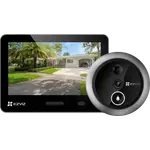
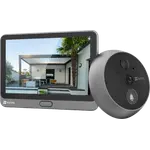
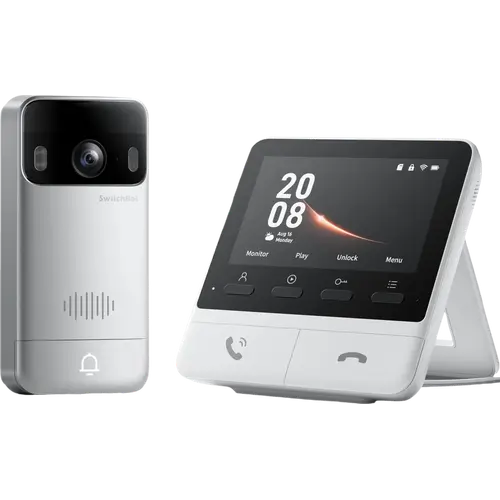
The SwitchBot Smart Video Doorbell answers one question better than almost any rival: who is at the door, right now, without picking up a phone. It ships with a 4.3 inch indoor monitor that lights up with the live 2K feed the moment the bell is pressed, records to an included microSD card with no plan to pay, and installs wire-free on a 5000mAh battery. The trade-off is responsiveness and volume: many owners wait ten to fifteen seconds for the picture, and the monitor's chime does not carry across a whole house. Buy it for the screen and the fee-free storage, not as a fast security camera.
- No-subscription buyers
- Phone-free households
- Renters and wire-free installs
- SwitchBot lock owners
- Homes with kids or elderly relatives
Pros
- Comes with a 4.3 inch indoor monitor that wakes to the live feed, so answering the door never needs a phone
- No subscription for the core features: a 4GB microSD card is pre-installed and cards up to 512GB are supported
- Sharp 2K video (2304 x 1296) with a 165 degree diagonal view and true color night vision
- Wire-free IP65 install on a 5000mAh battery, with USB-C charging, an optional solar panel and a wired option for constant power
- Free human detection with an adjustable detection zone, detection distance and clip length, which cuts false alerts
- Works with Alexa and Google Home, feeds Home Assistant over RTSP, and doubles as a Matter bridge for a paired SwitchBot lock
Cons
- Slow to show the picture: many owners wait ten to fifteen seconds, long enough for a courier to walk away
- The indoor chime is not loud enough to carry across a house, and it cannot ring an existing wired door chime
- No Apple Home and no SmartThings, and the camera itself is not a Matter accessory
- One motion zone only, with no privacy blackout area, no facial recognition and no package detection
- Pet and vehicle tagging need a paid cloud plan, which starts at about four dollars a month
- The microSD card lives in the mains-powered monitor, so a power cut stops recording, and Wi-Fi is 2.4GHz only
Who is the SwitchBot Smart Video Doorbell for?
This is a doorbell for households that do not want to live inside an app. The kit is two devices sold as one: an IP65 outdoor unit with a 2K camera (2304 x 1296, 165 degree diagonal view, color night vision) and a 4.3 inch indoor monitor that acts as the chime, the intercom handset and a Wi-Fi relay for the doorbell. Press the button outside and the screen inside wakes with the live feed, so a child, a grandparent or anyone without the app can see and answer the door. It also suits people who refuse monthly fees: a 4GB microSD card comes pre-installed in the monitor, cards up to 512GB are supported, and cloud storage is strictly optional. Because the doorbell runs on its own battery and can be stuck or screwed to the frame, it works in rented flats and on doors with no existing bell wiring.
What buyers love
The monitor is the reason people pick this over a Ring or a Nest, and owners who switched say so directly: instant live video on a screen that is always there, plus a glanceable clock, weather and a missed-visitor list. Setup gets consistent praise, a few minutes of pairing both units in the SwitchBot app with a paper drilling template in the box. Owners also report a clear night image thanks to the color night mode, and noticeably fewer false alerts than their previous doorbell, because human detection is on by default and the detection distance, clip length and volumes are all adjustable. Battery life holds up in daily use, several owners charge it over USB-C in minutes or add the optional solar panel and stop thinking about it, and one wired it permanently to the monitor with bell wire. The Alexa link is the integration people actually use: an Echo announces the ring across the house.
What to know before you buy
Latency is the recurring complaint and the main reason the average rating sits well below the hardware's promise. Owners across regions describe ten to fifteen seconds before the video appears on the phone, and a monitor that rings instantly but is slow to show the picture, which is long enough for a delivery driver to leave. The second issue is sound: the indoor chime is not loud enough to hear upstairs or over a television, the outdoor speaker is louder than the indoor one, and the system cannot ring an existing wired door chime (one owner destroyed the unit by connecting it to old doorbell transformer wiring, so treat the low-voltage terminals as a link to the monitor, not to mains). A minority report dropouts, app crashes and faster battery drain than advertised, and one owner could not change the detection zone at all. Feature-wise there is one motion zone, no privacy blackout area, no facial recognition and no package detection, while pet and vehicle tagging sit behind a cloud plan of a few dollars a month. Recording also lands on the card inside the mains-powered monitor, so a power cut stops it even though the doorbell itself is on battery.
How does it fit into a smart home?
Treat it as a good standalone intercom with a few smart hooks rather than an ecosystem device. Alexa is the strongest link, with Echo announcements and voice-called live view, and SwitchBot lists Google Home as supported too. Home Assistant is officially documented over RTSP, with the stream published when the bell is rung, so the feed is reachable but doorbell events are not a rich automation source. The monitor is separately certified as a Matter bridge and its job in that role is narrow but useful: it puts a paired SwitchBot lock on a Matter fabric over Bluetooth, and gives you a dedicated unlock button on the screen plus NFC card unlocking at the door. What you do not get is the camera itself as a Matter accessory, an Apple Home tile or a SmartThings device, so an Apple household should look elsewhere.
Is the SwitchBot Smart Video Doorbell worth it?
Yes, if you want the screen and the fee-free storage, and no, if you want a fast security camera. Nothing else at this price puts a dedicated 2K monitor, an IP65 battery doorbell, a microSD card and a Matter bridge for a smart lock in the same box, and the wire-free install makes it one of the easiest upgrades for a rented home. But the delay before the picture arrives and the soft chime are real, repeatedly reported and not fixable with settings, so if you are buying primarily to catch couriers in the act, a faster wired doorbell is the safer spend. For seeing who is at the door from the sofa, with nobody's subscription attached, it is a strong value pick.
Frequently asked questions
Does the SwitchBot Smart Video Doorbell need a subscription?
No. A 4GB microSD card is pre-installed in the indoor monitor and holds roughly 3,500 short events, and you can fit a card of up to 512GB. Cloud storage is an optional paid extra with a 30-day free trial, and the only features behind it are pet and vehicle tagging; human detection and local recording are free.
Does it work with Alexa, Google Home and Home Assistant?
Yes to all three. SwitchBot lists Alexa and Google as the supported assistants, an Echo device can announce the ring and show the feed, and Home Assistant is documented over RTSP, with the stream published when the doorbell is rung.
Does it work with Apple Home, SmartThings or Matter?
Apple Home and SmartThings are not supported, and the camera is not exposed as a Matter accessory. The indoor monitor is certified as a Matter bridge, but what it publishes to a Matter home is a paired SwitchBot lock, not the doorbell or its video.
How long does the battery last, and can it be hardwired?
SwitchBot rates the 5000mAh battery at up to 570 days, and owners generally find it lasts months rather than weeks. You recharge it over USB-C, add the optional solar panel, or wire the doorbell to the indoor monitor with bell wire for permanent power. Do not connect it to an existing mains doorbell transformer.
Does it still work if the internet goes down?
Mostly yes. The doorbell talks to the monitor directly, so the bell, the live view and the intercom keep working without internet, and events record to the microSD card. The monitor needs mains power for any of that, so a power cut is a different story.
How far does it detect motion, and can I limit the area?
The PIR sensor covers about 7.5m across a 130 degree spread, and you can shrink that by resizing a single detection rectangle over the live image and by lowering the detection distance in the app. There is only one zone, and there is no privacy blackout area.