


Meross EM16P Review: Eighteen Circuits and a Home Assistant Integration That Just Works
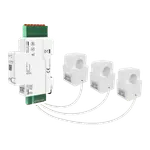
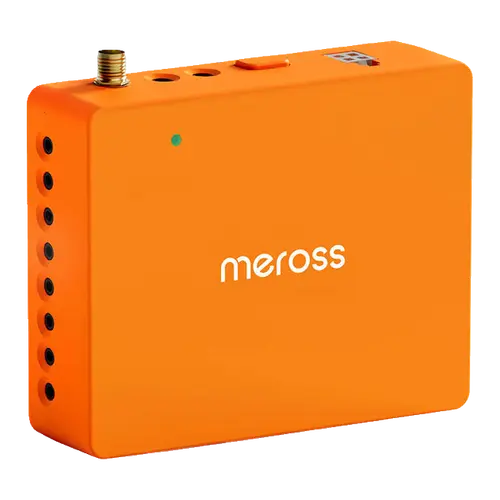
The EM16P is a complete panel monitor in one box: two 200 A clamps for the mains, sixteen 60 A clamps for branch circuits, and support for single-phase, split-phase and three-phase Wye services. Its selling point over the cheaper end of the market is the official Home Assistant integration, which needs no flashing and exposes every channel to the Energy dashboard, alongside a plain but effective app with cost charts, alerts and five years of exportable history. Expect to spend the time labelling circuits, and expect a clamp or two to read backwards until you invert it in software.
- Circuit-level monitoring
- Home Assistant users
- Solar owners
- No-subscription seekers
Pros
- 18 channels: 2 x 200 A mains plus 16 x 60 A branch clamps, all included
- Official Home Assistant integration, no flashing required
- 60 A branch clamps cover 60 A and 70 A breakers that 50 A clamps cannot
- Single-phase, split-phase and three-phase Wye support
- Five years of history with exportable hourly reports and no subscription
- Clamp direction can be inverted in the app instead of rewiring
- 2 year warranty
Cons
- Circuit mapping and labelling take longer than the wiring itself
- Some clamps read negative until inverted in software
- Setup requires a Meross account even though data stays local
- Reports of device-offline errors needing a restart
- No relay output, no Ethernet, no Alexa, Google Home, HomeKit or Matter
Who is the Meross EM16P for?
Anyone who wants the whole panel mapped rather than one number for the house. Owners describe using it to hunt down a high baseline draw, to compare individual appliances, and in one case to work out remotely whether a furnace was still drawing power after an alert said the house was getting cold. The 60 A branch clamps matter more than they sound: one buyer switched from a competing monitor specifically because its 50 A clamps could not cover 60 A and 70 A breakers. It also suits Home Assistant households, where the official integration turns the unit into a large set of entities feeding the Energy dashboard.
What buyers love
Two themes dominate. First, the Home Assistant support is real: it works without flashing, it exposes every circuit, and reviewers with over a hundred entities report historical data, grouped sensors and custom reporting all working as expected. Second, installation is more approachable than people expect. Owners with no electrical background report finishing in about an hour, helped by clip-on transformers that plug into the module, clear instructions and videos, and packaging that keeps each sensor separate. The app is described as plain but practical: tap any circuit and get its history by day, month or year. Cost tracking and threshold alerts are included with no subscription, and the data stays on the local network.
What to know before you buy
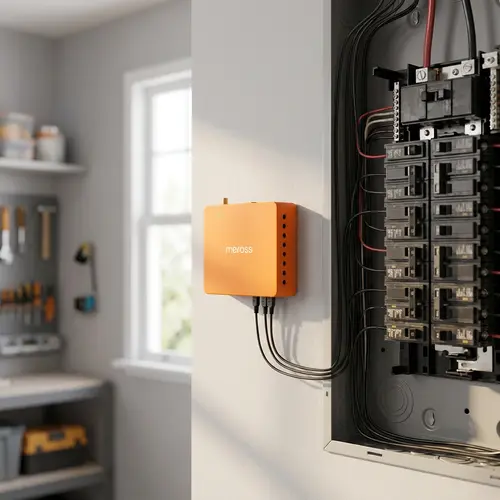
Plan before you start. The recurring advice is to map and verify your breakers first, because panel labels lie and the install time is dominated by tracing circuits, not by wiring. Space is the other constraint: crowded panels take patience, and the monitor itself has to be hardwired, which may mean adding a dedicated breaker depending on local code. Expect at least one clamp to read negative on first power-up, which is fixed by inverting that channel in the app rather than by reopening the panel. Setup requires a Meross account even though the data stays local, one reviewer reports recurring device-offline errors needing a restart, and another questions how reliably the unit determines direction of flow. There is no relay output, no Ethernet, and no Alexa, Google Home, HomeKit or Matter support.
Is the Meross EM16P worth it?
For the amount of hardware in the box, yes. Eighteen clamps, a documented open API, local web control, five years of exportable history and a two-year warranty put it above the entry level without reaching the price of the premium options, and buyers consistently rate it well. Choose it if you want per-circuit detail with a Home Assistant integration that behaves; choose something else if you need voice control, a relay to switch loads, or the polish of a large consumer ecosystem app.
Frequently asked questions
How many circuits can the Meross EM16P monitor?
Eighteen: two 200 A clamps on the service mains plus sixteen 60 A clamps on branch circuits, all included in the box. Channels can be merged for a combined view of a 240 V appliance.
Does it work with Home Assistant?
Yes, through an official integration that needs no firmware flashing. Owners report the whole channel set appearing as entities, feeding the Energy dashboard with consumption, feed-in and historical statistics.
Does it need a subscription or the cloud?
No subscription. The energy data stays on your local network, and the device exposes an Open API and local web control. An account is still required during setup.
What electrical systems does it support?
Single-phase 2-wire, single-split-phase 3-wire and 3-phase 4-wire Wye systems with an earthed neutral. Delta systems are not supported.
Why does a circuit show negative energy?
The clamp is facing the wrong way. You do not need to reopen the panel: the app lets you invert that channel's reading in software, which owners describe as a quick fix on first power-up.
Can I install it myself?
Reviewers with no electrical background report installing it in around an hour, but it is panel work with the power off, the module has to be hardwired and may need a dedicated breaker. The slow part is identifying and labelling the circuits before you clamp anything.