


Refoss EM16P Review: The Local-First Energy Monitor Home Assistant Users Ask For
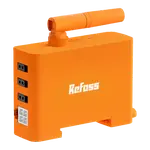
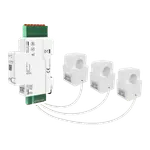
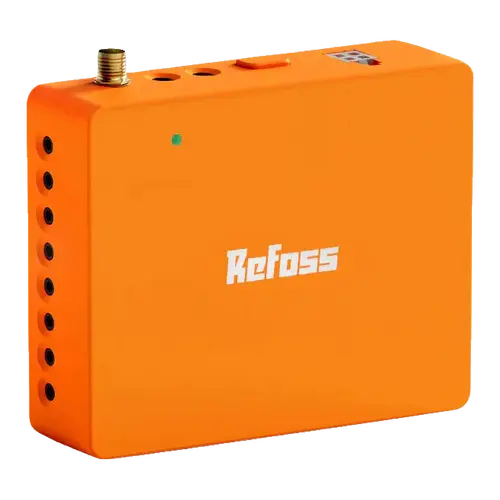
The EM16P is what you buy when the readings have to stay on your own network. Two 200 A mains clamps and sixteen 60 A branch clamps cover up to eighteen circuits, and the data is available through a local web UI, an open JSON-RPC API and MQTT, plus a native Home Assistant integration that needs no flashing. Installation is repeatedly described as simple thanks to plug-in CT connectors and a clear manual, but a recurring quirk is worth knowing: many owners find some clamps report power in reverse even when wired per the manual, which is fixed with a factor in the app rather than by rewiring.
- Home Assistant users
- Local-control and privacy
- Solar with zero feed-in
- Circuit-level monitoring
Pros
- Native Home Assistant integration with no firmware flashing
- Local web UI, open JSON-RPC API and MQTT, works without the cloud
- 18 channels: 2 x 200 A mains plus 16 x 60 A branch sensors
- Solar net metering with zero feed-in automations
- Reports voltage, current, active power and power factor
- Five years of exportable history at no extra cost
- Plug-in CT connectors and a clear manual make installation quick
Cons
- Some CT clamps read in reverse even when wired per the manual
- CT leads are a fixed length and cannot be trimmed, leaving slack in the panel
- App misses settings such as declaring a circuit as 120 V or 240 V
- No Ethernet port and no Alexa, Google Home, HomeKit or Matter
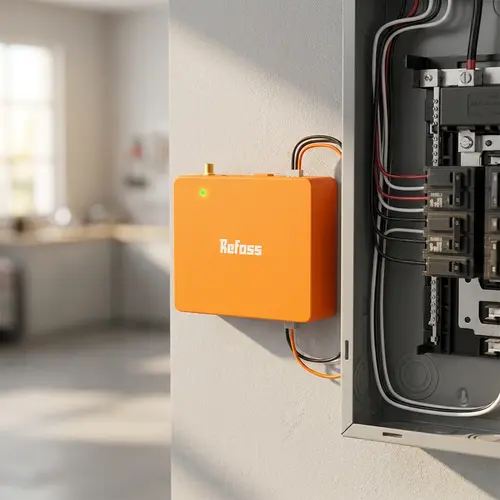
- Requires working inside a live breaker panel
Who is the Refoss EM16P for?
This is the enthusiast pick in the category. Owners consistently say they chose it for one reason: the local Home Assistant integration, which connects itself with almost no setup and keeps working without a cloud account. Beyond that it is a conventional panel monitor, sized for a 200 A service with up to sixteen branch circuits, and several owners run two units to cover a dual-panel or 400 A home. If you want a polished consumer app and voice assistants, this is not that product. If you want the raw numbers in your own automation platform, it is close to the reference option.
What buyers love
Installation gets the most praise. The CT leads use plug-in connectors rather than screw terminals, every clamp is labelled, and the manual is described as thorough and well written, so owners with basic electrical skills report finishing in half an hour to two hours. The hardware feels solid in the hand. In the app, the details that keep coming up are the ones that save sensors: a multiplier for a balanced 240 V appliance measured with a single clamp, merged channels for a combined view, per-circuit consumption alerts and a cost per kWh you set yourself. Owners with solar highlight the bi-directional metering, and the Open API, MQTT and web UI mean the same data can feed a dashboard you built yourself.
What to know before you buy
The recurring complaint is CT orientation. Multiple owners, including electrical engineers, report that some clamps read negative even when installed exactly as the manual describes, so consumption shows as export until you flip the clamp or set a negative factor in the app. It is a five minute fix once you know, but it is annoying on a fresh install and it makes the Home Assistant entities briefly nonsensical. Wiring tidiness is the other gripe: the CT leads are moulded to a fixed length and cannot be trimmed, so the panel ends up with slack to manage, and the Wi-Fi antenna pigtail is short. The app is functional rather than elegant, missing some settings owners expect (such as declaring a circuit as 120 V or 240 V), and the Home Assistant integration does not let you rename sensors from within it. There is no Ethernet port, no Alexa, Google Home, HomeKit or Matter support, and accuracy is specified within +/- 2%.
Is the Refoss EM16P worth it?
For a local-first setup, yes. Eighteen channels, a documented API, MQTT, a local web UI and five years of exportable history with no subscription is a lot of monitor for a mid-tier price, and the Home Assistant integration is the smoothest part of the whole product. The trade is polish: expect to spend an hour labelling channels, correcting a few reversed clamps and tidying cable slack. Buyers who want a hands-off consumer experience with voice control will be happier elsewhere, but nobody in that group was the target here.
Frequently asked questions
Does the Refoss EM16P work without the cloud?
Yes. It runs locally through its built-in web UI, an Open API using JSON-RPC 2.0 over HTTP, webhooks and MQTT, and it keeps seven days of minute-level data on the device itself. The free cloud service is optional and adds longer history and export.
How does it integrate with Home Assistant?
Natively, with no firmware flashing and no loss of warranty. Owners describe adding it and having the integration find the monitor by itself. The one limitation reported is that sensors cannot be renamed from inside the integration.
How many circuits can it monitor?
Up to eighteen: two 200 A clamps for the service mains and sixteen 60 A clamps for branch circuits, all included in the box. Owners with two panels install a second unit, and channels can be merged for a combined view of a 240 V appliance.
Why do some circuits show negative power?
Because the clamp is reading in the opposite direction, a common report on this monitor even when installed per the manual. You do not need to rewire: flip the clamp or set a negative factor for that channel in the app and the readings correct themselves.
Does it support three-phase and solar?
Yes to both. Refoss documents three-phase support alongside single-phase and split-phase panels, and the monitor measures bi-directionally so solar production, consumption and export are reported separately for zero feed-in automations.
Does it work with Alexa or Google Home?
No. The documented integrations are Home Assistant, the Open API and MQTT. There is no Alexa, Google Home, Apple HomeKit, SmartThings or Matter support.