

Aqara Hub M2 Review: The Essential Zigbee Hub for Aqara, With an IR Bonus and HomeKit Quirks
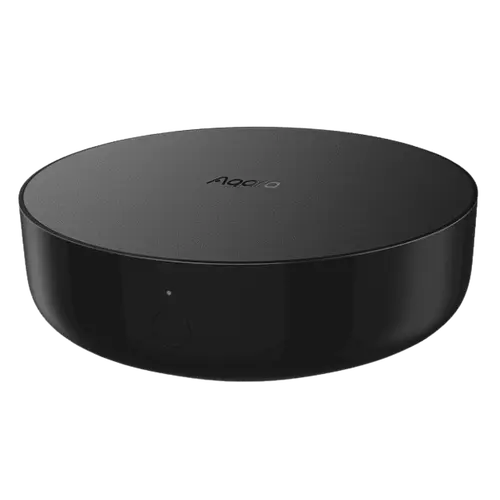
The Aqara Hub M2 is the hub owners say you simply need if you use Aqara Zigbee sensors, switches and blinds: it provides solid Zigbee coverage and reliable pairing that a generic Zigbee stick often can't (Aqara's sensors behave far better on their own hub than on a third-party coordinator). It connects over Ethernet or 2.4GHz Wi-Fi, adds a 360-degree IR blaster to control a TV or air conditioner (even via Siri or Alexa), includes a built-in speaker/alarm, and integrates cleanly with Home Assistant (via HomeKit) plus Alexa, Google and Apple HomeKit, supporting up to 128 subdevices. Many owners find setup quick and the hub rock-solid for years, and Aqara's customer support earns praise for replacing dead units. The rough edges: HomeKit integration is awkward, the hub presents as a 'Security System' rather than a normal bridge (delete it and all sensors vanish), there's no room sync between the Aqara and Apple Home apps, and the IR blaster isn't exposed to Home Assistant. More annoyingly, some hubs randomly go offline, and changing your Wi-Fi requires a full reset and re-pairing every child device. Setup can be clunky on eero/mesh routers (using Bluetooth setup or temporarily disabling 5GHz helps), the Aqara app has fewer features than Xiaomi's, and it's 2.4GHz Wi-Fi only with no Z-Wave and no Thread. Matter bridging does exist, added in firmware 4.0.0 and long labelled beta, which is what carries the hub into SmartThings. For Aqara Zigbee users, it's essential and good value; for a universal hub, look elsewhere.
- Aqara Zigbee sensors, switches and blinds
- Home Assistant users (via HomeKit)
- Wanting Ethernet reliability plus an IR blaster
- Apple HomeKit or Alexa/Google households
Pros
- Essential, reliable Zigbee hub for Aqara sensors, switches and blinds
- Works well with Home Assistant (via HomeKit) plus Alexa, Google and HomeKit
- 360-degree IR blaster to control a TV or AC (even by voice)
- Ethernet option for a more stable connection; built-in speaker/alarm
- Up to 128 subdevices, good value, and responsive customer support
Cons
- Awkward HomeKit integration (presents as a 'Security System'; no room sync)
- IR blaster isn't exposed to Home Assistant
- Some hubs go offline; changing Wi-Fi requires a full reset and re-pairing
- Setup can be clunky on eero/mesh routers
- 2.4GHz-only; no Z-Wave or Thread, and Matter bridging only arrived in a late beta firmware
Who is the Aqara Hub M2 for?
This is a Zigbee coordinator and smart-home bridge for the Aqara ecosystem, with a 360-degree IR blaster, Bluetooth, a built-in speaker/alarm, and both Ethernet and 2.4GHz Wi-Fi. It works with Alexa, Google Home, Apple HomeKit and Home Assistant, reaches SmartThings through its Matter bridge (firmware 4.0.0 and later), and supports up to 128 subdevices. It has no Z-Wave and no Thread. It best suits people using Aqara Zigbee sensors, switches or blinds (who need this hub for reliable operation), Home Assistant users, those who want a wired Ethernet connection plus an IR remote, and Apple HomeKit or Alexa/Google households. If you want a universal Zigbee/Z-Wave/Matter hub, or a polished HomeKit bridge experience, read the caveats first.
What buyers love
The core value is that it's essential for Aqara Zigbee gear: owners who struggled to pair Aqara sensors reliably on a generic Zigbee stick (with devices dropping offline every few days) found the M2 solved the problem completely, delivering good Zigbee coverage and stable pairing. It integrates well with Home Assistant through the HomeKit integration, so Aqara items show up in HA without needing Matter, and it works with Alexa, Google and Apple HomeKit for voice control. The 360-degree IR blaster is a valued bonus, owners set up an old air conditioner or use Siri via a HomePod (or Alexa) to control a TV, with a detailed 'scenes' workflow. An Ethernet option adds connection reliability over Wi-Fi, the built-in speaker enables an alarm/chime, and up to 128 subdevices makes it scalable. Many owners report quick setup (a couple of minutes) and rock-solid stability over a year or more, praise the price (cheaper than Lutron for no-neutral switches), and note Aqara's customer support is responsive, troubleshooting thoroughly and replacing dead hubs.
What to know before you buy
HomeKit integration is the weakest area: the hub appears as a 'Security System' rather than a normal bridge like a Hue, so if you delete it from HomeKit all its sensors disappear, there's no room sync between the Aqara Home app and Apple Home (sensors land in the hub's room and are hard to move), and battery status shows only in the Home app, not the Aqara app. The IR blaster, while great, is only usable from the Aqara app and isn't exposed to Home Assistant. Reliability can be inconsistent: some owners report the M2 (and A1) randomly going offline, and, notably, changing your Wi-Fi network requires a full reset and manually re-pairing every child device, a real pain, and a firmware update knocked one hub offline until support helped. Setup can be clunky on eero or mesh routers (owners hit a 'network credential generation failed' error and had to use Bluetooth setup, temporarily disable 5GHz, or enable legacy mode). The Aqara Home app has fewer features than Xiaomi's Mi Home app, a few owners found the sensors' range shorter than advertised, and it requires 2.4GHz Wi-Fi. There's no Z-Wave and no Thread, and the Matter bridge that does exist took until firmware 4.0.0 to arrive and stayed labelled beta for a long time, so it's an Aqara-plus-IR hub, not a universal one.
Is the Aqara Hub M2 worth it?
For anyone invested in Aqara Zigbee devices, the Hub M2 is essentially required and a strong value: it gives reliable Zigbee coverage and pairing, works well with Home Assistant, adds a handy 360-degree IR blaster and a wired Ethernet option, and integrates with Alexa, Google and HomeKit, backed by good support. The caveats are worth knowing: an awkward HomeKit 'Security System' integration with no room sync, an IR blaster not exposed to Home Assistant, occasional offline issues, and the frustration of re-pairing everything if you change Wi-Fi, plus a sometimes-clunky setup on mesh routers. Buy it if you use (or plan to use) Aqara sensors, switches or blinds and want a dependable hub; if you need a universal Zigbee/Z-Wave/Matter hub or a seamless HomeKit bridge, choose a different one.
Frequently asked questions
Do I need this for my Aqara sensors?
Effectively yes. Aqara Zigbee sensors, switches and blinds work far more reliably on this hub than on a generic Zigbee coordinator, owners who tried a third-party Zigbee stick had constant pairing and drop-off problems that the M2 solved. It provides good Zigbee coverage and stable pairing, and supports up to 128 devices.
How well does it work with Apple HomeKit?
It works, but awkwardly. The hub appears in HomeKit as a 'Security System' rather than a normal bridge, so deleting it removes all its sensors, there's no room sync between the Aqara and Apple Home apps (sensors default to the hub's room), and battery status only shows in the Home app. It's functional but not as clean as, say, a Hue bridge.
Can I use the IR blaster with Home Assistant?
No. The 360-degree IR blaster is great for controlling a TV or air conditioner, and you can even trigger it via Siri or Alexa using scenes, but it only works from the Aqara app and isn't exposed to Home Assistant. If HA-controllable IR is important to you, that's a limitation to note.
What happens if I change my Wi-Fi network?
It's a hassle. Changing the Wi-Fi requires a full reset of the hub, which means re-pairing every child device manually. Some owners also report the hub randomly going offline. Using the Ethernet connection improves stability, and connecting by Ethernet avoids some Wi-Fi headaches entirely.
Does it support Z-Wave, Thread or Matter?
Matter yes, the other two no. It's a Zigbee coordinator with an IR blaster and Bluetooth that bridges to HomeKit, Alexa, Google and Home Assistant, and firmware 4.0.0 added a Matter bridge that exposes its paired Aqara devices to Matter controllers, SmartThings included. What it does not have is Z-Wave or a Thread border router. Treat it as an Aqara-and-IR hub rather than a universal multi-protocol smart-home hub.