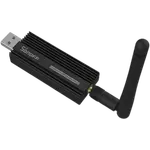
13% OFF
Prime exclusive deal$139.99
$159.99
 Join Prime to buy it at $139.99
Join Prime to buy it at C$169.99

Full Smart Hubs comparison in 2026
Join Prime to buy it at $139.99
Join Prime to buy it at C$169.99

New releases and the smart home news worth knowing, in your inbox.
No spam. Unsubscribe in one click.
| Feature | Aqara Hub M3 | Sonoff Zigbee Bridge Ultra | Winner |
|---|---|---|---|
| Rating | 4.1 | 4.4 | Sonoff Zigbee Bridge Ultra |
| Warranty | 1 year | 2 years | Sonoff Zigbee Bridge Ultra |
| Connectivity | 2.4 GHz WiFi, 5 GHz WiFi, Ethernet | 2.4 GHz WiFi, Ethernet | Aqara Hub M3 |
| Protocols | Bluetooth, Zigbee Coordinator, Thread Border Router, Matter Bridge, Third-Party Devices, IR | Zigbee Coordinator, Matter Bridge, Third-Party Devices | Aqara Hub M3 |
| Integrations | Google Home, Alexa, Apple HomeKit, Samsung SmartThings, Home Assistant | Google Home, Alexa, Apple HomeKit, Samsung SmartThings, Home Assistant | Tie |
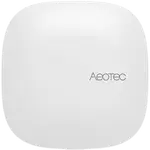
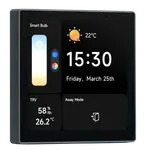
The Aqara Hub M3 runs Zigbee, Thread, Matter, Bluetooth and IR. The Sonoff Zigbee Bridge Ultra is Zigbee and Matter only, with no Thread, Bluetooth, Z-Wave or IR, so Thread devices need a separate border router.
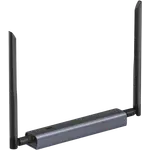
The Sonoff Zigbee Bridge Ultra supports up to 256 devices, double the 127 of the Aqara Hub M3. On a large Zigbee install that headroom is the difference between one hub and two.
The Aqara Hub M3 offers dual-band Wi-Fi, Ethernet and Power over Ethernet. The Sonoff Zigbee Bridge Ultra connects over 2.4 GHz Wi-Fi or Ethernet and has no PoE, so it needs its own power adapter.
The Sonoff Zigbee Bridge Ultra pairs third-party Zigbee 3.0 devices as well as Sonoff gear, though owners report some, such as Philips Hue bulbs, still will not join. The Aqara Hub M3 pairs only Aqara devices over Zigbee, with anything else arriving through Matter.
The Sonoff Zigbee Bridge Ultra carries a two year warranty and the Aqara Hub M3 one year, and the Sonoff is also the cheaper of the two by a clear margin.
Only the Aqara Hub M3 adds Thread, Bluetooth and an IR blaster to Zigbee and Matter, so it covers more device types in one box.
The Sonoff Zigbee Bridge Ultra supports up to 256 devices against 127, so a big install may not need a second hub.
The Sonoff Zigbee Bridge Ultra costs less than the Aqara Hub M3 and carries a two year warranty against one.
The Sonoff Zigbee Bridge Ultra pairs other brands' Zigbee 3.0 gear, while the Aqara Hub M3 pairs only Aqara devices over Zigbee.
Both hubs are bought by people running a lot of Zigbee, and their owners notice the same things. Aqara Hub M3 owners single out how much one box replaces, with Zigbee, Thread, Matter, Bluetooth, Wi-Fi and Ethernet centralized, and they praise the Matter bridging into Home Assistant, HomeKit and Alexa plus fast local automations and the built-in speaker. Sonoff Zigbee Bridge Ultra owners single out stability: one owner replaced two flaky older Sonoff bridges with a single Ultra and found everything finally reliable, and they value the 256-device ceiling, easy setup and clean Home Assistant support. The complaints split along ecosystem lines. Aqara owners find the phone-only app confusing and dislike that the Zigbee side pairs only Aqara devices. Sonoff owners report that third-party Zigbee compatibility is limited, that the advertised range is overstated and needs repeaters, and that some voice-assistant sensor readings are inconsistent.
The Sonoff Zigbee Bridge Ultra wins on price, warranty and capacity, supporting up to 256 devices with a two year warranty for less money. The Aqara Hub M3 is the better multi-protocol hub, adding Thread, Bluetooth and IR to Zigbee and Matter along with dual-band Wi-Fi and Power over Ethernet.
Radio reach. The Aqara Hub M3 runs Zigbee, Thread, Matter, Bluetooth and IR, while the Sonoff Zigbee Bridge Ultra is Zigbee and Matter only, so Thread devices need another border router.
It can pair other brands' Zigbee 3.0 devices, but owners report that support is uneven and that some, such as Philips Hue bulbs, will not join. The Aqara Hub M3 is stricter still, pairing only Aqara devices over Zigbee.
The Sonoff Zigbee Bridge Ultra supports up to 256 devices, while the Aqara Hub M3 supports up to 127 child devices.
A large Zigbee setup that wants a stable network, a Matter bridge and up to 256 devices at the lower price, with a two year warranty, and is fine without Thread or IR.
A household that wants one box for Zigbee, Thread, Matter, Bluetooth, Wi-Fi and IR, and value fast local automations and bridging into every major platform.
 Our store on AmazonShop our ideas on AmazonLists of the smart home setups we would put together ourselves, ready to add to your Amazon cart.Shop on Amazon
You are looking at two of them. The full table lines up all Hubs in the catalog with the same specs, so you can filter by what you need and sort by price or rating.