
Bosch Smart Home Controller II Review: A Reliable, Private Hub for Bosch Devices, but Closed to Third Parties
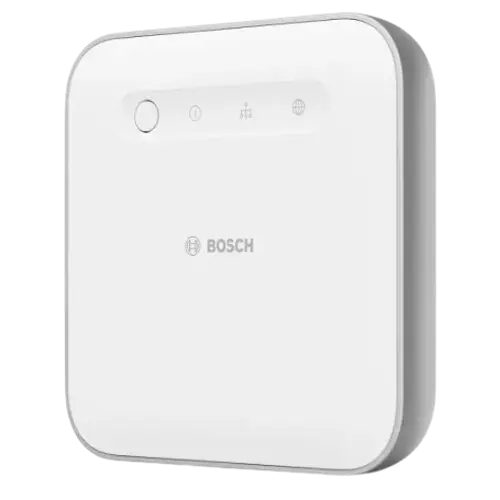
The Bosch Smart Home Controller II (BSHC-2) is the central hub of Bosch's Smart Home ecosystem, and for Bosch users it delivers exactly what it promises: easy setup (plug into your router, follow the app), stable and reliable connections that don't drop, fast command execution, and central control of all compatible devices in one app. It's required for several Bosch devices (like the Rollladensteuerung II roller-shutter control and certain thermostats), has better range than the first generation (reaching rooms the Gen 1 couldn't through thick concrete), features premium build quality, and supports Zigbee and Matter with integration to Alexa and Apple HomeKit. A big plus for European buyers is local processing and strong data privacy, owners specifically value not relying on an Asian-brand cloud. The main limitation is openness: it's largely closed to third-party devices, supporting only modern Zigbee 3.0 gear (with a QR code) and rejecting older Zigbee Light Link devices like OSRAM/LEDVANCE Lightify, with no open API, so 'you can't connect competitors' accessories.' Some owners also report frequent firmware updates that briefly disconnect devices (one found a Twinguard smoke detector unavailable after updates, a serious concern for a safety device), a fiddly Gen 1 to Gen 2 migration that required re-adding everything, a high price, and complex automations that take patience. For Bosch households wanting a reliable, private hub, it's a clear recommendation; for a multi-brand smart home, it's too closed.
- Bosch Smart Home ecosystem users
- Local processing and strong data privacy
- Reliable, stable device control
- Zigbee 3.0 and Matter setups
Pros
- Reliable, stable central hub for the Bosch Smart Home system
- Easy setup; required to run many Bosch devices
- Better range than the Gen 1; premium build quality
- Local processing with strong data privacy (a European plus)
- Zigbee and Matter support with Alexa and Apple HomeKit integration
Cons
- Largely closed to third-party devices (only modern Zigbee 3.0; no older ZLL; no open API)
- Firmware updates can briefly disconnect devices (a concern for safety gear)
- Gen 1 to Gen 2 migration is fiddly (re-adding devices manually)
- Expensive; app interface not to everyone's taste
- Ethernet only (no Wi-Fi); no Z-Wave, Thread or Bluetooth
Who is the Bosch Controller II for?
This is the central hub (gateway) for the Bosch Smart Home system, a Zigbee coordinator and Matter bridge that connects over Ethernet (no Wi-Fi) and processes locally. It's required to run many Bosch devices (roller-shutter controls, thermostats, smoke detectors, contact sensors) and integrates with Alexa, Apple HomeKit, SmartThings and Home Assistant. It best suits people building a Bosch Smart Home setup, those who value local processing and strong data privacy, anyone wanting reliable and stable device control, and Zigbee 3.0/Matter users. It has no Z-Wave, Thread, Bluetooth or IR, and it's a largely European product. If you want broad third-party device support or an open platform, read the caveats first.
What buyers love
Reliability is the headline: owners describe it as the stable, dependable heart of their smart home, connections stay up, commands execute quickly, and everything is centralized in one app. Setup is easy even without technical knowledge, plug it into the router and follow the app step by step, and it's required to unlock several Bosch devices (like the Rollladensteuerung II roller-shutter control and 230V thermostats). The second generation has better range than the first, one owner finally reached a kitchen through thick concrete that the Gen 1 couldn't. Build quality is premium and unobtrusive, automations and cross-device logic (heating, roller shutters, smoke alarms working together) are powerful and configurable, and it supports Zigbee and Matter with Alexa and Apple HomeKit integration for future-proofing. A major draw for European buyers is local processing and high data-privacy standards, with owners specifically preferring it over Asian-brand cloud systems, and regular firmware updates keep it current.
What to know before you buy
The biggest limitation is that it's largely closed to third-party devices. It supports only modern Zigbee 3.0 gear (which should carry a QR code) and won't work with older Zigbee Light Link (ZLL) devices, owners found OSRAM/LEDVANCE Lightify lights and plugs wouldn't pair or update, and one Belgian owner bluntly notes 'you can't connect competitors' accessories.' There's no open API, so it's best treated as a Bosch-first hub. Some owners also report frequent firmware updates that briefly disconnect devices, one found their Bosch Twinguard smoke detector repeatedly unavailable after updates, a serious concern for a safety device, and recommended Homematic IP or Silvercrest as more dependable alternatives. Migrating from the Gen 1 to the Gen 2 controller isn't seamless: the app transfer often fails, requiring you to reset and re-add all thermostats, smoke detectors and contact sensors manually. It's also expensive compared with entry-level hubs, the app interface isn't to everyone's taste, and configuring more complex scenarios can take patience. Note it uses Ethernet only (no Wi-Fi), has no Z-Wave, Thread or Bluetooth, and is aimed at the European market.
Is the Bosch Controller II worth it?
For a Bosch Smart Home household, the Bosch Smart Home Controller II is a clear recommendation: reliable and stable, easy to set up, required for many Bosch devices, with better range than the Gen 1, premium build, powerful automations, Zigbee and Matter support, and, importantly for privacy-conscious European buyers, local processing with strong data protection. The trade-offs are real: it's largely closed to third-party devices (only modern Zigbee 3.0, no older ZLL, no open API), updates can briefly disconnect devices (a worry for safety gear like smoke detectors), Gen 1 to Gen 2 migration is fiddly, and it's pricey. Buy it if you're committed to the Bosch ecosystem and value reliability and privacy; if you want a genuinely multi-brand, open smart-home hub, choose a more flexible platform.
Frequently asked questions
Do I need it for my Bosch devices?
For many, yes. The Controller II is the central hub of the Bosch Smart Home system and is required to run devices like the Rollladensteuerung II roller-shutter control, certain thermostats, smoke detectors and contact sensors. Without it, much of the Bosch ecosystem won't function.
Can I connect non-Bosch or older Zigbee devices?
Support is limited. It works with modern Zigbee 3.0 devices (which should have a QR code) and Matter, but it won't pair with older Zigbee Light Link (ZLL) devices, owners found OSRAM/LEDVANCE Lightify gear wouldn't work. There's no open API, so it's best treated as a Bosch-first hub rather than an open multi-brand platform.
Is it reliable for safety devices like smoke detectors?
Generally it's stable, but some owners report frequent firmware updates that briefly disconnect devices, one found a Bosch Twinguard smoke detector repeatedly showing as unavailable after updates. For a safety device that's a real concern, so if smoke/fire detection is critical, weigh this carefully and keep an eye on connectivity.
How is data privacy?
Strong, and it's a key selling point for European buyers. The controller processes locally and Bosch emphasizes high data-privacy standards, so owners specifically choose it over cloud-dependent, Asian-brand systems for better data protection and security.
Is upgrading from the first-generation controller easy?
Not entirely. The Gen 2 has better range, but migrating from the Gen 1 via the app often doesn't transfer cleanly, so owners had to reset and re-add all their thermostats, smoke detectors and contact sensors manually. Plan for some extra time (and note user error can play a part) when upgrading.




















![Bosch Smart radiator thermostat II [+M]](/img/item-types/radiator-valves/bosch-smart-radiator-thermostat-2-thumb.webp)