

Home Assistant Green Review: The Easiest Way Into Local, Private Smart Home Control
Home Assistant Green is the official, ready-to-run box for people who want to escape walled gardens and run their smart home locally and privately. It is genuinely plug-and-play on the hardware side (connect Ethernet and power and it is up in minutes), silent and tiny, and it unifies devices from Hue, Shelly, Lutron, Alexa, Google, Apple and hundreds more into one dashboard with fast local automations and no mandatory cloud. The trade-offs are real: it is Ethernet-only (no Wi-Fi or Bluetooth on board), Zigbee, Thread and Matter-over-Thread need the separate Connect ZBT-1 dongle, remote access and voice typically want a Home Assistant Cloud subscription (or a DIY alternative), and the software has a learning curve, so it rewards reading the docs and tinkering rather than a one-tap setup.
- Local-control and privacy seekers
- Multi-brand smart homes
- Home Assistant beginners
- Automation tinkerers
Pros
- Official, ready-to-run Home Assistant hardware: plug in Ethernet and power
- Unifies devices across brands under one local, private dashboard
- Fast, reliable local automations with no mandatory cloud
- Works with Apple HomeKit, Google Home, Alexa, SmartThings and Home Assistant
- Power-user features: ONVIF, RTSP, Node-RED, Tailscale and a huge add-on community
- Tiny, silent and well made, with scheduled backups and international power adapters
Cons
- Home Assistant software has a real learning curve (not one-tap)
- Ethernet-only: no built-in Wi-Fi or Bluetooth
- Zigbee, Thread and Matter-over-Thread need the separate Connect ZBT-1 dongle
- Remote access and voice typically want a Home Assistant Cloud subscription
- Only a couple of USB ports, so multiple radios may need a powered USB hub
- No speaker, microphone, microSD slot or PoE
Who is the Home Assistant Green for?
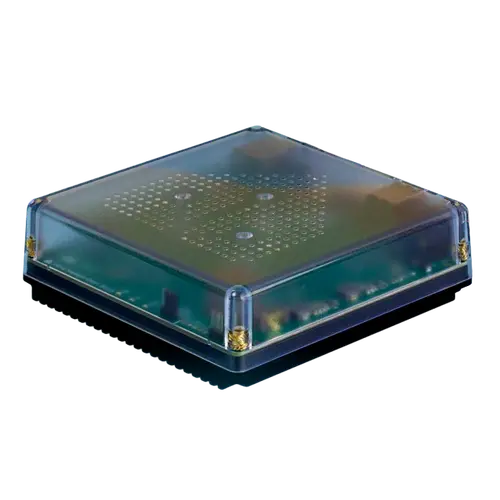
This is the official Home Assistant hardware: a small, fanless mini-PC (quad-core Rockchip RK3566, 4GB RAM, 32GB eMMC) that runs Home Assistant out of the box so you do not have to build a Raspberry Pi yourself. It is built for people who want to pull every smart device, regardless of brand, into one local system: it integrates with Apple HomeKit, Google Home, Amazon Alexa, Samsung SmartThings and the wider Home Assistant ecosystem, and supports power-user features like ONVIF and RTSP cameras, Node-RED and Tailscale. It connects over Ethernet (there is no built-in Wi-Fi or Bluetooth), and Zigbee, Thread and Matter-over-Thread are added with the separate Connect ZBT-1 dongle. It best suits privacy and local-control seekers, owners of mixed-brand setups who are tired of juggling apps, and beginners who want the Home Assistant experience without assembling the hardware.
What buyers love
The recurring theme is that it tears down the walls between brands. Owners describe finally getting Lutron, Hue, Shelly, cameras, smart plugs and voice assistants all talking to each other in one dashboard, with automations that simply are not possible inside Alexa or Google alone. Local control is praised as faster, more reliable and more private than cloud platforms, and many were surprised how plug-and-play the hardware is: plug in Ethernet and power, wait about five minutes, and it discovers compatible devices automatically. The unit itself is called tiny, silent and well made, the international power adapters are a nice touch, scheduled backups give peace of mind, and the huge community plus add-ons (HACS, Node-RED, ESPHome, the HomeKit bridge) mean there is a guide for almost anything. For people leaving Alexa or Google, it is repeatedly called a major step up.
What to know before you buy
The honest caveat is the software learning curve: the hardware is plug-and-play, but Home Assistant itself is deep and not one-tap, and several owners leaned on documentation, the community or even an AI assistant to get certain integrations and automations working (this becomes a hobby). It is Ethernet-only, so you cannot place it wherever you like without a network drop, and it has no on-board Zigbee, Thread or Bluetooth: those need the separate Connect ZBT-1 dongle (or extra USB radios), which adds cost, and with only a couple of USB ports a powered USB hub may be needed for multiple radios. Remote access and cloud voice control typically want a Home Assistant Cloud subscription, though free DIY alternatives exist with effort. Some Matter devices still need a phone with Bluetooth for initial pairing, and one buyer received a unit running Home Assistant Container instead of the fuller Home Assistant OS. It has no speaker, microphone, microSD slot or PoE.
Is the Home Assistant Green worth it?
For anyone serious about a private, local, multi-brand smart home, yes: it is the easiest official on-ramp to Home Assistant, well-reviewed, silent and capable, and it pays off enormously once set up. The value is in unifying everything you already own under fast local control with no mandatory cloud. Just go in expecting to learn the software, plan for a wired connection, and budget for the Connect ZBT-1 if you need Zigbee or Thread (and likely a Home Assistant Cloud subscription for easy remote access and voice). If you want a tap-to-configure consumer hub, this is not it; if you want the most powerful and open smart-home brain in a ready-made box, it is an excellent buy.
Frequently asked questions
Is the Home Assistant Green plug-and-play?
The hardware is: connect Ethernet and power and it is running in about five minutes, auto-discovering many devices. The Home Assistant software, however, has a learning curve, so getting advanced integrations and automations dialed in takes time and some reading.
Does it support Zigbee, Thread and Matter?
Not on its own. Zigbee, Thread and Matter-over-Thread require the separate Home Assistant Connect ZBT-1 dongle (or other USB radios). Matter devices over Wi-Fi/Ethernet work, but some still need a phone with Bluetooth for initial pairing.
Does it need an internet connection or a subscription?
It runs locally without the internet, which is a core appeal. However, easy remote access and cloud voice assistant integration typically use a paid Home Assistant Cloud subscription, though you can set up free alternatives yourself with some effort.
Does it have Wi-Fi, and how does it connect?
It connects over Ethernet and does not have built-in Wi-Fi or Bluetooth. You plug it into your router, so plan for a wired network drop where you place it.
Which smart home platforms does it work with?
It integrates with Apple HomeKit, Google Home, Amazon Alexa and Samsung SmartThings, plus the broad Home Assistant ecosystem and power-user tools like ONVIF/RTSP cameras, Node-RED and Tailscale.