

Reolink Home Hub Pro Review: Subscription-Free Local Recording for a Reolink Camera Fleet
The Reolink Home Hub Pro is a local recording and storage center for people who already own several Reolink cameras. It pools their footage onto a 3.5-inch drive you install yourself, adds a unified event history, a 120 dB siren, HDMI live view and Wi-Fi 6, and needs no subscription. The trade-off is scope and completeness: it manages only Reolink cameras, ships without a drive, and its wired ports do not power PoE cameras. For a Reolink household tired of juggling memory cards and cloud plans, it is a practical centerpiece.
- Reolink camera owners
- No-subscription seekers
- Homes with several cameras
- Privacy-focused setups
Pros
- Manages up to 12 Reolink Wi-Fi and PoE cameras
- One 3.5-inch SATA bay for a drive up to 16TB, plus a microSD slot up to 512GB
- Subscription-free local recording with AES-128 encryption
- Unified event history and smart playback across connected cameras
- HDMI output for a multi-camera live view on a TV or monitor
- Built-in siren rated up to 120 dB
- Dual-band Wi-Fi 6 and two Ethernet ports
- Works with Google Assistant, Amazon Alexa and Home Assistant
- 2-year limited warranty
Cons
- No hard drive included on this version
- Only Reolink cameras; no third-party Zigbee, Z-Wave, Thread or Matter devices
- No Apple HomeKit or Samsung SmartThings support
- Ethernet ports are 10/100 Mbps and not PoE
- HDMI output is live view only, with limited control
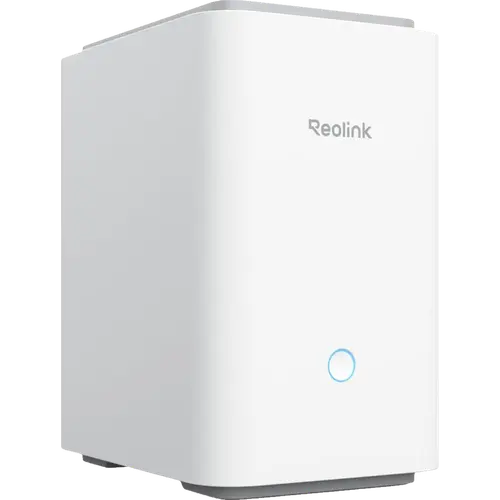
- Larger case than the internal hardware seems to need
- Battery cameras record on motion rather than continuously
Who is the Reolink Home Hub Pro for?
This hub is for someone building or expanding a Reolink camera system who wants the recordings kept at home instead of on a paid cloud. It centralizes up to 12 Reolink Wi-Fi and PoE cameras, including models up to 16MP, and puts their footage on a 3.5-inch hard drive you supply, with a microSD slot as a second option. Because it creates its own local network, records offline and encrypts the drive with AES-128, it suits buyers who care about privacy and about avoiding a monthly fee. It is not a universal smart-home hub: it pairs only Reolink cameras and has no Zigbee, Z-Wave, Thread or Matter radio for third-party sensors, lights or locks.
What the Reolink Home Hub Pro offers
Three things stand out. First, storage that scales without fees: one 3.5-inch SATA bay takes a drive up to 16TB, and a microSD card adds up to 512GB, so a small system can keep weeks of footage instead of days. Second, one place to review everything: the app combines the event history of every connected camera, filters detections by type and date, and offers smart playback across cameras, while the HDMI output shows a multi-camera live grid on a monitor or TV. Third, it adds real alarm hardware, with a built-in speaker and siren rated up to 120 dB that a connected camera can trigger. Networking is dual-band Wi-Fi 6 plus two 10/100 Mbps Ethernet ports, one for the router and one for an IP camera, and the hub keeps recording and serving footage locally when the internet drops. Voice control covers Google Assistant and Amazon Alexa, and Home Assistant lists the Home Hub Pro among its tested models.
What owners praise
Owners who already run Reolink cameras consistently highlight the same wins. Setup is usually quick and the app walks through adding cameras, and several people describe moving away from memory cards in each camera as the main relief. The combination of a large local drive, no monthly fees and encrypted storage is the reason most of them bought it, and the pooled event thumbnails make it easier to review several cameras in one pass. Owners also report that Wi-Fi coverage and stability improved once the hub sat closer to the cameras, that the siren is genuinely loud, and that the unit survived a power cut and came back recording on its own. The HDMI output and the Windows client are frequently mentioned as handy extras.
What to know before you buy
The first practical point is the drive: this version ships without one, so the advertised capacity only exists once you install a 3.5-inch HDD. The second is scope: the hub manages Reolink Wi-Fi and PoE cameras only, and 4G cameras, cameras bundled in NVR kits and add-on cameras are excluded, so a mixed-brand home is out of luck. Its two Ethernet ports are ordinary 10/100 Mbps links, not PoE, which means a PoE camera still needs its own switch or injector. Owners also note that the case is larger than the hardware seems to need, that HDMI is a live view without full control, that day-long event navigation in the phone app can feel clunky, and that moving cameras from an older Reolink hub takes a slightly fiddly two-step pairing. Battery cameras record on motion rather than continuously, and at least one owner received a unit that failed early, so the 2-year warranty is worth keeping in mind.
Is the Reolink Home Hub Pro worth it?
For an existing Reolink owner with three or more cameras, the Home Hub Pro earns its place: it consolidates recording on one large local drive, removes the subscription question, adds a loud alarm and a useful HDMI live view, and covers Google Assistant, Alexa and Home Assistant. The value holds as long as your cameras are Reolink and your priority is local storage rather than cross-brand automation. If you need one hub to run Zigbee, Z-Wave, Thread or Matter devices from several brands, or you rely on Apple HomeKit or Samsung SmartThings, this is the wrong tool.
Frequently asked questions
Does the Reolink Home Hub Pro require a subscription?
No. Recordings are stored locally on a 3.5-inch drive up to 16TB, or on a microSD card up to 512GB, with AES-128 encryption, so there are no monthly fees and the hub keeps recording without an internet connection.
Does it work with Alexa and Google Home?
Yes. It supports Amazon Alexa and Google Assistant, and Home Assistant lists the Home Hub Pro among its tested models. It does not support Apple HomeKit, Samsung SmartThings or Matter.
How many cameras can it manage?
Up to 12 Reolink Wi-Fi and PoE cameras, including models up to 16MP. Reolink 4G cameras, cameras bundled in NVR kits and add-on cameras are not supported, and battery cameras need a firmware update.
Does it include a hard drive?
No. This version ships without a drive. You add one 3.5-inch SATA HDD up to 16TB, or use a microSD card up to 512GB, and the microSD slot is meant for card storage rather than continuous recording alongside a drive.
Do I need a PoE switch for wired cameras?
Yes, if your cameras are PoE. The hub has two 10/100 Mbps Ethernet ports, one for the router and one for an IP camera, but neither supplies power, so a PoE camera needs its own switch or injector.
Is it a general smart-home hub?
No. It is a camera recording and storage hub for Reolink cameras and has no Zigbee, Z-Wave, Thread or Matter radio, so it cannot pair third-party sensors, bulbs or locks.