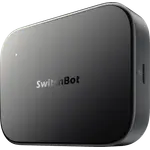
SwitchBot AI Hub Review: Home Assistant Built In and a Local Recorder for RTSP Cameras
The SwitchBot AI Hub is a specialist hub for people who want their automations and camera recordings to stay on local hardware. It runs a Home Assistant Core container with no dongle, bridges up to 30 SwitchBot sub-devices into Matter, and records up to 8 cameras, including third-party RTSP models, to a microSD card. The trade-offs are clear: it has no IR blaster, no temperature, humidity, light or motion sensors, no Ethernet port and no Zigbee, Thread or Z-Wave radio, and its cloud AI features need a subscription. It suits Home Assistant tinkerers and camera owners far better than someone who just wants a first hub.
- Home Assistant users
- RTSP camera owners
- Local-first smart homes
- SwitchBot ecosystem owners
Pros
- Home Assistant Core container built in, with no dongle required
- Records up to 8 cameras locally, including RTSP models, with full Frigate compatibility
- Matter bridge for up to 30 SwitchBot sub-devices
- Works with Apple Home, Google Home, Alexa, SmartThings and Home Assistant
- MicroSD slot with a 16GB card included and support for cards up to 1TB
- Dual-band Wi-Fi with 5 GHz support plus Bluetooth
- Two year warranty
Cons
- No IR control, so it cannot operate TVs or air conditioners on its own
- No built-in temperature, humidity, light or motion sensors
- Wi-Fi only, with no Ethernet port and no Power over Ethernet
- No Zigbee coordinator, Thread border router or Z-Wave radio
- AI+ cloud features and the Home AI Agent require a subscription
- No ONVIF camera support, and no Node-RED or Tailscale support
Who is the SwitchBot AI Hub for?
This hub suits someone who already runs cameras and smart devices and wants the control and the recordings kept at home. It ships with a Home Assistant Core container built in, so an open-source automation platform runs on the device itself without a separate dongle or spare computer. It can manage up to 8 cameras and supports any RTSP-compatible camera with full Frigate compatibility, which makes it a possible recorder for a mixed-brand camera setup. As a Matter bridge it brings up to 30 SwitchBot sub-devices into Apple Home, Google Home, Alexa and SmartThings, and Home Assistant can read it too. If your priorities are tinkering, local storage and cross-brand camera support, this is the SwitchBot hub built for you.
What the SwitchBot AI Hub offers
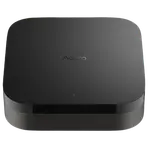
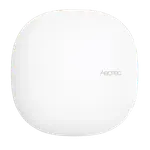
Storage is local: a microSD slot ships with a 16GB card and accepts cards up to 1TB, so camera events are kept on hardware you own. Connectivity covers dual-band Wi-Fi on both 2.4 GHz and 5 GHz plus Bluetooth, and the 5 GHz band helps when the hub is handling several camera streams. The Matter bridge turns SwitchBot devices into standard Matter devices that any of the major platforms can control, and RTSP support lets it add other brands' cameras over the network. It is compact at 126 x 94 x 26 mm and 235g, and it carries a two year warranty.
What to know before you buy
The biggest omission is infrared: the hub has no IR control, so a TV or an air conditioner still needs a SwitchBot hub with an IR blaster. It also has no built-in temperature, humidity, light or motion sensors, so it cannot double as a room monitor, and it has no speaker or microphone. Networking is wireless only: there is no Ethernet port and so no Power over Ethernet, which would have been steadier for a device recording video. It is not a radio hub either, with no Zigbee coordinator, Thread border router or Z-Wave, and its Bluetooth pairs only SwitchBot devices. Camera support covers RTSP but not ONVIF, and the spec sheet lists no Node-RED or Tailscale support. The AI+ service, which adds cloud AI event descriptions and daily reports, and the Home AI Agent are paid subscriptions.
Is the SwitchBot AI Hub worth it?
The value case depends on whether you will use the two things it does that the rest of the range does not: run Home Assistant on the box and record camera footage locally. For a household with several RTSP cameras that wants to stop relying on cloud video, or for someone who would otherwise set up a small computer for Home Assistant, it consolidates that into one compact unit. For someone who wants to link SwitchBot gadgets to a voice assistant, control the TV and read the room temperature, a SwitchBot hub with IR and sensors is the better fit. Judge it as a local recorder and Home Assistant host that also bridges Matter, not as an upgrade to a standard smart home hub.
Frequently asked questions
Does the SwitchBot AI Hub work with Apple Home, Google Home and Alexa?
Yes. It acts as a Matter bridge for up to 30 SwitchBot sub-devices, and the spec sheet lists Apple Home, Google Home, Alexa, SmartThings and Home Assistant as supported, so those devices can be controlled from whichever platform you use.
Can it control my TV or air conditioner?
No. The AI Hub has no IR control. To operate infrared devices such as TVs, air conditioners or fans you need a SwitchBot hub that has an IR blaster.
Do I need a subscription to use it?
The Matter bridge, the built-in Home Assistant container and the RTSP camera support are not listed as paid. The AI+ service, which adds cloud AI event descriptions and daily reports, and the Home AI Agent are paid subscriptions.
Which cameras can it record from?
It manages up to 8 cameras and supports any RTSP-compatible camera, with full Frigate compatibility. It does not support the ONVIF protocol.
Where does it store camera recordings?
On a microSD card in the hub. A 16GB card is included and the slot accepts cards up to 1TB.
Does it have an Ethernet port?
No. It connects over dual-band Wi-Fi, on both 2.4 GHz and 5 GHz, plus Bluetooth. There is no Ethernet port and therefore no Power over Ethernet option.