14% OFF
$59.99
$69.99

Full Smart Hubs comparison in 2026

New releases and the smart home news worth knowing, in your inbox.
No spam. Unsubscribe in one click.
| Feature | SwitchBot Hub 2 | YoLink Hub | Winner |
|---|---|---|---|
| Price | $59.99 | $23.59 | YoLink Hub |
| Rating | 4.3 | 4.5 | YoLink Hub |
| Warranty | 1 year | 2 years | YoLink Hub |
| Connectivity | 2.4 GHz WiFi | 2.4 GHz WiFi, Ethernet | YoLink Hub |
| Protocols | Bluetooth, Matter Bridge, IR | None | SwitchBot Hub 2 |
| Integrations | Google Home, Alexa, Apple HomeKit, Samsung SmartThings, Home Assistant | Google Home, Alexa, Home Assistant | SwitchBot Hub 2 |
| Sensors | Temperature, Humidity, Light | None | SwitchBot Hub 2 |
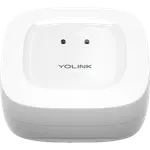
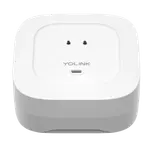
The YoLink Hub runs its own 923.3 MHz LoRa network, so its sensors never touch your Wi-Fi and hold a link across a large property. The SwitchBot Hub 2 uses Bluetooth for nearby SwitchBot gadgets and 2.4 GHz Wi-Fi for the rest, which is fine indoors but short of the YoLink range.
The SwitchBot Hub 2 includes temperature, humidity and light sensors with logged history, handy for a workshop, freezer or grow space and for climate automations. The YoLink Hub has no sensors of its own; it is the gateway its separate sensors report through.
The SwitchBot Hub 2 is a Matter bridge, bringing its gadgets and climate readings into Apple Home, Alexa, Google Home, SmartThings and Home Assistant. The YoLink Hub is not a Matter bridge, so its devices do not reach Apple Home or SmartThings on this model.
The SwitchBot Hub 2 includes a learning IR blaster that can mimic a television, receiver or mini-split air conditioner remote in seconds. The YoLink Hub has no IR, so it cannot control those appliances at all.
The YoLink Hub accepts an Ethernet patch cable and 2.4 GHz Wi-Fi, and can use both at once as a fallback. The SwitchBot Hub 2 is 2.4 GHz Wi-Fi only with no Ethernet port, so a shaky network can knock it offline.
The YoLink Hub's 923.3 MHz LoRa network is built for long distance through walls and metal, where Wi-Fi and Bluetooth fall short.
The SwitchBot Hub 2 has a learning IR blaster, which the YoLink Hub lacks entirely.
The SwitchBot Hub 2 has built-in temperature, humidity and light sensors; the YoLink Hub has none of its own.
The SwitchBot Hub 2 bridges over Matter to Apple Home, Alexa, Google Home, SmartThings and Home Assistant, while the YoLink Hub does not bridge to Matter.
The YoLink Hub takes an Ethernet cable as well as Wi-Fi; the SwitchBot Hub 2 is wireless only.
YoLink Hub owners talk in feet, not adjectives: sensors in a lake down a hill, a pump house far from the house, a freezer in a detached garage, and the Hub parting with Ethernet or 2.4 GHz Wi-Fi and holding the link anyway. They call setup a QR-code scan that takes minutes, praise the price and the support, and warn that it is a cloud appliance with no Matter or local API, so app control and alerts stop when the internet does, that free alerts are capped, and that a few units stopped reconnecting. SwitchBot Hub 2 owners love the IR blaster that learns a television or mini-split air conditioner in seconds, the built-in temperature and humidity sensors with clean graphs, and the fact that it is one of the few IR blasters that works with Apple Home over Matter. Their gripes are the 2.4 GHz-only Wi-Fi that can drop offline, unreliable links to some SwitchBot bots, and a cap on how many devices it exposes over Matter.
They serve different jobs. The YoLink Hub is better for long-range sensing with a wired option, while the SwitchBot Hub 2 is better for IR control, built-in climate sensors and Matter bridging.
No. The YoLink Hub is not a Matter bridge and supports Alexa, Google Home and Home Assistant only on this model. The SwitchBot Hub 2 does bridge to Apple Home, SmartThings, Alexa, Google Home and Home Assistant.
No. The SwitchBot Hub 2 uses Bluetooth and 2.4 GHz Wi-Fi, so it is a short-range bridge. The YoLink Hub runs its own LoRa network and is the one built to cover a large property.
Yes. The SwitchBot Hub 2 includes temperature, humidity and light sensors with history graphs, which the YoLink Hub does not have; its climate data comes from separate sensors.
Neither needs one to work. The SwitchBot Hub 2 and the YoLink Hub both run without a monthly fee, though the YoLink Hub caps its free text and email alerts and the SwitchBot Hub 2 is cloud-based for remote access.
The YoLink Hub, which YoLink tested with up to 180 devices. The SwitchBot Hub 2 is built around a small set of SwitchBot gadgets and a Matter device cap, so it suits a lighter setup.
 Our store on AmazonShop our ideas on AmazonLists of the smart home setups we would put together ourselves, ready to add to your Amazon cart.Shop on Amazon
You are looking at two of them. The full table lines up all Hubs in the catalog with the same specs, so you can filter by what you need and sort by price or rating.