
Updated November 2026
Data from the official SwitchBot and YoLink sites.
2026 verdict
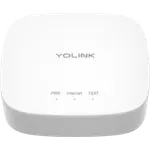
If your sensors need to reach a detached garage, a lake cottage or a metal freezer hundreds of feet away, the YoLink Hub is the one built for that job.
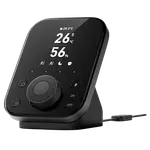
Its LoRa radio outranges Wi-Fi and Bluetooth by a wide margin, and it costs less while holding a higher owner rating than the SwitchBot Hub 3. It also carries a longer two year warranty and connects over Ethernet as well as Wi-Fi. The SwitchBot Hub 3 answers with a genuinely broader smart home role: a Matter bridge, an IR blaster and built-in temperature, humidity, light and presence sensors, plus native support for Apple Home, Google Home, Alexa, SmartThings and Home Assistant, where the YoLink Hub skips Apple Home and SmartThings entirely and depends on YoLink's own cloud. Pick the YoLink Hub for long-range sensors across a large property, and the SwitchBot Hub 3 for a general-purpose hub with sensors and IR control of its own.
News by email
Still comparing? Get what's new by email
New releases and the smart home news worth knowing, in your inbox.
No spam. Unsubscribe in one click.
| Feature | SwitchBot Hub 3 | YoLink Hub | Winner |
|---|---|---|---|
| Price | $99.99 | €62.77 | YoLink Hub |
| Rating | 3.8 | 4.5 | YoLink Hub |
| Warranty | 1 year | 2 years | YoLink Hub |
| Connectivity | 2.4 GHz WiFi | 2.4 GHz WiFi, Ethernet | YoLink Hub |
| Protocols | Bluetooth, Matter Bridge, IR | None | SwitchBot Hub 3 |
| Integrations | Google Home, Alexa, Apple HomeKit, Samsung SmartThings, Home Assistant | Google Home, Alexa, Home Assistant | SwitchBot Hub 3 |
| Sensors | Temperature, Humidity, Light, Motion | None | SwitchBot Hub 3 |
| Local Control | YES | NO | SwitchBot Hub 3 |
What the differences mean
Radio and range
The YoLink Hub generates its own 923.3 MHz LoRa network, which owners report holding across hundreds of feet and through walls that stop Wi-Fi cold. The SwitchBot Hub 3 connects its devices over 2.4GHz Wi-Fi and Bluetooth, with the shorter range that implies.
Ecosystem reach
The SwitchBot Hub 3 works with Apple Home, Google Home, Alexa, SmartThings and Home Assistant, bridging older Bluetooth devices through Matter. The YoLink Hub supports Alexa, Google Home and Home Assistant only; Apple Home and SmartThings are not on its list.
Cloud dependency
The YoLink Hub has no local API: app control and alerts stop when the internet connection does. The SwitchBot Hub 3 runs many automations locally and bridges devices to Matter, which keeps working without the cloud for those.
Built-in sensors
The SwitchBot Hub 3 has temperature, humidity, light and presence sensors built into the hub itself. The YoLink Hub has none; every sensor is a separate YoLink device that talks to the Hub.
Price, rating and warranty
The YoLink Hub costs less, holds a higher owner rating and carries a two year warranty against one year on the SwitchBot Hub 3.
Which one to buy if
- sensors need to reach a detached building or hundreds of feet away
The YoLink Hub's LoRa radio is built for exactly that range; Wi-Fi and Bluetooth on the SwitchBot Hub 3 are not.
- Apple Home or SmartThings has to see the devices directly
The SwitchBot Hub 3 supports both; the YoLink Hub supports neither.
- you cannot have control and alerts stop when the internet drops
The YoLink Hub is fully cloud dependent, while the SwitchBot Hub 3 runs many automations locally.
- price and owner rating matter more than ecosystem breadth
The YoLink Hub costs less and rates higher than the SwitchBot Hub 3.
$99.99
- + Protocols: Bluetooth, Matter Bridge, IR
- + Integrations: Google Home, Alexa, Apple HomeKit, Samsung SmartThings, Home Assistant
- + Sensors: Temperature, Humidity, Light, Motion
- - Price: $99.99 vs €62.77
- - Rating: 3.8 vs 4.5
Winner
€62.77
- + Price: €62.77
- + Rating: 4.5
- + Warranty: 2 years
- - Protocols: None vs Bluetooth, Matter Bridge, IR
- - Integrations: Google Home, Alexa, Home Assistant vs Google Home, Alexa, Apple HomeKit, Samsung SmartThings, Home Assistant
What owners say
YoLink Hub owners describe range in feet rather than adjectives, links holding through a metal freezer wall, into a detached garage or down a hillside to a lakeside cottage, and several say the system replaced Z-Wave or SmartThings gear that kept dropping out. Setup is a QR code scan buyers across several countries call minutes of work, and customer service earns some of the warmest comments in the whole review pool. Their main complaint is the cloud dependency: app control and alerts stop when the internet does, since this model has no local API and is not a Matter bridge. SwitchBot Hub 3 owners lead with the physical dial and buttons that let the household skip the app entirely, plus an improved IR blaster that clones remotes other hubs could not. Their complaints center on firmware that still feels like it is maturing, with occasional slow menus, and HomeKit support that runs through Matter and Shortcuts rather than native scenes.
Frequently Asked Questions
Which is better overall: the SwitchBot Hub 3 or the YoLink Hub?
The YoLink Hub costs less, rates higher and reaches far further with its LoRa radio. The SwitchBot Hub 3 is the better choice when Apple Home, SmartThings or built-in sensors and IR control matter more than raw range.
What is the biggest difference between the SwitchBot Hub 3 and the YoLink Hub?
Radio and range. The YoLink Hub runs its own long-range LoRa network built for sensors far from the house, while the SwitchBot Hub 3 uses Wi-Fi and Bluetooth and makes up for the shorter range with built-in sensors, an IR blaster and a Matter bridge.
Does the YoLink Hub work with Apple Home?
No, Apple Home and SmartThings are not on YoLink's compatibility list for this Hub. The SwitchBot Hub 3 works with both, reaching Apple Home through Matter.
Does the YoLink Hub still work if the internet goes down?
No. It has no local API, so app control and alerts stop until the connection returns. The SwitchBot Hub 3 keeps many of its automations running locally.
Who should buy the YoLink Hub?
Anyone monitoring sensors across a large property, a detached garage or a vacation cottage, on Alexa, Google Home or Home Assistant, who does not need Apple Home or SmartThings.
Who should buy the SwitchBot Hub 3?
SwitchBot owners who want a general-purpose hub with built-in sensors, an IR blaster and physical controls, and who need Apple Home or SmartThings support.
Spotted something wrong on this page? Tell us and we will fix it.
 Our store on AmazonShop our ideas on AmazonLists of the smart home setups we would put together ourselves, ready to add to your Amazon cart.Shop on Amazon
Full comparison table
Compare all 32 Hubs side by side
You are looking at two of them. The full table lines up all Hubs in the catalog with the same specs, so you can filter by what you need and sort by price or rating.
- 32 Hubs
- 40 specs compared
- 37 filters
- Hubs

Caseta Smart Hub
- Hubs

Hue Bridge
- Hubs

Tapo H100
- Hubs
Tapo H500
- Hubs

Bridge Max
- Hubs

Smart Home controller II
- Hubs

Home Assistant Green
- Hubs
Hue Bridge Pro
- Hubs
Zigbee Bridge Ultra
- Hubs

SBS50 Base Station
- Hubs

Smart Wi-Fi Hub MSH400HK
- Hubs

SwitchBot Hub 2
- Hubs
Hub Mini
- Hubs

Smart Home Hub
- Hubs
Tapo H200
- Hubs
Tapo H110
- Hubs

Hub M2
- Hubs
Hub M3
- Hubs
Smart Wi-Fi Hub MSH450
- Hubs

Pro SmartHub
- Air Purifiers
Air Purifier Table
- Air Quality Monitors
Meter Pro (CO2 Monitor)
- Buttons
Remote
- Cameras
Outdoor Pan/Tilt Cam 3K
- Ceiling Lights

RGBICWW Ceiling Light 12inch
- Ceiling Lights

RGBICWW Ceiling Light 15inch
- Displays
Smart E-Ink Home Dashboard
- Doorbells
Smart Video Doorbell
- Door Locks
SwitchBot Lock Pro
- Door Locks
Lock Ultra Max
- Door Locks
SwitchBot Lock Ultra Vision Combo
- Door Locks
SwitchBot Lock Vision Pro
- Door Locks

Lock Vision
- Door Locks
SwitchBot Lock
- Door & Window Sensors
Contact Sensor
- Hubs
AI Hub
- Hubs
SwitchBot Hub 2
- Hubs
Hub Mini
- IR Remote Controls
SwitchBot Hub 2
- IR Remote Controls
Hub Mini
- Cameras

Uno
- Door & Window Sensors
LoRa Smart Outdoor Contact Sensor
- Door & Window Sensors
Solar Outdoor Door Sensor
- Motion Sensors
Indoor Motion Sensor RT
- Motion Sensors
LoRa 1/4 Mile Motion Sensor
- Plugs
Mini Plug
- Plugs
Smart Outdoor Energy Plug
- Smoke & CO Detectors
Photoelectric Smoke Alarm
- Temperature & Humidity Sensors
Smart Wireless Thermometer Hygrometer
- Water Leak Sensors
Water Leak Sensor 1
- Water Leak Sensors
Water Leak Sensor 4
- Water Shutoff Valves
FlowSmart All-in-One Water Meter & Shutoff
- Water Shutoff Valves
Valve Controller 2 with EVO Valve Operator
- Water Timers
Smart Sprinkler Timer