

Tapo H500 CentralHub Review: The Hub That Buys Your Tapo Cameras Out of a Subscription
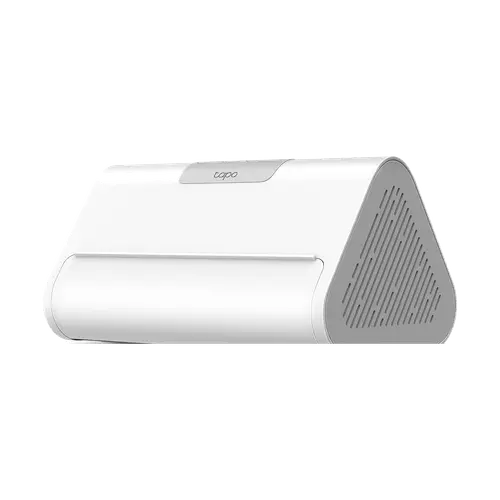
The Tapo H500 is aimed squarely at people who already own Tapo cameras and are tired of paying a monthly fee to keep their footage. It pools recordings from up to 16 cameras and doorbells onto its own 16GB of storage or onto a 2.5-inch drive you add yourself, adds facial recognition to cameras that never had it, and puts the whole system on a monitor through its HDMI port. Owners describe setup as painless and the storage economics as the main reason they bought it, with one calculating a large multi-year saving against a competing subscription system. The rough edges are the AI, which several owners find inconsistent at recognising faces, and the fact that it only makes sense inside the Tapo ecosystem.
- Existing Tapo camera owners
- Subscription-free local recording
- Multi-camera homes
- Wall or TV monitoring over HDMI
- Matter households
Pros
- Pools recordings from up to 16 Tapo cameras and doorbells with no subscription
- 16GB built-in storage plus a 2.5-inch SATA bay taking up to 16TB
- HDMI output for a live camera wall on a monitor or TV
- Adds facial recognition to Tapo cameras that lack it
- 110dB built-in siren that also works as a doorbell chime
- Matter bridge into Alexa, Google Home, Apple Home and SmartThings
- Footage stays in the hub, so a stolen camera does not take the recordings
Cons
- Facial recognition is inconsistent, with owners reporting family members not being recognised
- Tapo devices only, so cameras from other brands cannot join
- The 2.5-inch drive is sold separately
- No Thread radio, so Thread-based Matter devices still need their own border router
- Matter bridging is limited to the device types on TP-Link's compatibility list
- Only a 10/100 Mbps Ethernet port
- Some features are unavailable in certain regions
Who is the Tapo H500 for?
This is an ecosystem product, and it earns its place the moment you own more than one or two Tapo devices. It connects up to 16 Tapo cameras and video doorbells alongside 64 Tapo Sub-G sensors, buttons and switches, then becomes the single place their footage lives. The buyers who show up in the reviews are almost all consolidating: people replacing a competing camera system and its annual cloud plan, people who had been buying a microSD card for every camera, and people who already ran a smaller Tapo hub and migrated up. A second, quieter audience uses the HDMI output to put a rolling carousel of camera feeds on a spare monitor or TV, which is unusual at this price.
What buyers love
The storage is the headline and owners treat it that way. One reports five cameras writing to a 500GB SSD with most of the drive still free after a month, another runs a 1TB drive recording around the clock, and the recurring point is that none of it costs a subscription. Setup gets consistently easy marks, including migrating from an older Tapo hub, and one owner notes the drive mounting screws come in the box. The HDMI output is singled out repeatedly as better thought through than expected. There is also a security argument owners make that the cloud never solved: because the recordings sit inside the hub, a stolen camera does not walk away with the footage.
What to know before you buy
The facial recognition is the most divisive part. Some owners call it good but still improving, while others say it repeatedly fails to recognise family members and needs faces re-added, so treat it as a bonus rather than the reason to buy. The hub also expects a solid network: one owner points out you want a capable router or access point to get the most from it, and connects cameras to a separate access point rather than through the hub. It is a Tapo-only device, so cameras from other brands are out of scope, and one buyer outside the US reports features that are not available in their region. The Matter bridge covers only the device types on TP-Link's compatibility list, and there is no Thread radio, so Thread-based Matter devices still need their own border router. Finally, the drive is not included, which is a real extra cost on top of the hub.
Is the Tapo H500 worth it?
If you own several Tapo cameras and pay for cloud storage, this pays for itself and the arithmetic is not close: the hub plus a drive is a one-time cost against a recurring one, and owners keep saying so in exactly those terms. Its rank among Amazon's best-selling home automation hubs suggests plenty of people have run that calculation. If you own cameras from another brand, or you want the facial recognition to be the centrepiece rather than a bonus, this is not the buy. As a subscription-ending storage and control box for a Tapo system, with an HDMI wall display thrown in, it is very hard to argue with.
Frequently asked questions
Does the Tapo H500 need a subscription?
No. It records to its own 16GB of built-in storage or to a 2.5-inch SATA drive you add, and owners specifically buy it to replace a paid cloud plan. TP-Link still offers an optional cloud subscription, but the hub does not require it.
How much storage can the Tapo H500 take?
It has 16GB of built-in eMMC storage and one 2.5-inch SATA bay that accepts an HDD or SSD of up to 16TB, sold separately. Owners report five cameras leaving most of a 500GB SSD free after a month.
How many cameras and sensors can it connect?
Up to 16 Tapo cameras and video doorbells, plus 64 Tapo Sub-G sensors, buttons and switches. Continuous 24/7 recording is supported for up to four of the cameras.
Does the Tapo H500 work with Alexa, Google Home and Apple Home?
Yes. It acts as a Matter controller and a Matter bridge, which is how it exposes its Tapo devices to Alexa, Google Home, Apple Home and SmartThings, for the device types on TP-Link's compatibility list.
Can I watch the cameras on a TV or monitor?
Yes. It has an HDMI output that shows up to four combined video streams, and owners describe using its carousel view to rotate through feeds on a dedicated screen.
Does it work with non-Tapo cameras?
No. The hub is designed around Tapo cameras, doorbells and Sub-G sensors, and cameras from other brands cannot be added.