

SofaBaton U3 Review: An Air-Mouse Universal Remote for Streaming-First Living Rooms
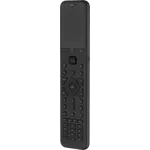
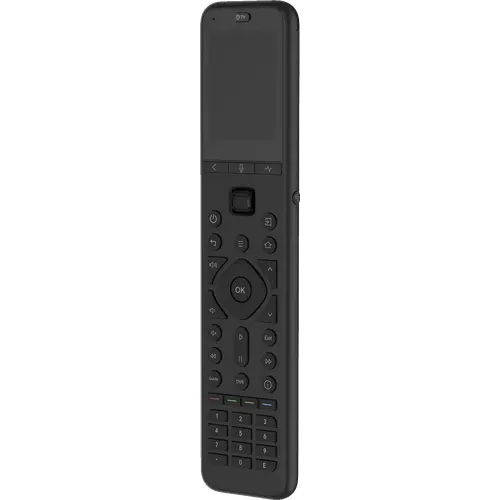
The SofaBaton U3 is a rechargeable universal remote that controls IR, Bluetooth and RF devices from one handset, with a 2.4-inch screen, backlit buttons, an air-mouse pointer and one-touch global macros. It suits living rooms that have collected several remotes and want them collapsed into one, especially where streaming boxes and smart TVs benefit from Bluetooth and cursor control. The trade-offs are real: there is no Wi-Fi device support and no smart home integration, setup takes patience, and the charging dock and IR repeater are sold separately. For a straightforward AV setup it is a capable, well-built replacement for a stack of remotes, but it is not a plug-and-play or automation-first device.
- Living rooms with several remotes
- Streaming-first setups
- Controlling IR, Bluetooth and RF gear
- Families sharing one remote
Pros
- Controls IR, Bluetooth and RF433/315 devices from one remote, with a database covering thousands of brands
- Stays connected to up to three Bluetooth devices at once for instant switching
- Global Macro button runs a multi-device command sequence with one press
- Air mouse turns hand movement into on-screen cursor control for smart TV navigation
- 2.4-inch LCD with backlit buttons that light up on pick-up
- Strong 40 ft infrared range, extendable with the optional R1 repeater
- Rechargeable battery charged over USB-C, rated at up to 50 days of use
- Solid, premium build with tactile, well spaced buttons
Cons
- Setup takes time and patience in the app, and requires a SofaBaton account
- No Wi-Fi device control, so Wi-Fi-only equipment is not supported
- No smart home integration: no Alexa, Google Home, Apple Home, SmartThings, Home Assistant or Matter
- Charging dock and R1 IR repeater are sold separately
- Air mouse can feel jittery for precise on-screen tasks
- Some devices are missing from the database or pair awkwardly over Bluetooth
- Infrared still needs roughly a clear line of sight without the optional repeater
- Premium price, and a handset some find chunky and slippery
Who is the SofaBaton U3 for?
The U3 is aimed at a living room that has collected a pile of remotes. It replaces up to 30 of them using a database SofaBaton says spans more than 6,000 brands and half a million devices, and because it speaks infrared, Bluetooth and RF433/315 it can drive TVs, soundbars, projectors, streaming players and RF gear from a single handset. It is the streaming-first model in the range: instead of the activity-based approach of the X-series, it uses a Device mode plus a Global Macro button, which makes it easier for a whole household to pick up and use. It fits someone who wants one remote for a simple to moderate setup, and fits less well anyone who wants deep home automation.
What owners praise
Owners repeatedly call the U3 solid and premium in the hand, with tactile backlit buttons and a 2.4-inch screen that are easy to use in a dark room, and several note the backlight comes on when you pick it up. Replacing a whole coffee table of remotes is the most common theme, helped by the wide IR, Bluetooth and RF compatibility and the large device database. Bluetooth multi-device support draws particular praise, since the U3 can stay connected to up to three Bluetooth devices at once and switch between them without re-pairing. The air mouse, which turns hand movement into on-screen cursor control, is a favourite for navigating smart TV menus and typing searches, and the Global Macro repeats a sequence of commands across devices with a single press. Many also rate the rechargeable battery, and note that updates through the app have improved reliability over time.
What to know before you buy
The U3 is not plug and play. Setting up devices and fine-tuning buttons takes time and patience in the SofaBaton app, and several owners mention you must create a SofaBaton account first. It is a remote, not a smart home hub: it has no Wi-Fi device control and no Alexa, Google Home, Apple Home, SmartThings, Home Assistant or Matter integration, so Wi-Fi-only gear and automation-first homes are out of scope (the X-series is the part of the range with hub and smart-home features). Infrared control needs roughly a clear line of sight, though its range is strong and an optional R1 repeater extends it to gear hidden in cabinets; note the repeater helps infrared only, not Bluetooth. The charging dock and repeater are sold separately. A few owners find the air mouse jittery for precise tasks, some devices are missing from the database or pair awkwardly over Bluetooth, and battery life, rated at up to 50 days, is described by some as closer to a weekly top-up. The remote feels chunky and slippery to some hands, and it is priced well above a basic universal remote.
Is the SofaBaton U3 worth it?
If your goal is to collapse several IR, Bluetooth and RF remotes into one rechargeable handset with a real screen, backlit keys, air-mouse pointing and one-touch macros, the U3 delivers, and owners generally rate its build and feature set highly. Buy it knowing that setup takes an evening, that Wi-Fi devices and smart home platforms are not supported, and that the dock and repeater cost extra. For a simple to moderate living room it is a strong pick; if you want automations, Home Assistant or Matter, look instead at the hub-based X-series.
Frequently asked questions
Does the SofaBaton U3 work with Wi-Fi devices?
No. The U3 controls devices over infrared, Bluetooth and RF433/315 only, and it does not support Wi-Fi device control. Check that your gear can be driven by one of those three before buying.
Does the SofaBaton U3 work with Alexa, Google Home or Home Assistant?
No. The U3 has no smart home platform integration, so it does not work with Alexa, Google Home, Apple Home, SmartThings, Home Assistant or Matter. Its voice button is not a platform integration: it hands voice search to a Bluetooth-connected device that has its own voice assistant built in, such as some Google TV and Android TV hardware.
How many devices can the SofaBaton U3 control?
Up to 30 devices, chosen from a database SofaBaton says covers more than 6,000 brands and over 500,000 devices. Anything not in the database can usually be taught to the remote in learning mode.
Does the SofaBaton U3 need a direct line of sight?
Infrared control needs roughly a clear line of sight, though the U3's IR is strong, rated to 40 feet and able to bounce off walls. Bluetooth and RF need no line of sight at all. If your devices are hidden in a cabinet, the optional R1 repeater extends infrared to them; it does not extend Bluetooth.
Can the SofaBaton U3 replace a Logitech Harmony?
For a simple to moderate setup it is a viable replacement, and owners who wanted one remote for a family setup say it works. Note that it does not use activity modes the way the X-series or a Harmony does; it relies on a Device mode plus a Global Macro button, so anything that needs automatic multi-device scenes has to be built as a macro.
How is the SofaBaton U3 powered and charged?
It has a built-in rechargeable battery charged over USB-C, rated by SofaBaton at up to 50 days of use. Some owners report charging more often, around once a week. A charging dock is available but sold separately.