


Asus Chromebox 5a Review: Seven USB Ports and Quad Display on ChromeOS
The Asus Chromebox 5a is the odd one out in this category, and deliberately so. Instead of Windows it runs ChromeOS, which means near-instant boot, automatic background updates and management through the Google admin console, making it a natural fit for classrooms, reception desks, digital signage and any workflow that lives in a browser and Google Drive. The hardware is modest by design, an Intel Celeron 7305 with 4GB of memory and a 128GB NVMe drive, but the port selection is not: seven USB ports, two HDMI 2.1 outputs, a DisplayPort and a micro SD reader. Memory and storage are both replaceable, which softens the low starting configuration.
- Education and classroom deployments
- Digital signage and kiosks
- Browser and Google Workspace users
- Managed fleets needing simple maintenance
Pros
- ChromeOS with automatic updates and low maintenance overhead
- Seven USB ports including a Type-C with DisplayPort output
- Four display outputs: dual HDMI 2.1, DisplayPort 1.4 and USB-C
- Intel Wi-Fi 6E with Bluetooth 5.4
- Upgradeable DDR4 SODIMM memory to 16GB and replaceable NVMe storage
- Micro SD card reader
- Compact 800 gram chassis with a VESA mount option
Cons
- Only 4GB of memory and 128GB of storage as shipped
- Entry-level Celeron processor with integrated graphics
- ChromeOS cannot run native Windows or macOS applications
- No Thunderbolt or USB4 port
- Gigabit Ethernet rather than 2.5G
- VESA mount, keyboard, mouse and HDMI cable are not included
Who is the Asus Chromebox 5a for?
It belongs wherever the work happens inside a browser. ChromeOS removes most of the maintenance a Windows fleet demands, updating itself in the background and resetting cleanly, and it supports Android apps through Google Play for the gaps a web app cannot fill. That profile suits schools, shared desks, front-of-house terminals and signage screens, and the four display outputs mean one unit can drive a video wall as easily as a single monitor. The included VESA mount option puts it behind the screen, and at 800 grams it disappears into any installation.
What the Asus Chromebox 5a offers
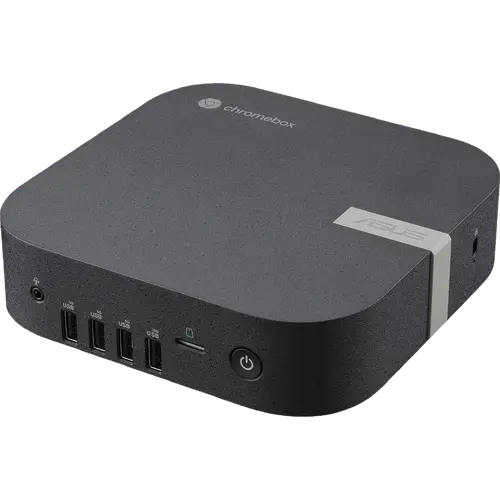
Connectivity is the standout. Seven USB ports in total, one USB 3.2 Gen2 Type-A and three Gen1 Type-A on the front, two more Gen2 Type-A on the back plus a USB 3.2 Gen2 Type-C with DisplayPort 1.4 output and power input, cover peripherals without a hub. Video comes from two HDMI 2.1 ports, a full DisplayPort 1.4 and the Type-C output, for up to four 4K screens. Wireless is Intel Wi-Fi 6E with Bluetooth 5.4, a newer combination than most machines in this price range, alongside gigabit Ethernet. Storage is a 128GB M.2 2280 NVMe PCIe 4.0 drive supporting replacements up to 512GB, memory uses DDR4-3200 SODIMM and can reach 16GB, and a micro SD slot handles removable media.
What to know before you buy
The starting configuration is thin. Four gigabytes of memory and a 128GB drive are workable for ChromeOS and a handful of tabs, but they leave little headroom, and heavy multitasking will show it, so budget for a memory upgrade if the machine is a primary desktop. The Celeron 7305 is an entry-level chip aimed at responsiveness rather than throughput, with Intel UHD graphics that rule out gaming and video editing. ChromeOS itself is the other consideration: no native Windows or macOS applications, so any workflow that depends on desktop software does not transfer. There is no Thunderbolt or USB4, no fingerprint sensor and no HDMI cable in the box, and both the VESA mount and the keyboard and mouse are listed as optional accessories.
Is the Asus Chromebox 5a worth it?
For its niche, it is well judged. Nothing else here combines ChromeOS simplicity with seven USB ports, four display outputs, Wi-Fi 6E and user-replaceable memory and storage, and for a managed fleet the reduction in maintenance is worth more than raw specifications. Anyone who needs Windows applications, more processing power or gaming should buy one of the Ryzen or Core mini PCs in this category instead, where the same money buys considerably more computer.
Frequently asked questions
Can you upgrade the Asus Chromebox 5a memory and storage?
Yes. Memory uses DDR4-3200 SODIMM modules and supports up to 16GB on the Celeron configuration, and the M.2 2280 NVMe PCIe 4.0 drive can be replaced with capacities from 128GB to 512GB.
Can the Asus Chromebox 5a run Windows software?
No. It runs ChromeOS, which covers web applications and Android apps from Google Play. Native Windows and macOS programs are not supported.
How many monitors does the Asus Chromebox 5a support?
Up to four, using two HDMI 2.1 ports, a DisplayPort 1.4 and the USB-C port with DisplayPort output.
Does the Asus Chromebox 5a include a VESA mount?
No. The box contains the AC adapter, power cord, user manual and warranty card. The VESA mount, screw pack, keyboard and mouse are listed as optional accessories.
Is 4GB of RAM enough for the Asus Chromebox 5a?
It is enough for ChromeOS with light browsing and Google Workspace, but tight for heavy multitasking. Since the memory uses standard DDR4 SODIMM modules, upgrading to 8GB or 16GB is straightforward.