

Updated October 2026
Data from the official Asus and Beelink sites.
2026 verdict
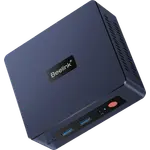
Windows 11 Pro is the operating system that decides this, and the Beelink SER3 (16GB + 500GB) is the mini PC that ships with it.
It has 16 GB of DDR4, a 500 GB SSD, dual HDMI and a three-year warranty, and it is the more affordable of the two. The Asus Chromebox 5a (Celeron 4GB + 128GB) runs ChromeOS on a Celeron 7305 with 4 GB of DDR4, a 128 GB SSD and a richer video row: two HDMI 2.1 ports, DisplayPort 1.4 and USB-C. It is the better reviewed, with Wi-Fi 6E and Bluetooth 5.4. Both use gigabit Ethernet. Pick the Beelink when you need a Windows desktop with more memory and storage, and the Chromebox when the house already lives in ChromeOS.
News by email
Still comparing? Get what's new by email
New releases and the smart home news worth knowing, in your inbox.
No spam. Unsubscribe in one click.
The biggest differences
Where these two are furthest apart, and by how much.
- Memory Capacity4×Beelink SER3 (16GB + 500GB)16 GB vs 4 GB
- Storage Capacity3.9×Beelink SER3 (16GB + 500GB)500 GB vs 128 GB
| Feature | Asus Chromebox 5a (Celeron 4GB + 128GB) | Beelink SER3 (16GB + 500GB) | Winner |
|---|---|---|---|
| Price | $399.00 | $299.00 | Beelink SER3 (16GB + 500GB) |
| Rating | 4.4 | 4.3 | Asus Chromebox 5a (Celeron 4GB + 128GB) |
| Memory Speed | 3200 MT/s | 2400 MT/s | Asus Chromebox 5a (Celeron 4GB + 128GB) |
| Memory Capacity | 4 GB | 16 GB | Beelink SER3 (16GB + 500GB) |
| Storage Capacity | 128 GB | 500 GB | Beelink SER3 (16GB + 500GB) |
| CPU Model | Intel Celeron 7305 | AMD Ryzen 3 3200U | Different strengths |
| Memory Configuration | Single-channel | Dual-slot | Different strengths |
| GPU Model | Intel UHD Graphics | AMD Radeon Vega 3 | Different strengths |
| Memory Type | DDR4 | DDR4 | Tie |
What the differences mean
Operating system
The Beelink SER3 (16GB + 500GB) comes with Windows 11 Pro. The Asus Chromebox 5a (Celeron 4GB + 128GB) comes with ChromeOS, which updates itself and stays inside the browser. That is not a setting you flip later without leaving the product each one is. Desktop apps, local installs and a normal Windows disk belong on the Beelink. A managed browser desktop belongs on the Chromebox.
Memory and storage
The Beelink SER3 (16GB + 500GB) has 16 GB of DDR4-2400, up to 32 GB, and a 500 GB SSD. The Asus Chromebox 5a (Celeron 4GB + 128GB) has 4 GB of single-channel DDR4-3200, up to 16 GB, and a 128 GB NVMe SSD. The Chromebox memory is the faster of the two. The Beelink has four times the RAM fitted and far more storage. Both can be upgraded, within those ceilings.
Video outputs
The Asus Chromebox 5a (Celeron 4GB + 128GB) has two HDMI 2.1 ports, DisplayPort 1.4 and a USB-C port with DisplayPort, four outputs in all. The Beelink SER3 (16GB + 500GB) has two HDMI ports and no DisplayPort and no USB-C video. If the desk is three or four screens, the Chromebox is the one that can feed them. If it is a television and one monitor, the Beelink is enough.
Wireless
The Asus Chromebox 5a (Celeron 4GB + 128GB) has Wi-Fi 6E and Bluetooth 5.4. The Beelink SER3 (16GB + 500GB) has Wi-Fi 6 and Bluetooth 5.2. Ethernet is gigabit on both, so a cable makes them equal on the wire. The Chromebox also has a micro SD reader. The Beelink does not. Neither has Thunderbolt.
Which one to buy if
- the household already lives in ChromeOS
The Asus Chromebox 5a (Celeron 4GB + 128GB) ships with ChromeOS, Wi-Fi 6E and four display outputs, which is the point of that box.
- you need Windows 11 Pro with 16 GB and a 500 GB SSD
The Beelink SER3 (16GB + 500GB) is that desktop. The Chromebox is ChromeOS with 4 GB and 128 GB.
- you want four screens, including HDMI 2.1 and DisplayPort
The Asus Chromebox 5a (Celeron 4GB + 128GB) has two HDMI 2.1 ports, DisplayPort 1.4 and USB-C video. The Beelink has two HDMI ports.
- you want the more affordable mini PC with a three-year warranty
The Beelink SER3 (16GB + 500GB) is the lower priced of the two and lists a three-year warranty, with an HDMI cable in the box.
$399.00
- + Rating: 4.4
- + Memory Speed: 3200 MT/s
- - Price: $399.00 vs $299.00
- - Memory Capacity: 4 GB vs 16 GB
Winner
$299.00
- + Price: $299.00
- + Memory Capacity: 16 GB
- + Storage Capacity: 500 GB
- - Rating: 4.3 vs 4.4
- - Memory Speed: 2400 MT/s vs 3200 MT/s
What owners say
Owners of the Beelink SER3 (16GB + 500GB) talk about a Windows 11 Pro desktop that is still going years later, with a fan that stays off through light daily use and a chassis small enough for spots a tower cannot reach. They like that the licence is real and that the 16 GB of DDR4 sits in slots they can open, and dual HDMI plus four USB 3.2 ports covers the desks they describe. The complaints are about headroom and a few bad units. The dual-core Ryzen 3 is called the limit for serious multitasking and anything heavier than documents or 4K playback, memory stops at 32 GB and runs at 2400 MHz, and a minority report reboots or crashes within weeks. There is no DisplayPort and no USB-C video in the stories they tell.
Frequently Asked Questions
Which is better overall: Asus Chromebox 5a (Celeron 4GB + 128GB) or Beelink SER3 (16GB + 500GB)?
The Beelink SER3 (16GB + 500GB), if you want Windows. It has 16 GB, a 500 GB SSD and Windows 11 Pro, and it is the more affordable mini PC. The Asus Chromebox 5a (Celeron 4GB + 128GB) is the better reviewed ChromeOS machine, with stronger video outputs and Wi-Fi 6E, but only 4 GB and 128 GB.
What is the biggest difference between the Asus Chromebox 5a and the Beelink SER3?
The operating system. The Asus Chromebox 5a (Celeron 4GB + 128GB) runs ChromeOS. The Beelink SER3 (16GB + 500GB) runs Windows 11 Pro, with much more memory and storage. Video outputs favour the Chromebox. Everyday Windows work favours the Beelink.
Does the Asus Chromebox 5a run Windows like the Beelink SER3?
No. The Asus Chromebox 5a (Celeron 4GB + 128GB) comes with ChromeOS. The Beelink SER3 (16GB + 500GB) comes with Windows 11 Pro. They are not two installs of the same system.
Which one can drive more monitors, the Chromebox or the SER3?
The Asus Chromebox 5a (Celeron 4GB + 128GB), with two HDMI 2.1 ports, DisplayPort 1.4 and a USB-C DisplayPort output. The Beelink SER3 (16GB + 500GB) has two HDMI ports and no DisplayPort.
Who should buy the Asus Chromebox 5a (Celeron 4GB + 128GB)?
Someone who wants a ChromeOS mini PC with Wi-Fi 6E, Bluetooth 5.4, a micro SD reader and four display outputs, and who does not need Windows apps or more than 16 GB of RAM.
Who should buy the Beelink SER3 (16GB + 500GB)?
Someone who wants the more affordable Windows 11 Pro desktop, with 16 GB of DDR4, a 500 GB SSD, dual HDMI and a three-year warranty, for browsing, documents and 4K playback.
Spotted something wrong on this page? Tell us and we will fix it.
 Our store on AmazonShop our ideas on AmazonLists of the smart home setups we would put together ourselves, ready to add to your Amazon cart.Shop on Amazon
Full comparison table
Compare all 109 Mini PCs side by side
You are looking at two of them. The full table lines up all Mini PCs in the catalog with the same specs, so you can filter by what you need and sort by price or rating.
- 109 Mini PCs
- 41 specs compared
- 38 filters
- Mini PCs


K15 (32GB + 512GB)
- Mini PCs


NUC 15 Pro+ (Ultra 9 32GB + 1TB)
- Mini PCs

ROG GR70 (RTX 5070 32GB + 2TB)
- Mini PCs

NUC 13 Pro Slim (i7 16GB + 512GB)
- Mini PCs


SEi14 (32GB + 1TB)
- Mini PCs


MS-03 (Ultra 9 64GB + 1TB)
- Mini PCs


GT1 Mega Ultra 5
- Mini PCs

MS-S1 Max (128GB + 2TB)
- Mini PCs

MS-S1 Max (64GB + 2TB)
- Mini PCs


Mac Mini (M4 16GB + 512GB)
- Mini PCs

Mac Mini (M4 Pro 24GB + 512GB)
- Mini PCs

K17 Plus (32GB + 1TB)
- Mini PCs
NucBox K13 (Ultra 7 256V 16GB + 512GB)
- Mini PCs

M1-1390 (32GB + 1TB)
- Mini PCs

M1 Pro-125H (32GB + 1TB)
- Mini PCs

UM870 Slim (32GB + 1TB)
- Mini PCs
UM880 Plus (32GB + 1TB)
- Mini PCs

X1 Lite-255 (32GB + 1TB)
- Mini PCs

Mac Mini (M2 Pro 16GB + 512GB)
- Mini PCs

G1 Pro (32GB + 1TB)
- Mini PCs

Ascent GX10 (128GB + 1TB)
- Mini PCs
NUC 13 Pro Slim (i7 16GB + 512GB)
- Mini PCs

NUC 14 Pro Tall (Ultra 7 32GB + 1TB)
- Mini PCs
NUC 15 Pro+ (Ultra 9 32GB + 1TB)
- Mini PCs

NUC 15 Pro Slim (Core 5 16GB + 512GB)
- Mini PCs

NUC 16 Pro (Ultra 7 16GB + 512GB)
- Mini PCs

NUC 16 Pro (Ultra X7 32GB + 1TB)
- Mini PCs
ROG GR70 (RTX 5070 32GB + 2TB)
- Mini PCs

ROG NUC 16 (RTX 5060 32GB + 1TB)
- Mini PCs

ROG NUC 16 (RTX 5070 Ti 32GB + 1TB)
- Mini PCs

ROG NUC 16 (RTX 5080 32GB + 1TB)
- Mini PCs

ROG NUC 16 (RTX 5080 64GB + 2TB)
- Mini PCs

ROG NUC 2025 (RTX 5070 32GB + 1TB)
- Mini PCs

ROG NUC 2025 (RTX 5070 32GB + 2TB)
- Mini PCs
ROG NUC 2025 (RTX 5070 Ti 32GB + 2TB)
- Mini PCs

ROG NUC 2025 (RTX 5080 32GB + 2TB)
- Routers

ROG Rapture GT-BE19000AI
- Routers

ROG Rapture GT-BE98 Pro
- Routers

ROG Strix GS-BE12000
- Routers
RT-BE55
- Mini PCs
EQ mini (12GB + 512GB)
- Mini PCs

EQi 304 (24GB + 512GB)
- Mini PCs
EQi13 (16GB + 500GB)
- Mini PCs

EQi13 (24GB + 1TB)
- Mini PCs

EQR5 (5500U 16GB + 480GB)
- Mini PCs
EQR5 (7330U 16GB + 500GB)
- Mini PCs
EQR7 (7735U 16GB + 500GB)
- Mini PCs
EQR7 (7735U 24GB + 1TB)
- Mini PCs
EQR7 (7735U 24GB + 500GB)
- Mini PCs

GTi14 (32GB + 1TB)
- Mini PCs
GTi15 Ultra (64GB + 1TB)
- Mini PCs
GTi15 Ultra (64GB + 2TB)
- Mini PCs

GTi15 Ultra (96GB + 2TB)
- Mini PCs
GTR9 Pro (128GB + 2TB)
- Mini PCs
ME mini (N150 12GB + 64GB)
- Mini PCs
ME mini (N95 12GB + 64GB)
- Mini PCs

ME Pro (N150 16GB + 1TB)
- Mini PCs
Mini S12 (N95 12GB + 500GB)
- Mini PCs

Mini S12 (N95 8GB + 480GB)
- Mini PCs

Mini S12 Pro (N100 16GB + 500GB)