
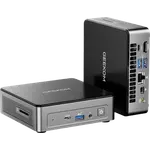

Updated October 2026
Data from the official Asus and Geekom sites.
2026 verdict
ChromeOS versus Windows at the budget end, and the Geekom Mini Air12 (Pentium 7505 8GB + 256GB) wins this mini PC comparison.
It leads on price, 8GB versus 4GB, and 256GB versus 128GB, with Windows 11 Pro and a three-year warranty. The Asus Chromebox 5a (Celeron 4GB + 128GB) runs ChromeOS, and is the one with two HDMI 2.1 outputs, a full DisplayPort 1.4, Bluetooth 5.4 and up to four 4K screens. Choose the Mini Air12 as a cheap Windows terminal; choose the Chromebox 5a when a managed ChromeOS kiosk or video wall is the job.
News by email
Still comparing? Get what's new by email
New releases and the smart home news worth knowing, in your inbox.
No spam. Unsubscribe in one click.
The biggest differences
Where these two are furthest apart, and by how much.
- Memory Capacity2×Geekom Mini Air12 (Pentium 7505 8GB + 256GB)8 GB vs 4 GB
- Storage Capacity2×Geekom Mini Air12 (Pentium 7505 8GB + 256GB)256 GB vs 128 GB
| Feature | Asus Chromebox 5a (Celeron 4GB + 128GB) | Geekom Mini Air12 (Pentium 7505 8GB + 256GB) | Winner |
|---|---|---|---|
| Price | $399.00 | $269.00 | Geekom Mini Air12 (Pentium 7505 8GB + 256GB) |
| Rating | 4.4 | 4.3 | Asus Chromebox 5a (Celeron 4GB + 128GB) |
| Memory Capacity | 4 GB | 8 GB | Geekom Mini Air12 (Pentium 7505 8GB + 256GB) |
| Storage Capacity | 128 GB | 256 GB | Geekom Mini Air12 (Pentium 7505 8GB + 256GB) |
| CPU Model | Intel Celeron 7305 | Intel Pentium Gold 7505 | Different strengths |
| Memory Configuration | Single-channel | Dual-channel | Different strengths |
| GPU Model | Intel UHD Graphics | Intel UHD Graphics (48 EUs) | Different strengths |
| Memory Type | DDR4 | DDR4 | Tie |
$399.00
- + Rating: 4.4
- - Price: $399.00 vs $269.00
- - Memory Capacity: 4 GB vs 8 GB
Winner
10% OFF
$269.00
$299.00
- + Price: $269.00
- + Memory Capacity: 8 GB
- + Storage Capacity: 256 GB
- - Rating: 4.3 vs 4.4
Frequently Asked Questions
Which is better overall: Asus Chromebox 5a (Celeron 4GB + 128GB) or Geekom Mini Air12 (Pentium 7505 8GB + 256GB)?
The Geekom Mini Air12 (Pentium 7505 8GB + 256GB) is better overall on price, memory capacity and storage. The Asus Chromebox 5a (Celeron 4GB + 128GB) is the ChromeOS option with richer video outputs.
What is the biggest difference between Asus Chromebox 5a (Celeron 4GB + 128GB) and Geekom Mini Air12 (Pentium 7505 8GB + 256GB)?
The operating system. The Geekom Mini Air12 (Pentium 7505 8GB + 256GB) runs Windows 11 Pro with 8GB of DDR4 and a 256GB SSD. The Asus Chromebox 5a (Celeron 4GB + 128GB) runs ChromeOS with 4GB of DDR4-3200 and a 128GB SSD.
How do the display outputs compare?
The Asus Chromebox 5a (Celeron 4GB + 128GB) has two HDMI 2.1 outputs, a DisplayPort 1.4 and USB-C video. The Geekom Mini Air12 (Pentium 7505 8GB + 256GB) has one HDMI 2.0 and one Mini DisplayPort 1.4.
Who should buy the Geekom Mini Air12 (Pentium 7505 8GB + 256GB)?
Buyers who want a cheap Windows 11 Pro Pentium box with 8GB, 256GB and a three-year warranty should choose the Geekom Mini Air12 (Pentium 7505 8GB + 256GB).
Who should buy the Asus Chromebox 5a (Celeron 4GB + 128GB)?
Buyers who want ChromeOS, four-display video and a managed Celeron kiosk or signage box should choose the Asus Chromebox 5a (Celeron 4GB + 128GB).
Spotted something wrong on this page? Tell us and we will fix it.
 Our store on AmazonShop our ideas on AmazonLists of the smart home setups we would put together ourselves, ready to add to your Amazon cart.Shop on Amazon
Full comparison table
Compare all 109 Mini PCs side by side
You are looking at two of them. The full table lines up all Mini PCs in the catalog with the same specs, so you can filter by what you need and sort by price or rating.
- 109 Mini PCs
- 41 specs compared
- 38 filters

- Mini PCs


K15 (32GB + 512GB)
- Mini PCs


NUC 15 Pro+ (Ultra 9 32GB + 1TB)
- Mini PCs

ROG GR70 (RTX 5070 32GB + 2TB)
- Mini PCs

NUC 13 Pro Slim (i7 16GB + 512GB)
- Mini PCs


SEi14 (32GB + 1TB)
- Mini PCs


MS-03 (Ultra 9 64GB + 1TB)
- Mini PCs


GT1 Mega Ultra 5
- Mini PCs

MS-S1 Max (128GB + 2TB)
- Mini PCs

MS-S1 Max (64GB + 2TB)
- Mini PCs


Mac Mini (M4 16GB + 512GB)
- Mini PCs

Mac Mini (M4 Pro 24GB + 512GB)
- Mini PCs

K17 Plus (32GB + 1TB)
- Mini PCs
NucBox K13 (Ultra 7 256V 16GB + 512GB)
- Mini PCs

M1-1390 (32GB + 1TB)
- Mini PCs

M1 Pro-125H (32GB + 1TB)
- Mini PCs

UM870 Slim (32GB + 1TB)
- Mini PCs
UM880 Plus (32GB + 1TB)
- Mini PCs

X1 Lite-255 (32GB + 1TB)
- Mini PCs

Mac Mini (M2 Pro 16GB + 512GB)
- Mini PCs

G1 Pro (32GB + 1TB)
- Mini PCs

Ascent GX10 (128GB + 1TB)
- Mini PCs
NUC 13 Pro Slim (i7 16GB + 512GB)
- Mini PCs

NUC 14 Pro Tall (Ultra 7 32GB + 1TB)
- Mini PCs
NUC 15 Pro+ (Ultra 9 32GB + 1TB)
- Mini PCs

NUC 15 Pro Slim (Core 5 16GB + 512GB)
- Mini PCs

NUC 16 Pro (Ultra 7 16GB + 512GB)
- Mini PCs

NUC 16 Pro (Ultra X7 32GB + 1TB)
- Mini PCs
ROG GR70 (RTX 5070 32GB + 2TB)
- Mini PCs

ROG NUC 16 (RTX 5060 32GB + 1TB)
- Mini PCs

ROG NUC 16 (RTX 5070 Ti 32GB + 1TB)
- Mini PCs

ROG NUC 16 (RTX 5080 32GB + 1TB)
- Mini PCs

ROG NUC 16 (RTX 5080 64GB + 2TB)
- Mini PCs

ROG NUC 2025 (RTX 5070 32GB + 1TB)
- Mini PCs

ROG NUC 2025 (RTX 5070 32GB + 2TB)
- Mini PCs
ROG NUC 2025 (RTX 5070 Ti 32GB + 2TB)
- Mini PCs

ROG NUC 2025 (RTX 5080 32GB + 2TB)
- Routers

ROG Rapture GT-BE19000AI
- Routers

ROG Rapture GT-BE98 Pro
- Routers

ROG Strix GS-BE12000
- Routers
RT-BE55
- Mini PCs

A5 (Ryzen 5 16GB + 512GB)
- Mini PCs

A5 2027 Edition (Ryzen 7 16GB + 512GB)
- Mini PCs

A5 Pro (Ryzen 5 16GB + 512GB)
- Mini PCs

A5 Pro 2026 Edition (16GB + 1TB)
- Mini PCs

A6 (Ryzen 7 16GB + 1TB)
- Mini PCs

A7 Max (Ryzen 9)
- Mini PCs

A8 (Ryzen 7 16GB + 1TB)
- Mini PCs

A8 Max (Ryzen 7)
- Mini PCs

A8 Max (Ryzen 9)
- Mini PCs

A9 Max (HX 370)
- Mini PCs

A9 Max (HX 470)
- Mini PCs

A9 Mega (128GB + 2TB)
- Mini PCs

A9 Mega (64GB + 1TB)
- Mini PCs

AX8 Max (16GB + 1TB)
- Mini PCs
GT1 Mega Ultra 5
- Mini PCs

GT1 Mega Ultra 9
- Mini PCs

GT13 Max
- Mini PCs

IT13 2026 Edition (Ultra 7 32GB + 1TB)
- Mini PCs

IT13 (2TB)
- Mini PCs
IT13 Max (Ultra 9 24GB + 500GB)