





Asus NUC 13 Pro Slim Review: Two Thunderbolt 4 Ports and Four Displays in Half a Liter
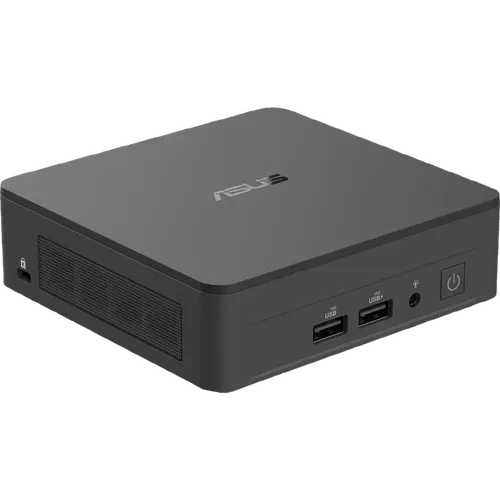
The Asus NUC 13 Pro Slim pairs the twelve-core Intel Core i7-1360P with Iris Xe graphics, 16GB of DDR4-3200 and a 512GB PCIe 4.0 drive, inside a 117 x 112 x 37 mm chassis weighing just 502 grams. It is built for offices rather than enthusiasts: two Thunderbolt 4 ports with DisplayPort 1.4 and two HDMI 2.1 outputs drive up to four 4K displays or a single 8K one, Intel supplies both the 2.5G Ethernet controller and the Wi-Fi 6E radio, and Asus qualifies the machine for 24/7 operation with a Kensington lock and a cable locking arm for shared spaces. Memory sits in two standard SO-DIMM slots and storage has a second M.2 2242 SATA bay. The limitations are its generation: DDR4 rather than DDR5, no NPU and an external 120W adapter.
- Business and office desktops
- Digital signage and kiosks
- Four-display productivity desks
- Behind-the-monitor VESA installs
Pros
- Two Thunderbolt 4 ports with DisplayPort 1.4 output
- Two HDMI 2.1 outputs, up to four 4K displays or one 8K
- Qualified by Asus for 24/7 continuous operation
- Intel I226-V 2.5G Ethernet plus Intel AX211 Wi-Fi 6E and Bluetooth 5.4
- Two DDR4 SO-DIMM slots and two storage slots
- Kensington lock slot and cable locking arm
- Only 502 grams in a 37 mm chassis
- VESA bracket, screws and cable clip included
Cons
- DDR4-3200 memory rather than DDR5
- No NPU, so no on-device AI acceleration
- Second storage slot is M.2 2242 SATA, not a second NVMe bay
- External 120W power adapter instead of an internal supply
- No SD card reader, fingerprint sensor, speakers or microphone
- No HDMI cable included despite two HDMI ports
Who is the Asus NUC 13 Pro Slim for?
This is a corporate-minded compact desktop rather than a hobbyist machine. The Core i7-1360P brings twelve cores (four performance and eight efficiency) with Iris Xe graphics at a 40W configurable TDP, which covers document work, browser-heavy multitasking, video calls, light photo editing and 4K playback without noise or bulk. The Slim chassis is the 37 mm variant of the NUC 13 Pro family, so it disappears behind a monitor with the included VESA bracket. Asus qualifies it for continuous 24/7 operation, which is why the same hardware shows up in digital signage, kiosks and always-on office roles as often as it does on desks.
What stands out on paper
Display output is generous for the size: two Thunderbolt 4 Type-C ports carrying DisplayPort 1.4 plus two HDMI 2.1 outputs, which together drive four 4K screens at 60Hz or a single 8K display. Ports total three USB 3.2 Gen2 Type-A (two on the front, one at the back, one of the front pair always powered), a USB 2.0 Type-A and a 3.5 mm headset jack. Networking pairs an Intel I226-V 2.5G controller with the Intel AX211 Wi-Fi 6E radio and Bluetooth 5.4, a fully Intel stack that tends to behave well under corporate imaging. Storage combines an M.2 2280 PCIe 4.0 x4 slot that accepts up to 8TB with a second M.2 2242 SATA slot, and memory uses two standard DDR4-3200 SO-DIMM slots. Physical security covers a Kensington lock slot and a cable locking arm, and the box includes the VESA bracket, screws, a cable clip and the AC adapter.
What to know before you buy
This is a previous-generation platform and it shows in the memory: DDR4-3200 rather than the DDR5 of the NUC 14 and later, which limits bandwidth for GPU-bound tasks. There is no NPU, so the Copilot+ features that need on-device AI acceleration are out of reach. Power comes from an external 120W adapter rather than an internal supply. The chassis has no SD card reader, no fingerprint sensor and no built-in speakers or microphone, and no HDMI cable is included despite the two HDMI ports. Graphics are integrated Iris Xe, fine for media and light gaming but not for demanding titles. The second storage slot is M.2 2242 SATA rather than a second NVMe bay, so the expansion drive will be noticeably slower than the boot drive.
Is the Asus NUC 13 Pro Slim worth it?
Its appeal is reliability and I/O rather than raw speed: an all-Intel networking stack, four display outputs, a 24/7 operation rating, a Kensington lock and VESA mounting in a half-liter box that ships fully configured with Windows 11 Pro. Buyers who want DDR5, an NPU or USB4 should look at the NUC 14 Pro and the newer Core Ultra machines in this category. Buyers deploying fleets, signage or a quiet office desktop that simply has to work will find this generation still fits the job, usually at a lower price than its successors.
Frequently asked questions
How many displays can the Asus NUC 13 Pro Slim drive?
Up to four 4K displays at 60Hz, using the two HDMI 2.1 ports plus the two Thunderbolt 4 Type-C ports with DisplayPort 1.4. It can alternatively drive a single 8K display.
What is the difference between the Slim and the Tall NUC 13 Pro?
Height and storage. The Slim chassis is 37 mm tall and weighs 502 grams; the Tall version is 54 mm and 610 grams, and uses the extra space for a 2.5-inch drive bay.
Can the memory be upgraded?
Yes. It uses two standard DDR4-3200 SO-DIMM slots. This configuration ships with 16GB installed.
Does it support a second SSD?
Yes, but with a caveat. The main slot is M.2 2280 NVMe PCIe 4.0 x4 and accepts drives up to 8TB, while the second slot is M.2 2242 SATA for up to 1TB, so the secondary drive runs at SATA speeds.
Does it include a VESA mount?
Yes. The box holds the VESA bracket and screws, a cable clip, the AC adapter and the power cord, alongside the documentation.
Is it suitable for running continuously?
Asus qualifies it for 24/7 operation, which is why it is used for digital signage and always-on office roles. It also carries a Kensington lock slot and a cable locking arm for physical security.