




Asus NUC 14 Pro Tall Review: Dual Thunderbolt 4 and Room for a Second Drive
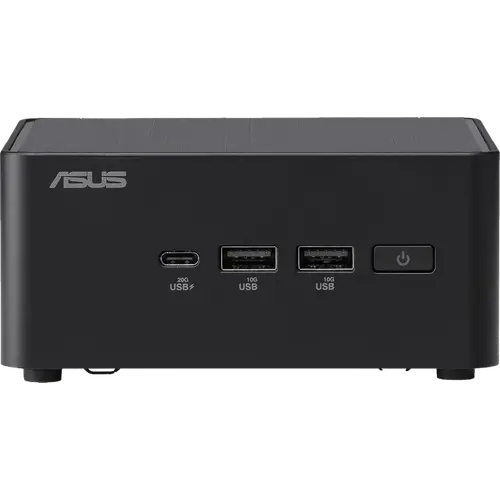
The Asus NUC 14 Pro Tall pairs the Intel Core Ultra 7 155H with Arc integrated graphics, 32GB of DDR5 and a 1TB PCIe 4.0 drive, in a chassis of 117 x 112 x 54 mm weighing 600 grams. The Tall version exists specifically to fit a 2.5-inch drive alongside the M.2 SSD, which is why it appeals to people who want serious local storage in a small machine. Connectivity is strong for the size: two Thunderbolt 4 ports with DisplayPort 1.4, two HDMI 2.1 outputs, four more USB ports, 2.5G Intel Ethernet, Wi-Fi 6E and a Kensington lock slot, with the VESA bracket in the box. Memory reaches 96GB and the chassis opens without tools. There is no audio jack and no SD reader, and it ships with an external 120W adapter, but as a business desktop it is thoroughly equipped.
- Business and office desktops
- Home lab and always-on workloads
- Behind-the-monitor VESA installs
- Users who need extra local storage
Pros
- Two Thunderbolt 4 ports with DisplayPort 1.4 and 40Gbps data
- Two HDMI 2.1 outputs for multi-monitor setups
- Tall chassis adds a 2.5-inch drive bay alongside the M.2 slot
- Memory upgradeable to 96GB, toolless chassis access
- Core Ultra 7 155H with Arc graphics and an integrated NPU
- 2.5G Intel Ethernet plus Wi-Fi 6E and Bluetooth 5.3
- VESA bracket, screws and cable clip included
- Kensington lock slot and Windows 11 Pro preinstalled
Cons
- No 3.5 mm audio jack on the chassis
- No SD card reader or fingerprint sensor
- External 120W power adapter instead of an internal supply
- Wi-Fi 6E rather than Wi-Fi 7
- No HDMI cable included despite two HDMI ports
- Integrated graphics limit demanding gaming
Who is the Asus NUC 14 Pro Tall for?
This is aimed at offices, home labs and anyone who wants a compact Windows desktop with room to grow. The Core Ultra 7 155H brings sixteen cores across its performance, efficiency and low-power clusters, along with Arc integrated graphics and an NPU for on-device AI features, which covers document work, browser-heavy multitasking, virtual machines, light content creation and 4K playback. The Tall chassis is the distinguishing choice: at 54 mm it makes room for a 2.5-inch drive bay next to the M.2 slot, so total storage can grow well beyond the included 1TB without external enclosures.
What stands out on paper
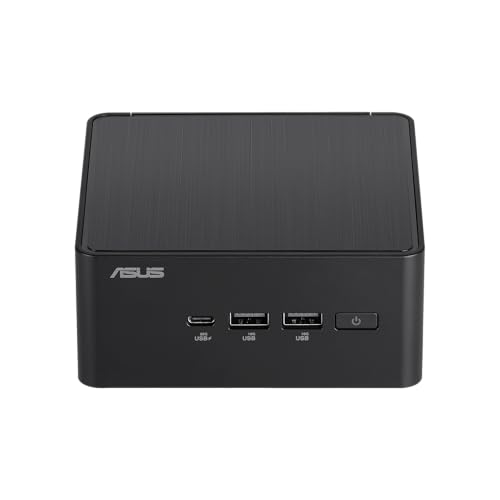
Two Thunderbolt 4 ports carry DisplayPort 1.4 and full 40Gbps data, so docks, external SSDs and displays all connect without adapters, and alongside the two HDMI 2.1 outputs the machine drives several monitors at once. The front adds a USB 3.2 Gen2x2 Type-C port rated at 20Gbps plus two Type-A ports, with another Type-A and a USB 2.0 port at the rear. Networking uses an Intel 2.5G controller with Wi-Fi 6E and Bluetooth 5.3. Serviceability is a deliberate feature: the chassis opens without tools, memory takes up to 96GB across two SO-DIMM slots, and the M.2 2280 slot is joined by the 2.5-inch bay. Asus includes the VESA bracket and screws plus a cable clip, and there is a Kensington lock slot on the side.
What to know before you buy
The chassis has no 3.5 mm audio jack, so headsets need USB, Bluetooth or a display connection, and there is no SD card reader or fingerprint sensor. Power comes from an external 120W adapter rather than an internal supply. Wireless is Wi-Fi 6E rather than Wi-Fi 7, which is expected for its generation but worth noting against newer models. Graphics are integrated Arc, capable for light gaming and media work but not for demanding titles. No HDMI cable is included despite the two HDMI ports. Being a previous generation, it now sits alongside the NUC 15 and NUC 16 families, so compare prices before choosing.
Is the Asus NUC 14 Pro Tall worth it?
Its case rests on serviceability and ports rather than headline speed: dual Thunderbolt 4, dual HDMI, 2.5G Ethernet, 96GB memory support and a 2.5-inch drive bay make it unusually flexible for a machine this size, and the toolless chassis suits fleets that get opened for upgrades. Buyers who want the newest platform should look at the NUC 15 and NUC 16 Pro, which move to Core Ultra Series 2 and Series 3 with Wi-Fi 7. Buyers who want a small, upgradeable business desktop with a real storage bay will find this generation still does the job, often at a lower price.
Frequently asked questions
What does the Tall version of the Asus NUC 14 Pro add?
Height, and with it a 2.5-inch drive bay. The Tall chassis is 54 mm rather than 37 mm, so a SATA drive can sit alongside the M.2 2280 SSD for extra local storage.
How many displays can it drive?
Four outputs are available: two HDMI 2.1 ports plus two Thunderbolt 4 ports carrying DisplayPort 1.4.
Can the memory be upgraded?
Yes, up to 96GB of DDR5 across two SO-DIMM slots, and the chassis opens without tools to get at them.
Does it have an audio jack?
No. This chassis has no 3.5 mm jack, so audio has to go out over USB, Bluetooth, HDMI or Thunderbolt.
Does it include a VESA mount?
Yes. The box contains the VESA bracket and screws, a cable clip, the AC adapter and power cord, plus documentation. An HDMI cable is not included.
How does it compare with the newer NUC 15 and NUC 16 Pro?
The newer families move to Core Ultra Series 2 and Series 3 processors with Wi-Fi 7 and faster memory. This generation keeps Wi-Fi 6E and the Core Ultra 155H, but retains the same practical strengths: Thunderbolt 4, toolless access and VESA mounting.