


Asus NUC 15 Pro Slim Review: Half a Kilogram With Dual Thunderbolt 4
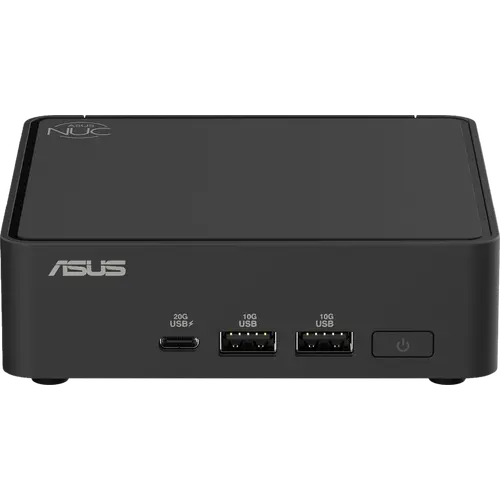
The Asus NUC 15 Pro Slim is the practical end of the NUC line: an Intel Core 5 210H with Intel Graphics, 16 GB of DDR5 and a 512 GB PCIe 4.0 drive in a chassis measuring 117 x 112 x 36.8 mm and weighing barely half a kilogram. Its port selection punches above the price, with two Thunderbolt 4 ports carrying DisplayPort 2.1 and USB4, two HDMI 2.1 outputs, four more USB ports and 2.5G Ethernet, plus Wi-Fi 7 and Bluetooth 5.4. Asus includes the VESA bracket, so it mounts behind a monitor out of the box, and toolless access plus a second M.2 2242 slot keep it serviceable. It is not a performance machine, since this is a Core Series processor without an NPU or Arc graphics, but as a compact business desktop it covers the essentials well.
- Office and business desktops
- Behind-the-monitor VESA installs
- Multi-display productivity
- Thin-client and kiosk duty
Pros
- Two Thunderbolt 4 ports with DisplayPort 2.1 and USB4
- Two HDMI 2.1 outputs for multi-display setups
- Very compact and light at 36.8 mm tall and about half a kilogram
- VESA bracket and screws included
- 2.5G Intel Ethernet plus Wi-Fi 7 and Bluetooth 5.4
- Memory upgradeable to 96 GB, main M.2 slot up to 8 TB plus a second M.2 2242 slot
- Toolless chassis access and a Kensington lock slot
- Windows 11 Pro preinstalled
Cons
- Core Series processor with Intel Graphics rather than Arc, and no NPU
- No 3.5 mm audio jack on the chassis
- No SD card reader and no fingerprint sensor
- External 120W power adapter instead of a built-in supply
- No HDMI cable included
- Priced above similarly specified machines from budget brands
Who is the Asus NUC 15 Pro Slim for?
This targets desks that need a reliable, tidy computer rather than raw speed. The Core 5 210H handles documents, browser-heavy work, video calls and 4K playback, and the 16 GB of DDR5 with a 512 GB Gen 4 drive is a sensible baseline for office deployment. The real appeal is physical: at 36.8 mm tall and around half a kilogram, with the VESA bracket included, it disappears behind a display or under a desk, which suits open-plan offices, classrooms, reception desks and digital signage. IT teams also get Windows 11 Pro preinstalled and toolless chassis access for servicing.
What stands out on paper
Two Thunderbolt 4 ports are the headline, because they bring DisplayPort 2.1 and USB4 with them: a single cable can drive a display and a dock, and external SSD enclosures run at full speed. Combined with the two HDMI 2.1 outputs, the machine supports a genuine multi-monitor setup without adapters. Elsewhere there is a USB 3.2 Gen2x2 Type-C port on the front rated at 20Gbps, three more USB 3.2 Gen2 Type-A ports, a USB 2.0 port and 2.5G Ethernet through an Intel controller, with Wi-Fi 7 and Bluetooth 5.4 on the wireless side. Memory can be taken to 96 GB, the main M.2 2280 slot accepts drives up to 8 TB and there is a second M.2 2242 slot for expansion. A Kensington lock slot on the side handles physical security, which matters for machines left in public areas.
What to know before you buy
This configuration uses a Core Series processor rather than a Core Ultra, which means Intel Graphics instead of Arc graphics and no NPU, so on-device AI features and GPU-accelerated creative work are outside its remit. There is no 3.5 mm audio jack on the chassis, so headsets need to connect over USB, Bluetooth or a display. There is also no SD card reader and no fingerprint sensor, and power comes from an external 120W adapter rather than an internal supply. The box includes the VESA bracket and the adapter but no HDMI cable. Buyers who need more performance should look at the Core Ultra versions of the same chassis, which add Arc graphics and an NPU.
Is the Asus NUC 15 Pro Slim worth it?
As a business desktop it makes a solid case, mostly because of the port selection and the form factor: dual Thunderbolt 4, dual HDMI, 2.5G Ethernet, Wi-Fi 7 and a VESA mount at half a kilogram is a lot of practicality in very little space, and memory and storage both remain upgradeable. It is priced as a professional product rather than a budget one, so anyone chasing value per dollar will find cheaper machines with faster processors from other brands. Buyers who want Asus support, Windows 11 Pro, toolless servicing and a machine that mounts out of sight will find it fits the job.
Frequently asked questions
How many displays can the Asus NUC 15 Pro Slim drive?
Four outputs are available: two HDMI 2.1 ports plus two Thunderbolt 4 ports that carry DisplayPort 2.1, so multiple monitors connect directly without a dock.
Does it include a VESA mount?
Yes. The box contains the VESA bracket and screws along with the AC adapter, power cord and a cable clip, so mounting it behind a display needs no extra purchase.
Can the memory and storage be upgraded?
Yes, and the chassis opens without tools. Memory supports up to 96 GB of DDR5, the main M.2 2280 slot accepts drives up to 8 TB, and there is a second M.2 2242 slot for an additional drive.
Does this configuration have an NPU for AI features?
No. The Core 5 210H is a Core Series processor, so it lacks the NPU and Arc graphics found on the Core Ultra configurations of the same NUC 15 Pro chassis.
Is there a headphone jack?
No. The chassis has no 3.5 mm audio jack, so audio must go out over USB, Bluetooth, HDMI or Thunderbolt.
Which Windows edition is included?
Windows 11 Pro comes preinstalled, which covers business features such as domain join and BitLocker.